[Bug Report] SigmaStudio DSP Readback via TCP (TCPIP1701) not working
SigmaStudio Version: SigmaStudio Version 4.1, Build 1, Rev 1761 (5/29/2108)
Operating System: Windows 10 Pro (64-bit), Version 1803, Build 17134.191, German
Problem Summary
Signal Data Readback such as for "DSP Readback" or "Level Detector" controls doesn't work with TCPIP1701.
Setup
For a new amplifier design which includes an ADAU1701, I am planning to connect to the ADAU1701 chip via TCP rather than USB. The final design will include a network enabled micro controller which connects to the DSP with I2C.
The following connector is used: TCPIP1701
To understand the protocol and as an early proof-of-concept I have used the SigmaTCP as described at https://wiki.analog.com/resources/tools-software/linux-software/sigmatcp?rev=1357228841 as a starting point. I have been working with the code provided on GitHub (https://github.com/analogdevicesinc/sigma-tcp), which I have managed to adjust to work with ADAU1701 with a few modifications.
The modified code is attached to allow reproduction of the problem.
The following modifications were done:
Adjust code to work with read/write requests as generated by the TCPIP1701 connector.
TCPIP1701 uses different header lengths and field widths than TCPIPADAU1761, but inspection of the network packets and comparision to the data shown in SigmaStudio's "Capture" window.
The "debug" driver's read and write functions have been adjusted fit the ADUA1701's memory model and word sizes (parameter memory, program memory, control registers) to allow a correct read back of once written values.
Debug output has been added to follow the TCP/IP communication between SigmaStudio and SigmaTCP.
Problem Details
Some controls/algorithms read signal data from the ADAU1701 using the "Data Capture" registers 0x081A, 0x081B.
One of these is e.g. the "DSP Readback" control.
When such a control is activated, the read request is send via TCP/IP, but the data returned to SigmaStudio is not processed.
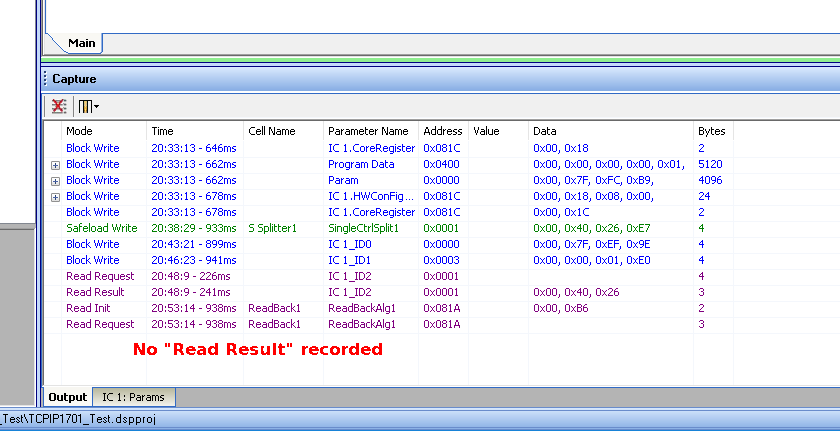
There is no "Read Response" recorded in the "Capture" window, nor is the display of the "DSP Readback" object updated with data returned via TCP.
Furthermore, from that time on, the whole TCP/IP communication is stuck until the project is closed and re-opened.
Affects
Controls known to be affected are:
DSP Readback
all Level Detectors
Real Time Display
Steps to reproduce
Steps 1-9 described below are fine. The error described above happens in step 10.
1) Start sigma-tcp with the "debug" option (i.e. no I2C connection, write to/read from memory rather than DSP).
$ ./sigma_tcp debug
Using debug backend
Waiting for connections...
IP addresses:
eth0: 192.168.1.23
2) Open "TCPIP1701_Test.dspproj" in SigmaStudio
3) Adjust TCP/IP address and open connection
Go to:
tab "Harware Configuration"
sub-tab "Config"
right-click on the "TCPIP1701" object and choose "Show TCPIP settings"
In the popup dialog:
set "IP Address" to the address where "sigma_tcp" is running (see "sigma_tcp" output, "192.168.1.23" in my example).
set "Port" to 8086.
press "Open Connection"
Close the "TCPIPForm" dialog.
The "sigma_tcp" output shows a new connection:
New connection from 192.168.1.106
4) Go back to the "Schematics" tab
5) Open the "Capture" window
Open or enlarge the "Capture" window if it is not yet displayed (menu "View"->"Capture Window" / Ctrl+5).
6) "Link Compile Download"
Run "Link Compile Download" (F7) to send the program and parameter data to "sigma-tcp".
The Capture window shows:
Block Write, address 0x081c, 2 bytes
Block Write, address 0x0400, 5120 bytes
Block Write, address 0x0000, 4096 bytes
Block Write, address 0x081c, 24 bytes
Block Write, address 0x081c, 2 bytes
The debug output from "sigma_tcp" shows that the same data has been received.
7) Adjust volume of the "Spliter Single" mdoule
Right click into the middle of the knob of "S Splitter 1". Manually set the value to -6 dB.
The Capture window shows:
Safeload Write, address 0x0001, 4 bytes: 0x00, 0x40, 0x26, 0xE7
The debug output from "sigma_tcp" shows that corresponding write request.
8) Edit and write parameters
In the "Capture" window, select the "IC 1: params" sub-tab.
Edit the "Delta 5.23" value at address 0 (DCBlockAlgDoublePrec1pole_2.0) and change the value from 0.9999 to 0.9995.
Go back to the "Output" sub-tab.
The Capture window shows:
Block Write, address 0x0000, 4 bytes: 0x00, 0x7F, 0xEF, 0x9E
The debug output from "sigma_tcp" shows that corresponding write request.
Go to the "IC 1: params" sub-tab again.
Click onto the row with address 3. Right-click the same row and select "Write".
Go back to the "Output" sub-tab.
The Capture window shows:
Block Write, address 0x0003, 4 bytes: 0x00, 0x00, 0x01, 0xE0
The debug output from "sigma_tcp" shows that corresponding write request.
9) Read parameters
In the "Capture" window, select the "IC 1: params" sub-tab.
Click onto the row with address 1. Right-click the same row and select "Read".
Go back to the "Output" sub-tab.
The Capture window shows:
Read Request, address 0x0001, 4 bytes
Read Result, address 0x0001, 3 bytes: 0x00, 0x40, 0x26
The debug output from "sigma_tcp" shows that corresponding read request and that it has returned the response packet with the requested 4 bytes.
(Note: There seems to be another issue here with processing the bytes returned via TCP/IP. It appears that sometimes only three of four bytes are processed. This seems to happen if the forth byte is between 0xC2 and 0xF4, but it may require more investigation.)
10) DSP Readback
In the "Schematic" window, press the "Read button" of the "Readback1" object.
The Capture window shows:
Read Init, address 0x081A, 2 bytes: 0x00, 0xB6
Read request, address 0x081A, 3 bytes
The debug output from "sigma_tcp" shows that corresponding "Read Init" and that the "Read Request" has been received. It has returned the response packet with the requested 3 bytes for the "Data Capture Register" at 0x81A.
Problem:
The data sent back to SigmaStudio on the TCP socket is not processed by SigmaStudio.
There is no "Read Response" recorded in the "Capture" window, nor is the display of the "DSP Readback" object updated with data returned via TCP.
From now on, the whole TCP/IP communication is stuck. "Link Compile Download", editing parameter values, or requesting a parameter read looks like it would work in the capture window. The capture windows records the coresponding request, as if it would send the data, but nothing is received by the "sigma_tcp" program.
It looks like that the thread which handles the TCP/Ip connection is completely stuck.
The connectivity problem can be solved only closing and reopening the DSP project or by a restart of SigmaStudio,
Attachments
SigmaStudio_Test_Projects.zip: includes two almost identical projects.
TCPIP1701_Test.dspproj = project to reproduce the problem described above
USBi_Test.dspproj = the same schematic, but connecting with USBi to demonstrate the expected behavior
SigmaStudio_TCPIP1701_Test.png
Screenshot with schematic and capture window for the test with TCPIP1701_Test.dspproj
SigmaStudio_USBi_Test.png
Screenshot with schematic and capture window for the test with USBi_Test.dspproj
sigma-tcp-adau1701.zip
Source-code for "sigma_tcp" with adjustments for ADAU1701. (Please not that only the debug mode has been tested. Run with "sigma_tcp debug".
Audio Signal Processors
SigmaDSP Audio Processors
adau1701
hi, i have the exact same problem. I also tried to get an answer here but didn't. Eventually I ended up disassembling the SigmaStudio code and found that the data is not passed correct. Something to do with memory copy and size of UTF8.
Here is my thread: https://ez.analog.com/dsp/sigmadsp/f/q-a/100513/tcpip1701-protocol-broken
Hi, i have sucessfull patched tcp.dll ( i can do a full readback ), so i will start a new thread about this problem, AD will know how to solve, if they want ( All versions of Sigma Studio have this bug, also all ADAUs family, is not only ADAU1701 affected.
Please contact me! skycamdk@gmail.com I need your solution :-)
Hi Rocha,
would you be able to attach you fixed .dll file or start this new thread with solution as it would be incredibly helpful.
Thank you
Please log in to reply.