This is an old revision of the document!
Table of Contents
General Filters
- General 2nd Order
- Coefficient Calculations on DSP (ADAU145X)
——————————————————————————————————
1.General 2nd Order

The General (2nd-Order) block gives access to a wide variety of 2nd-order (biquad)filter algorithms.The coefficient calculations happen in the controller.
- The available filter types are:
- Parametric
- Shelving
- General High-Pass
- General Low-Pass
- General Band-Pass
- General Band-Stop
- Butterworth Low-Pass / High-Pass
- Bessel Low-Pass / High-Pass
- Tone Control
- 1st-Order Low-Pass / High-Pass
- All-pass
- Peaking
- Notch
- Chebyshev Low-Pass / High-Pass
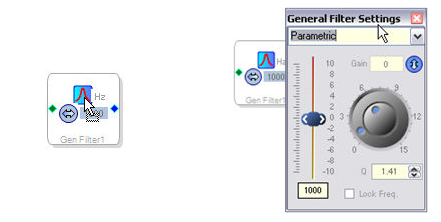
To open the filter control window, click on the icon button:
Select the desired filter type from the drop-down combo-box list. The filter controls and the icon button image will change to reflect the selected filter type.
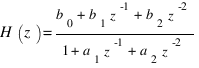
This block's algorithms use biquad filter designs(DF1) based on Robert Bristow-Johnson's work in this field.
common variables:

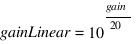
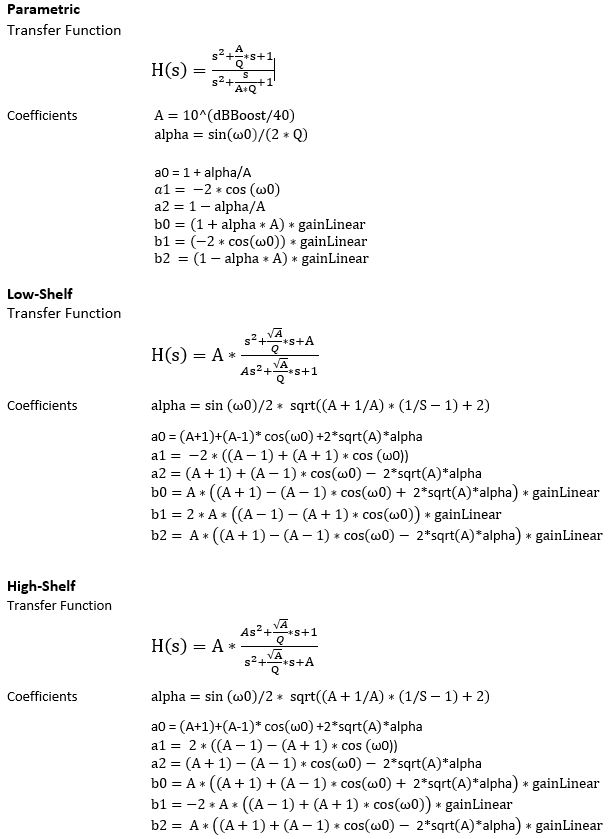
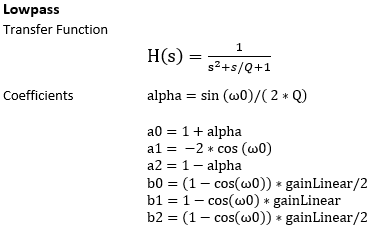
Note that the b0 and b2 coefficients for the high pass filter below are inverted from what is stored in RAM. The correct equations for b0, b1, and b2 for a high pass filter are as follows:
b0 = -(1 + cos(ω0)) * gainLinear / 2
b1 = -(1 + cos(ω0)) * gainLinear
b2 = -(1 + cos(ω0)) * gainLinear / 2
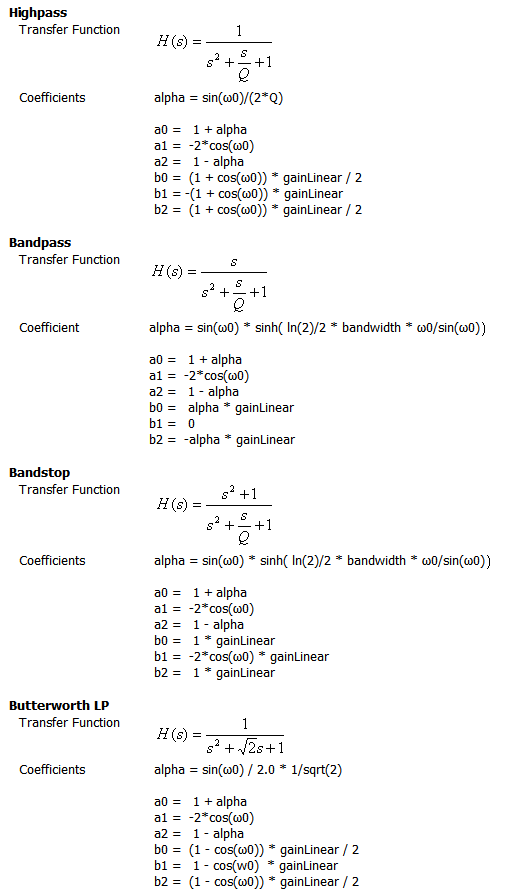
Note that the minus signs on b0 and b2 values are erroneous for the Butterworth HP and Bessel HP. They should not be included. See https://ez.analog.com/message/4769
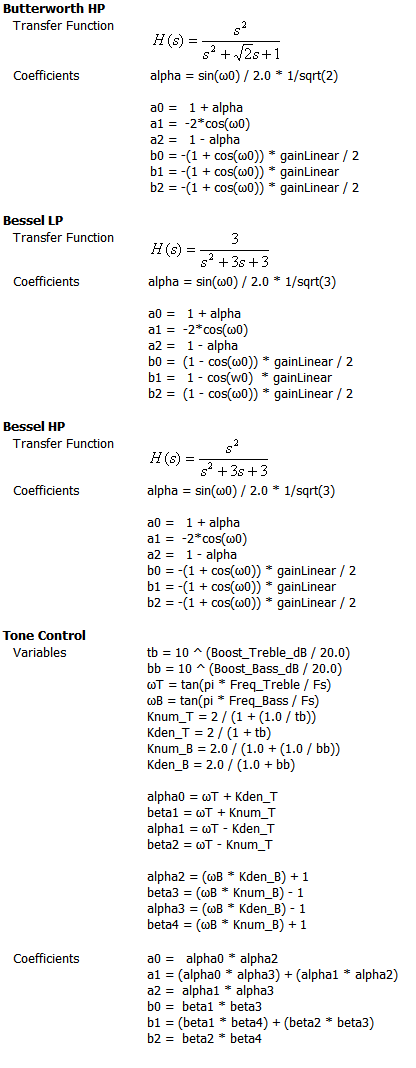
For all of the above filters, the coefficients are divided by a0, normalizing them and making a0 = 1 so that only 5 coefficients must be stored. In the actual implementation on the DSP, when the coefficients are stored in parameter RAM, a1 and a2 need to be inverted. SigmaStudio performs this operation automatically, in software, before the parameters are written to DSP memory. Microcontrollers must invert a1 and a2 before writing new coefficients to DSP memory.
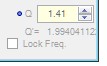
By default, the Q is shown with the value adjusted (from the classical EE definition) so that a boost of N dB followed by a cut of N dB for identical Q and f0/Fs results in a precisely flat unity gain filter or “wire”. This is equal to A*Q, where A = 10^(dBgain/40).
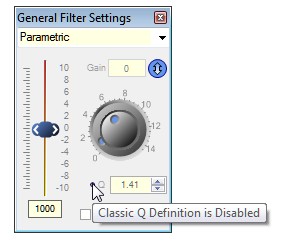
The “Classic EQ” version of Q can optionally be shown by clicking the small circular button next to the Q control.
2.Coefficient Calculations on DSP
The General (2nd-Order) block gives access to a wide variety of 2nd-order (biquad)filter algorithms.The coefficient calculations happen in the controller.
- The available filter types are:
- Parametric
- Shelving
- General High-Pass
- General Low-Pass
- General Band-Pass
- General Band-Stop
- Butterworth Low-Pass / High-Pass
- Bessel Low-Pass / High-Pass
- All-pass
- Peaking
- Notch
- Chebyshev Low-Pass / High-Pass
To open the filter control window, click on the icon button:
Select the desired filter type from the drop-down combo-box list. The filter controls and the icon button image will change to reflect the selected filter type.
GUI Control
| GUI Control Name | Default Value | Range | Function Description |
|---|---|---|---|
| Filter Type | Lowpass | LowPass/Highpass/BandPass/BandStop | Type of the filter |
| Frequency | 1000 Hz | 0-96000 Hz | The cut off frequency of the filter |
| Gain | 0 dB | -15 to 15 | Filter Gain |
| Q Factor | 0 | 0 to 16 | Q Factor of the filter |
| Enable | 1 | 0 t0 1 | Enable or disable filter |
| Phase Shift | 0 | 0 to 1 | Phase shift by 180 deg |
DSP parameter Information
| GUI Control Name | Compiler Name | Function Description |
|---|---|---|
| Frequency | FREQ_DSP_CALC0_ _ | The cut off frequency of the filter |
| Gain | GAIN_DSP_CALC0_ _ | Filter Gain |
| Q Factor | Q_DSP_CALC0_ _ | Q Factor of the filter |
| Filter Type | FILTER_TYPE0_ _ | Type of the filter |
| NA | INVERT__ | Negate the Coefficients corresponding to the input |
| NA | ONE_BY_FS_DSP_CALC0_ _ | 1/ Sample Rate |
| NA | ADDRESS_DSP_CALC0_ _ | Starting Address of the filter coefficients. |
| NA | MEM_SELECTION_DSP_CALC0_ _ | Memory section the filter coefficients are located (DM0/DM1) |
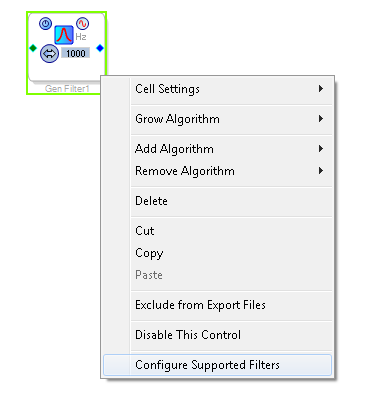
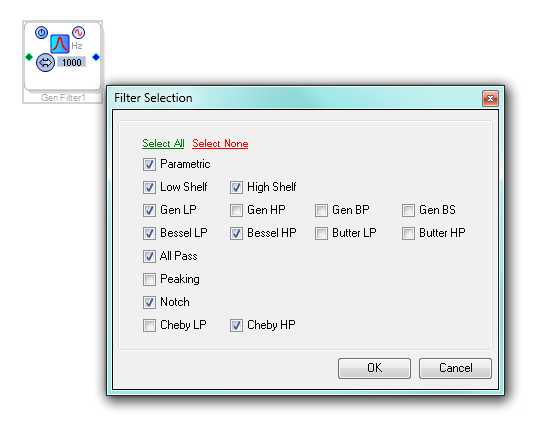
It is possible to selectively disable filters which are not going to be used.To select only those filters to be used, right click on the module and select Configure Supported Filters and select only those filters which might be used.