Содержание
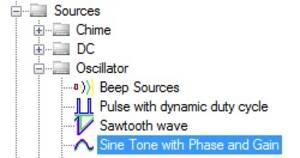
Sine Tone with Phase and Gain(ADSP-SC5xx/215xx)
Этот модуль можно использовать для генерации синусоидального тона на разных частотах. Усиление и фаза алгоритма могут быть сконфигурированы.
Выходные пины
| Name | Format [int/dec/float] - [control/audio] | Function Description |
|---|---|---|
| Pin 0: Output | audio | Вывод сигнала синусоидального тона из модуля |
Алгоритм расширения (Grow)
Модуль поддерживает расширение до максимум 14 каналов.
Конфигурация
| GUI Control Name | Default Value | Range | Function Description |
|---|---|---|---|
| GUI Control Name | Default Value | Range | Function Description |
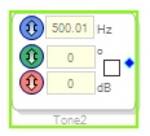
| on/off | off | on/off | Включает или выключает выход ячейки. Когда выход выключен, выходной пин выдает постоянное значение 0. |
| Frequency | 500.01 | 0.01 to 0.5*Sample Rate | Устанавливает частоту синусоидального тона, который выводится из ячейки. |
| Initial Phase | 0 | 0 to 360 | Начальная фаза синусоидального сигнала. |
| Gain | 0 | -138 to 24 dB | Усиление, которое применяется к синусоидальному тону |
Информация о DSP-параметрах
| GUI Control Name | Compiler Name | Function Description |
|---|---|---|
| Frequency_cos | ToneGenwithPhaseGainBlkAlg1cos | Значение косинуса для генерации конкретной частоты |
| Frequency_sin | ToneGenwithPhaseGainBlkAlg1sin | Значение синуса для генерации конкретной частоты |
| Phase | ToneGenwithPhaseGainBlkAlg1phasevalues | Упакованные значения косинуса и синуса для всех расширений для генерации конкретной фазы |
| Gain | ToneGenwithPhaseGainBlkAlg1gain0 | Значение усиления |
Здесь,
- Зеленый - Имя алгоритма
- Красный - Номер экземпляра (изменяется для каждого экземпляра)
- Синий - Имя параметра
- Оранжевый - Расширение (Growth)
Описание алгоритма
Этот модуль генерирует синусоидальный тон на основе частоты и фазы, установленных в GUI. Усиление синусоидального тона можно регулировать из GUI. Синусоидальный тон можно включать/выключать с помощью флажка On/Off в GUI.
Поддерживаемые ИС
- ADSP215xx
- ADSPSC5xx
Sine Tone With Phase and Gain(ADAU145x)
Блок Tone (Lookup/Sine) генерирует тон из таблицы поиска (lookup table). Усиление и начальная фаза алгоритма могут быть сконфигурированы. Установите частоту тона в текстовом поле или используйте стрелки; флажок включает и выключает тон.
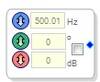
Чтобы изменить частоту дискретизации источника, щелкните правой кнопкой мыши по блоку и выберите Set Sampling Rate, после чего откроется окно Sampling Rate (по умолчанию 44.1 kHz).
Выходные пины
| Name | Format [int/dec/float] - [control/audio] | Function Description |
|---|---|---|
| Pin 0: Output | complex-audio | Вывод сигнала синусоидального тона из модуля |
GUI Control
| GUI Control Name | Default Value | Range | Function Description |
|---|---|---|---|
| on/off | off | on/off | Включает или выключает выход ячейки. Когда выход выключен, выходной пин выдает постоянное значение 0. |
| Frequency | 500.01 | 0.01 to 0.5*Sample Rate | Устанавливает частоту синусоидального тона, который выводится из ячейки. |
| Initial Phase | 0 | 0 to 360 | Начальная фаза синусоидального сигнала. |
| Gain | 0 | -144 to 42 dB | Усиление, которое применяется к синусоидальному тону |