Peak (No Gain)
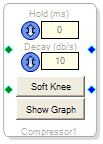 This block functions exactly like the Peak(gain) block (see that topic for details) but does not include the Post Gain knob.
Controls
| Hold (ms) |  | Controls the time (in ms) the compressor maintains its current output gain setting after the input level decreases, before the gain starts increasing back to normal. |
| Decay (db/s) |  | Controls the rate at which the compressor gain increases back to normal in response to decrease in the input signal level, e.g. the “Release” time. Larger values result in faster recoveries. |
| Soft Knee |  | Soft-knee lets the compressor ease into action, making a less-abrupt change from unprocessed signal to compressed signal. Typically it sounds better. If it is not activated, the default is hard-knee behavior, meaning compression reduces signal level immediately when the threshold is passed. |
| Show Graph |  | Opens the Compression Curve editor window. |