This is an old revision of the document!
Push and Hold
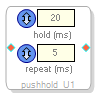 This block can be used for functions like a pushbutton, to condition a GPIO input to create pulses in response to the user pushing or holding the button.
A typical application would be a volume control comprising two buttons, one for up and the other for down.
- Drag the block into the workspace.
- Right-click it and select the algorithm:
- push_hold
- push/hold 2-in 2-out
- push/hold with two-button mute
- Set the parameters to fit your application:
| Hold (ms) | Determines how long the signal is held before the repeat pulses are generated. |  |
| Repeat (ms) | Sets the interval between repeated pulses. Enter the time in milliseconds in the field. |  |
Note: For the picture above right, push_hold was selected. Use push/hold 2-in 2-out to condition two GPIO inputs, for example one up and one down. Push/hold with mute works the similarly but with the extra feature that if both buttons are pressed, a mute pulse is generated (bottom output pin). To un-mute, any of the buttons can be pressed.