This is an old revision of the document!
Peak Gain
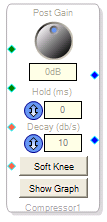 This block uses a peak-detecting dynamics processor that lets you control Hold, Decay, and Soft Knee behavior, and displays the compression curve graph for your curve drawing.
It also lets you control Post Gain, the signal level after processing.
Peak detection operates on any signal passing above the threshold, no matter how fast a transient it is. However, this compressor has no TC (time constant) setting.
Because it can stop the briefest and quickest loud signals, peak compression (limiting, effectively) is useful for preventing any overdriving of inputs — for example, a transmitter. However, it sometimes sounds less natural than rms compression.
- Drag the block into the workspace.
- Right-click it and select the algorithm for your application:
- Stereo 1 Peak w/ gain
- Stereo Separate Detect w/ gain
- Set these parameters to fit your application and click Show Graph and drag, add and remove (right-click) control points to achieve your desired processing curve.
As an application example, this block could be used at a radio station to attenuate background music according to the voice level of the announcer (“ducking”). The voice signal would be applied to the red pin, the music signal to the green one.
Controls
| Post Gain |  | Post-processing gain, for increasing the overall signal level following dynamics processing. |
| Hold (ms) |  | Controls the time (in ms) the compressor maintains its current output gain setting before it starts decreasing as the input level decrease. |
| Decay (db/s) |  | Controls the rate at which the compressor gain decreases in response to decrease in the input signal level, e.g. the “Release” time. |
| Soft Knee |  | Soft-knee lets the compressor ease into action, making a less-abrupt change from unprocessed signal to compressed signal. Typically it sounds better. If it is not activated, the default is hard-knee behavior, meaning compression reduces signal level immediately when the threshold is passed. |
| Show Graph |  | Opens the Compression Curve editor window. |