Hi, I am using 8x adau1701 for an instrumentation project. I want to generate phase synchronous carrier sources with all the ICs - what is the best way to achieve this?
I need to generate 16 phase synchronous carriers across 8 devices. I am programming using sigma studio. As i see it, I can clock them all and reset them and they will be synchronous from an Fs point of view. How do I kick off all the sources at the same time so that they too are synchronous. Any help would be much appreciated
A secondary , more general/fundamental question, if programming an adau1701 via SigmaStudio and I want to subsequently be able to make parametric changes (by uC via say I2C)- how do I identify the device registers associated with the parameters that control that specific SS tool e.g. a gain block ?
Audio Signal Processors
SigmaDSP Audio Processors
adau1701
Hello lightwise,
Since DaveThib answered your more complex question here, I could answer your easier one:
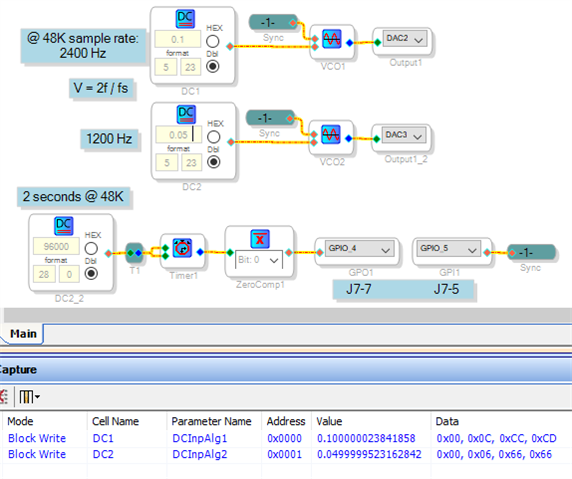
To see what and where to load parameters from a uC, view the Capture Window while changing the related GUI inputs. For example, below I changed the "voltage" of the two DC sources to get the results shown:
The Addresses are where your uC should safeload the values in parameter memory. And the Data field shows the hex bytes to load.
The Value field shows the equivalent in decimal format (5.23 binary for the ADAU1701). Here the values are essentially what I had entered in the DC sources. but for more complex algorithms SigmaStudio pre-calculates the parameters to save instructions in the DSP. Sometimes the SigmaStudio doc wiki offers the conversion formulas to perform similar calculations by uC to adjust such blocks in real-time. In other cases, EZ members have reverse-engineered the calculations by trying different inputs and noting the results in the Capture Window.. Thus, where the doc wiki doesn't provide the needed info, try searching EZ.
The circuit shown above was my attempt to solve your sync problem using the VCO with Reset Phase block. With identical inputs the VCOs start and remain in phase, but not with the values as shown. The Capture Window reveals the reason -- round-off errors from the format conversion. If you were willing to calculate all the parameters yourself, and also willing to tolerate slight errors in your absolute frequencies to get exactly-related numbers, it just might work! Notice that even within the same IC I ran the sync signal outside then back in by GPIO, so that every one of the DSPs in your system would get the same timing.
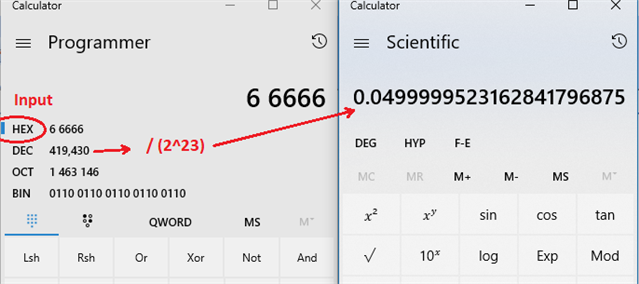
For the above example I ran SigmaStudio 3.17 on purpose. If you're using SigmaStudio 4.1, you'll notice blank fields under Value. For some reason this useful feature was deleted, but I would not have noticed the round-off without it. It's relatively simple to get the same info from the Bytes field -- below I did it with two Windows Calculators:
Since most of us don't think in hexadecimal, omitting the Values from the Capture Window further complicates the already difficult business of reverse-engineering needed coefficients and parameters. I hope to see the Values field come back soon!
Best regards,
Bob
Please log in to reply.