ADAU1466 core not running
Hi !
I recently received my ADAU1466 boards with Cirrus ADC and DACs. Today I had some time to evaluate them further.
I set up the hardware in sigma studio - mostly the serial ports- since the rest is similar to the evaluation board. In the schematic I set up the inputs and routed them directly to the outputs; I also set up a sine generator to test the outputs independently.
I downloaded the program to the DSP - no errors occurred.
However, none of the two setups worked. The DACs produced no output.
I checked the serial data lines; MCLK, LRCLK and BCLK were present. No signal on the SDATA lines.
I went on to check the hardware setup in sigma studio. In the "CORE_CONTROL" tap it said that the core is not running. When holding the curser over the "Start Core" button, it says "no bitfield information". It also says that the DSP is hibernating. These settings can be changed but have no effect when "Read the Page" is clicked.
Strangely, all the serial port settings that I have made earlier on, are also overwritten when the DSP is in this state; again, these settings can be changed but do not apply to the DSP.
Perhaps also worth mentioning; there is a clear difference in current draw between a reset state/ not booted state versus the booted state whereas the DSP puts out clock signals. So the DSP must be doing something, even though it says "Core not running"
I would highly appreciate if you could help me sort out this -hopefully minor- error !
Best regards,
Noel
Edit Notes
Forgot: "When holding the curser over the "Start Core" button, it says "no bitfield information". "
[edited by: nneu at 8:59 PM (GMT -4) on 10 Sep 2018]
Audio Signal Processors
SigmaDSP Audio Processors
adau1466
Hello again,
I don't mean to be rude or too demanding, but I need an answer as soon as possible.
The boards manufacturer is waiting for feedback, so I need to know if the error could be linked to a production error.
Best regards,
Noel
Hello,
First you need to determine if the core is running and that you are able to communicate with the DSP.
Step 1, check that the Selfboot switch is not turned on. It may be loading a default program which is why it appears to be running a program.
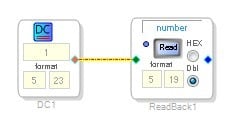
Step 2, In your program, insert a readback and a DC cell. Then when you click "Read" you should see the value of the DC cell. The only way this works is if the DSP program is actually running in the DSP and you are able to communicate with the DSP.
There are a couple of comments I want to make to help your understanding.
I am assuming you are using SPI communication to the DSP slave comms port? With SPI there is no handshaking so there is no way for SigmaStudio to actually know that the DSP is there and that it picked up the program. It is the way SPI works, nothing with our hardware. So the DSP could actually be powered down and SigmaStudio will say that the program was loaded and is active. So use the DC cell and readback trick to verify.
One other thing. use the "Read All" buttons very sparingly. Even the "Read this page" buttons on the Sigma350. If you do so make certain your project has been saved and then do not resave it. Because, it will read every register in the DSP and load it into the SigmaStudio GUI for display of the settings. When you are not communicating with the part properly then the USBi will read all zeros or all "FF" and that will change EVERY register in the part to "00" or "FF". This is why you see the core halted and other settings that you cannot change because you are not actually communicating with the part.
So if you did not save a copy of your program then you might be better to start with a new blank program so you get all the default register settings.
Let me know how this all goes and we will proceed from there. A copy of your hardware schematic will also be handy.
Dave T
Dear Dave,
thank you for your answer and suggestions.
First I must admit that I screwed up the self boot part; I thought self boot would be disabled in a reset state anyways and permanently connected self boot to high.
I have broken this trace on one of the boards and shorted the selfboot pin to ground.
This was not successful. The read back cell showed zero. I have used a new sigma studio program just to be sure.
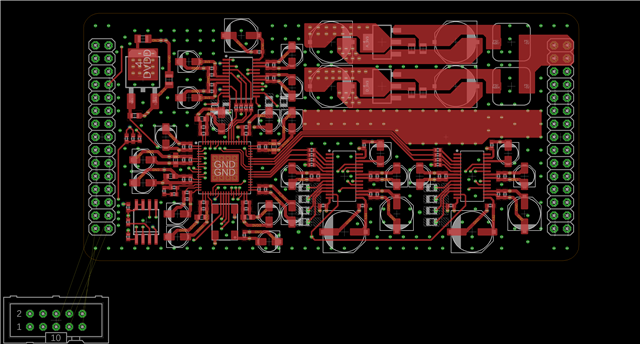
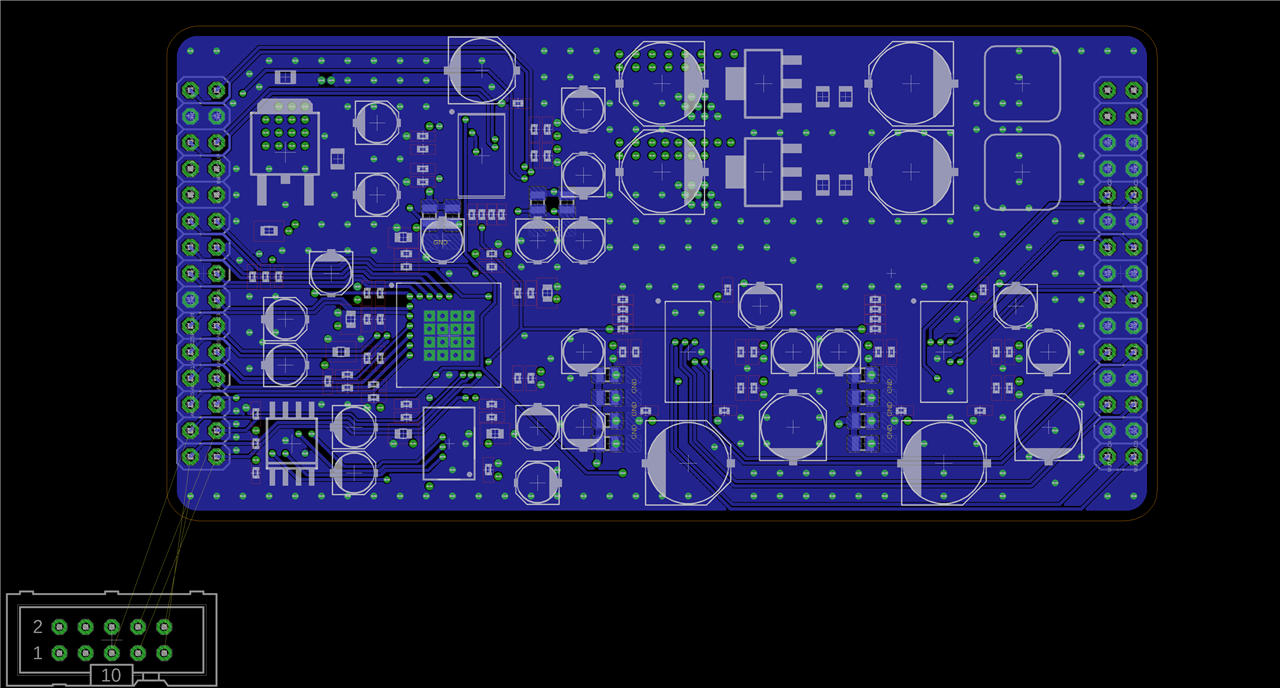
I have attached the schematic and board layout. This shows the top and bottom plane. If the power and ground planes are needed, I will upload those as well.
I am looking forward to hearing from you !
Best regards,
Noel

Hello nneu,
OK, so we need to step back and figure out why no communication. I am assuming you have checked all the power supplies? Is the DVDD OK?
Are you sending MCLK to the part? How does it look?
Unfortunately, I cannot read much of your schematic. The resolution is not fine enough.
It looks like you have the PLL filter components placed well on the layout. So no problem there.
Can you read any registers? Go to the configuration page, right click on the GUI for the DSP, and select "Read/Write Window". There you can read and write to registers to see if you are actually communicating with the part. If you are still not able to get this to work then it comes down to power, MCLK, ground and making certain that the reset pin is high.
Once you have this basic comms, Then check that the PLL is locked by reading the register. 0xF004
Is the clock output pin enabled? It looks like you are using it since I see a trace on the PCB to that pin. Do you have a clock on that pin and is it the correct frequency?
I will wait for your response.
Dave T
Hi Dave,
I went back to check on the above questions.
DaveThib said:
I am assuming you have checked all the power supplies? Is the DVDD OK?
Yes, I have checked all power rails. I have also checked that every pin on the DSP receives the according power.
DVDD is ok and present on all four pins.
DaveThib said:
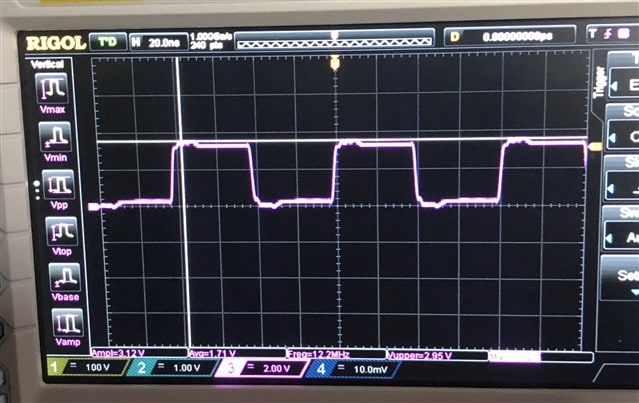
Are you sending MCLK to the part? How does it look?
Yes, the oscillator is right next to the DSP chip.
Looks good to me.
DaveThib said:
Can you read any registers? Go to the configuration page, right click on the GUI for the DSP, and select "Read/Write Window"
I didn't really know what to do in this window, so I just entered random numbers in the byte taps, wrote them and then went to read.
It did read back numbers other than "0000" but not the ones I entered in the write section.
Rest was high.
DaveThib said:
Once you have this basic comms, Then check that the PLL is locked by reading the register. 0xF004
It says PLL unlocked. I don't know if this is actually the case of if it is reading the default values because no communication is occurring - as you suggested in your first reply.
DaveThib said:
Is the clock output pin enabled? It looks like you are using it since I see a trace on the PCB to that pin. Do you have a clock on that pin and is it the correct frequency?
Well, I want to use it - yes. However I still can't configure this pin.
I do have a clock on this pin at the same frequency than MCLK.
Lastly, i have attached a higher resolution version of the schematic.
Best regards,
Noel

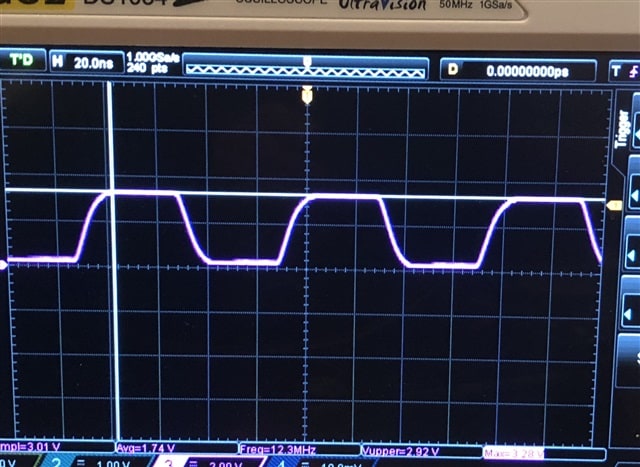
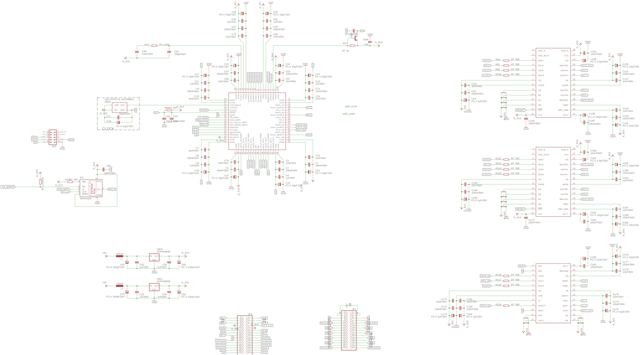
Hi Dave,
another quick update:
The core is now running - I have no idea why that is, because I haven't changed anything, but there must be some communication between the PC and the DSP.
The example you gave to check the communication (DC Block and Readback) still doesn't work, but there are clear indications that the communication works.
For instance, I can change the frequency of CLKOUT which is actually applied and can be read back, same goes for the pin configurations.
The problem currently seems to be that there is no PLL Lock.
Best regards,
Noel
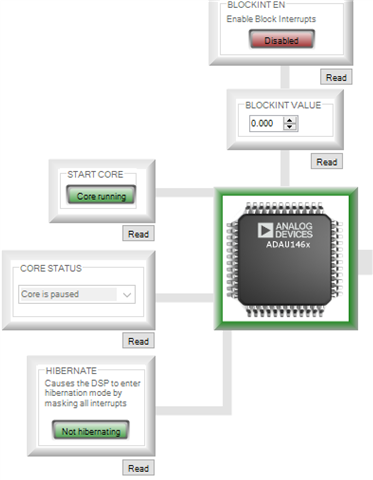
Dave,
I am wondering what is going wrong here. I have provided all information you asked for on the very same day. Yet, the only way I seem to get an answer at all, is through multiple complaints.
This matter has remained unresolved for almost three weeks.
Every time I check the engineer zone I am presented with the following picture;
Every question gets answered within days, but magically mine doesn't.
Considering that I've mentioned the urgency of this problem, the support is disappointing to say the very least.
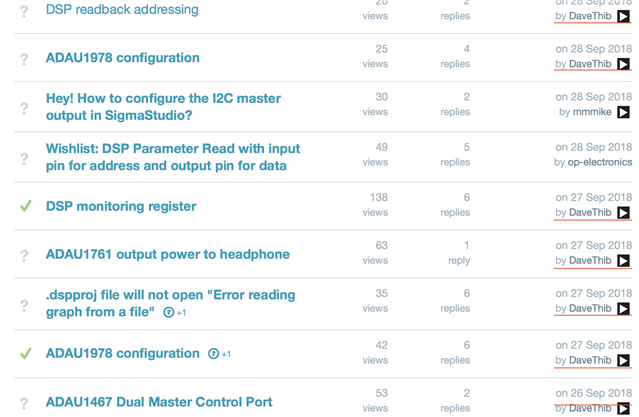
Hello Noel,
Sorry for the response issues. I am very busy and have to make priorities. I am also trying not to get further behind. Just as an FYI, Your profile shows no company, and you are using a gmail address. You should update it.
I assume you are using SPI to communicate with the PCB? Are you using the USBi that we designed and are you adding any length to the ribbon? Your board is small so the trace lengths should be fairly short so I do not think that is a problem.
Are there any other SPI masters on the board?
When you noticed the DSP is running were you then able to use the Readback Cell that is tied to the DC cell to read the DC value?
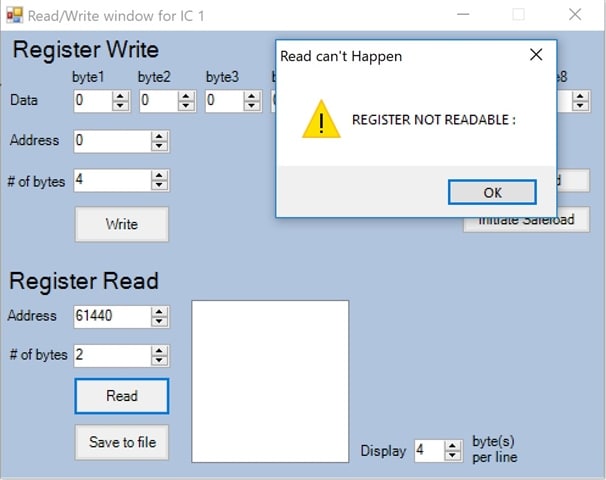
To use the Read Write window, I would only use the Read portion of it for now. Just see if you can read any data. The address box unfortunately is in decimal not Hex. So put in the decimal value for the PLL Feedback Divider Register. This register defaults to a non-zero value of 0x0060.
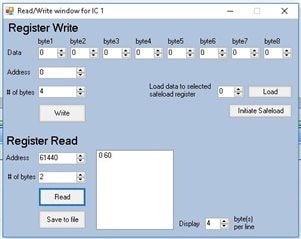
So register address 0xF000 = 61,440 in decimal. Put that in the address field. Then set the number of bytes to 2 and click "Read". You should see 0 60 show up in the large box.
If this works then look to see if the PLL is locked. That is register 0xF004. So that is 61,444 in decimal. Read that location. A zero result is NOT locked and a 0 01 is locked.
Your MCLK looks good.
Can you zip up your project and send it to me? I can check for other things more quickly by looking at the file.
Dave T
Hi Dave,
DaveThib said:
Your profile shows no company, and you are using a gmail address. You should update it.
Done Couldn't find the company field though.
DaveThib said:
I assume you are using SPI to communicate with the PCB? Are you using the USBi that we designed and are you adding any length to the ribbon?
That is correct. Yes, I am using the official USBi board.
I am adding about 10cm of lab jumpers to that length, however I've been using the USBi board with several meters of cable previously without any problems.
DaveThib said:
Are there any other SPI masters on the board?
No. The master would be on another board, but for testing the USBi is the only master.
DaveThib said:
When you noticed the DSP is running were you then able to use the Readback Cell that is tied to the DC cell to read the DC value?
Strangely, no.
DaveThib said:
So register address 0xF000 = 61,440 in decimal. Put that in the address field. Then set the number of bytes to 2 and click "Read". You should see 0 60 show up in the large box.
that resulted in:
DaveThib said:
If this works then look to see if the PLL is locked. That is register 0xF004. So that is 61,444 in decimal. Read that location. A zero result is NOT locked and a 0 01 is locked.
Tried that too. This time the register is readable, but results in "00" - not locked.
Btw. I removed the components of the pll from one of the boards and measured them; they are the right values.
DaveThib said:
Can you zip up your project and send it to me? I can check for other things more quickly by looking at the file.
Sure; can you give me your email address ?
Best regards,
Noel
Hello Noel,
Here are my results when I do the same:
I think the issue is with the USBi connections to the PCB. I would look at those again. I suppose you need the jumpers because you do not have a connector on the PCB. So try rewiring it but run some more grounds along the wires to help the signal integrity. One way to do that is to use a ribbon cable and use every other wire. Then the wires in-between you tie to ground on the DSP board.
Can you show me the pinout you are using? I would guess you pulled it from the eval board schematic so I expect it is correct.
The schematic you attached is still not readable. I am not impressed with the new forum platform and its handling of images. It is easy to post but not too usable. I suppose you could zip the picture of the schematic and upload it as a Zip file? But, don't worry too much about that right now. It seems that you are not reliably communicating with the DSP.
Dave T
Hi Dave,
That was quick
DaveThib said:
So try rewiring it but run some more grounds along the wires to help the signal integrity.
I just tried wrapping the ground wire around the other ones and connecting it to the closes GND pin on the board.
That didn't help.
DaveThib said:
Can you show me the pinout you are using? I would guess you pulled it from the eval board schematic so I expect it is correct.
Exactly. I tripplechecked if the connection is correct.
DaveThib said:
The schematic you attached is still not readable. I am not impressed with the new forum platform and its handling of images.
Weird. Obviously the schematic is not readable in its embedded form, but if you click the image it will open up in full resolution and be perfectly readable.
Still, I have attached the files.
Best regards,
Noel
Hello Noel,
I meant zipping up the PDF file. When I do click on the image it opens up larger in the browser but I cannot make it larger and it is still blurry and not very readable. This is not your fault, this is the forum software and I will bring this up with the forum support team here in the company.
So you attached the PADs file and I do have PADS but when I went to open it there was an error saying it did not recognize the file format so that means that you must be running a newer version.
Getting back to your issues. If you cannot read a register with SigmaStudio then the issue is with the SPI communications with the slave port. The slave port works independent of the core of the DSP. It only requires power, Master Clock, and that the reset pin is not held low in reset. The PLL does not have to be locked, if the PLL is not locked then the PLL is bypassed so it still is supplying clocks to the part. The clocks are very slow so you have to limit the SPI speed to less than the master clock frequency. There is no control of the SPI speed in SigmaStudio but it is I think 10MHz which is below the 12.288MHz that you are feeding into the MCLK IN Pin.
Now, there is one little thing that might be causing some confusion. This has bitten me a few times. If the part was just powered up or been reset, AND you have not tried to program it and you perform the register read. What will happen is that the slave port is in I2C mode. It takes three toggles of the CS pin to set it into SPI mode. So try reading that register four times. If you get the "0 60" on the fourth try then that is what is happening as far as the register read is concerned.
The SigmaStudio program will always toggle the CS three times before trying to write to the part so this is not the cause of your not being able to program the part problem. But it may be the cause of issues trying to poll the part for information.
I have wrapped the ground wire around I2C and I2S jumper wires before with some success. But I am still suspect of these jumpers or the connections.
Another thing to check. Under the USBi there is a small switch to switch to 1.8V instead of 3.3V. Make sure that it is set to 3.3V.
Try taking a scope shot of the SPI signals with the probes connected as close to the DSP as you can. See how the waveform looks. While you are there make certain the correct signals are on the correct pins.
Dave T
Hi Dave,
Please excuse the late reply on my part.
The files are EAGLE files, maybe you can take another look at them to exclude the possibility of a design error.
DaveThib said:
Now, there is one little thing that might be causing some confusion. This has bitten me a few times. If the part was just powered up or been reset, AND you have not tried to program it and you perform the register read. What will happen is that the slave port is in I2C mode. It takes three toggles of the CS pin to set it into SPI mode. So try reading that register four times. If you get the "0 60" on the fourth try then that is what is happening as far as the register read is concerned.
I tried that, unfortunately with no different results.
DaveThib said:
Another thing to check. Under the USBi there is a small switch to switch to 1.8V instead of 3.3V. Make sure that it is set to 3.3V.
Checked, all ok.
DaveThib said:
Try taking a scope shot of the SPI signals with the probes connected as close to the DSP as you can. See how the waveform looks. While you are there make certain the correct signals are on the correct pins.
All good from what I can tell.
If this is of major importance I could try to get some more representative pictures of the waveform.
In your opinion; could this be manufacturing error ?
If yes, any ideas what defect could cause such behaviour ?
Best regards,
Noel
Hello again,
I made some progress today. Since you suggested that this is a communication problem, I soldered some external pull-up resistors to the SDA/MISO and SCL/SCLK lines in order to give I2C a try.
That worked. I went through your checklist.
Upon checking the PLL register, I still get the message "register not readable". The DC block and Readback worked however.
More importantly, I also tried programming a sine generator and connecting it to the outputs. This also worked. It caused some confusion with the clock configuration, but I did get whatever waveform out of that DAC that the source generated.
I haven't managed to get the ADC to work though.
Is there any wav to get a view in sigma studio of what the DSP is receiving from the ADC ?
If this problem is too long to answer here, I might open another topic.
I checked one more thing; writing onto the eprom (SPI) over the DSP. This also worked.
Im looking forward to your ideas.
Best regards,
Noel
Hello Noel,
Since you now can communicate with SigmaStudio, then you can place a meter on the port that has the signal from the ADC on it. Then you can "see" if there is a signal that goes up and down with the input signal. You are able to write a program with an oscillator to the output so now you can connect the ADC in directly over to the output. I like to use lots of meters and switches (Muxes) to select listening to an Osc or the ADC as confirmation that things are working. The meters and readback cells are your tools for seeing what is inside the DSP. You debug tools. I also use DC sources often when testing and setting up level sensing programs. This gives you a constant value that you can trace.
Send over your project.
Dave T
Please log in to reply.