PEQ peaking filter shifted 1 octave in actual measurements
Hello, I'm a new user to SigmaStudio, learning via the EVAL-ADAU1466Z board. I am using it to develop an active loudspeaker.
I have set up self-boot by adding an E2PROM block and ostensibly written the program to it per the steps detailed in the user guide.
I am currently testing just one PEQ filter from choosing Filters>Double Precision>Parametric EQ. I set its parameters to 1000 Hz, -12 dB, .5 Q. When I put the EVAL-ADAU1466Z in the system and measure the loudspeaker DUT, I do not see the expected result. I can compare the EVAL-ADAU1466Z with a different manufacturer's DSP solution with the same filter setting, which produces the expected obvious broad, large dip at 1000 Hz in the DUT's magnitude curve. The EVAL-ADAU1466Z instead appears to be applying the PEQ, at 500 Hz instead of 1000 Hz.
I have double checked the program in SigmaStudio and repeated the steps to write the latest compiled to the E2PROM and enabled self-boot. I do not currently have the ability to measure the DUT with the EVAL-ADAU1466Z while SigmaStuido is connected due to a computer location and USB cable length limitation.
Below is a screen capture of schematic tab with the PEQ selected.
Thank you in advance for your assistance!
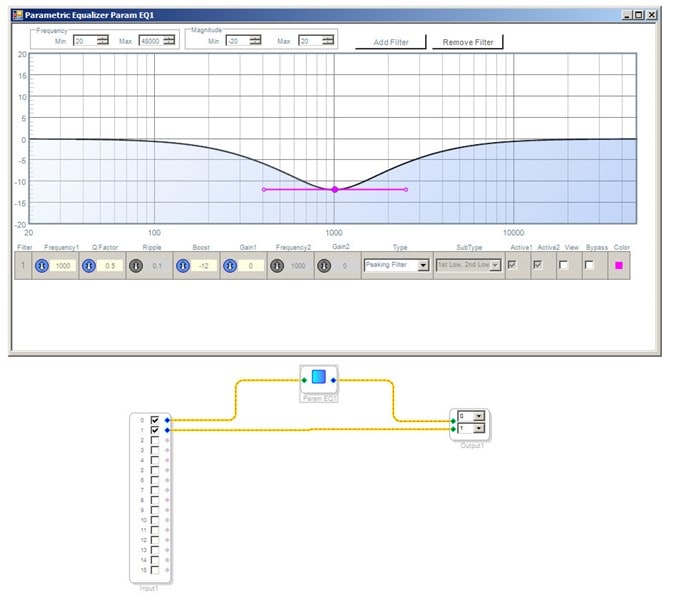
Hello,
It appears like you have the Sample Rate box atop the SigmaStudio Schematic window set to 96K. This box tells SigmaStudio to calculate time-dependent parameters such as filter coefficients to work with this rate, but it doesn't instruct the DSP to actually run at this rate, Separate setting(s) inside SigmaStudio's Register Controls window as well as choice of crystal or clock frequency set the DSP's core sample rate, which otherwise defaults to 48K. When the DSP runs at 48K with filters designed for 96K, everything slows by half -- so a 1 KHz filter peaks at 500 Hz.
In addition, the AD1938 codecs on the EVAL-ADAU1466Z board are hardwired for standalone operation -- to eliminate the need for initialization at power-up. This locks the codecs to 48K as well (see page 18 of the EVAL-ADAU1466Z Users Manual). So you'll need to do your testing at 48K. Although the DSP itself can run faster, the board's analog inputs and outputs are hardwired for 48K.
Best regards,
Bob
Bob,
Due to the 1 octave shift, I wondered if it had something to do with me changing the sampling frequency to 96K. I set the sample rate to 96K in order to get a more granular all-pass delay (10.4 microsecond vs. 20.8 microseconds via a 48K sampling rate) that I intend to employ in one of the filters I seek to implement. I was aware that the ADC and DACs only run at 48K, but assumed that the upconversion and down conversion would happen automatically.
To get the 10.4 microsecond increment for delay based on 1/96KHz, can I make the DSP run at 96K by changing the register control settings?
Best regards,
Steve
Hi Steve,
Yes you certainly make the core sample rate 96K with the register control -- there's a FAQ on EZ:
How do I change the sample rate of my SigmaStudio system?
but unfortunately it has not yet been updated for Sigma 300-350 chips (ADAU145x, ADAU146x). If I can figure out the settings I'll post an addition to that thread and let you know here. Of course if anyone already knows how to work these settings, they are free to update it as well...
Bob
Hello Steve,
A couple of things... This 1466 eval board can be modified to have the codec be controlled from the DSP. It will require some hardware modification.
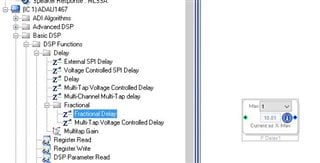
If you need a delay that is less than one sample period you can always use the fractional delay line instead of using an all-pass filter. This may not be what you need but I wanted to alert you to its existence.
Dave T
Bob,
Much thanks! For now using 48K will work.
Best regards,
Steve
Dave,
I'm assuming the codec determines the sampling frequency of the ADCs and DACs? I think the ultimate implementation of the 1466 for my project will require 96K operation of both the DSP, the digital inputs and all ADC/DAC.
Thanks for the tip on fractional delay. I'll play with it!
Best regards,
Steve
Hello Steve,
The Codec can be set to be the master to the DSP and therefore drive the serial ports of the DSP. You still need to properly set the DSP rates. Usually you run on the same master clocks.
The Codec can also be a slave to the DSP. Often systems will be setup to have the ADCs be the master of the system and the DACs be a slave to the DSP. This is better when trying to run at higher sampling rates and especially when using TDM format for the serial data.
If you need, and want to, modify the eval board for 96kHz operation I can try to get you the instructions. It is a fairly new eval board so I do not have that ready to just send over. There are some resistors to remove and jumpers to install. Then you need to add to your SigmaStudio project the bootup code for the codec.
Now I should also mention another option. That would be to modify it so that SigmaStudio controls the codec AND the DSP. The advantage of that is that you can change the settings on the codec in real time. Then once you have your hardware you would have to implement the bootup code for the codec on the DSP.
Dave T
KJBob is it possible to update the FAQ to include how to change the core sample rate for the ADAU146x series? It appears this has still yet to be updated. cc: DaveThib
Hello leedsjb,
I do not understand what you think needs updating? This is all detailed in the datasheet. The problem is that the clocking on this part is so flexible that there is not one easy answer. "Change Register X and it will change the rate". Let me make an attempt to simplify this. First, I want to make a distinction between core rate and sampling rate.
Core Rate:
This comes from the system clock. The system clock is the output of the PLL (in the ADAU1450 the output of the PLL is divided by 2). The PLL frequency needs to be properly setup so that the incoming master clock rate will produce a system clock of 294.912MHz. for a system where you want it based on 48k/96k/192kHz sampling rates. It will be a little lower (270.9504MHz) for a system based on 44.1k/88.2k/188.4kHz sampling rates.
So this system clock is what drives the core and is your instruction rate. So 294.912Mhz instruction rate gives you the 6144 instructions per frame at 48kHz. (294.912MHz/48k)
If the sampling rate is double then you split up the number of instructions per second by the number of frames per second.
The System clock is divided down internally to many rates that the rest of the systems in the part use. This would be the serial ports, the AUXADCs, the PDM demodulators, the comms ports, and the Clock Generators. So this is where the fs*4, fs*2, fs, fs/2, fs/3, fs/4 etc., rates come from. These are the internal rates and are derived from the incoming master clock via the PLL.
So the Clock Generators are where you can setup different rates that are based on the system rates with the exception of Clock Generator 3 which has the ability to use an external clock to drive it. ( This part is so flexible!)
OK, so now the core sampling rate.
This does come from one register, the Start Pulse Selection register. Address 0xF401.
First of all, the Start pulse is used to start executing instructions included in the program in RAM. After the end of the last frame, the DSP will be hibernating waiting for the start pulse. If the start pulse comes before it is finished executing all the instructions, then it will stop executing the program and start over from the beginning leaving some code not executed. I will not go into details now as to how to detect this and prevent it. Well, to prevent it is to make the program smaller or lower the sampling rate I guess.
So the start pulse selection register selects where the start pulse comes from. Most of the settings that are labeled "base" are from Clock Gen 1 and some from Clock Gen 2. (Note that Clock Gen 3 is not available here) Then you can use the clocks coming from the serial ports or the SPDIF receiver PLL. This is where these rates can be external and asynchronous to the internal clocks unless the external source is also running off of the same master clock.
So this one register does setup the sampling rate of the core. The other subtle things to realize is that the serial ports are somewhat separate systems. The serial input port shifts in the data and makes it a parallel binary number. It stores it into a RAM location for the core to pick it up. On the output side, the core stuffs data into a RAM address that the serial output port picks up as a parallel binary number and shifts out the bits one at a time when required. The serial ports have no idea when the data is picked up or when the data has been deposited. It only accesses the data at the end/start of each frame according to the serial port's clocks. They have no idea what the core is doing.
So if you have data coming into the serial port at a 48kHz rate and the core is operating at 96kHz, then the core will pick up each sample twice because the serial port will only update it at a 48kHx rate. This is what can cause distortion and noises in the audio if the core and the serial ports are not setup properly.
Now one last point. The Sampling Rate settings in SigmaStudio GUI, either at the top of the page or by right-clicking on some objects, have nothing to do with the actual sampling rate inside the DSP. This is all set by the clocks and the register settings I detailed above. The reason for the sample rate settings in SigmaStudio is to let the program know what the actual sampling rate is in the DSP. Then for algorithms like an oscillator or a filter, can be properly programmed to behave as it should. The Stimulus and Probe blocks also use these settings to show the filter response. If the setting is not correct then the actual performance of the filter will be incorrect. In addition, if the setting in SigmaStudio is not the same setting that the coefficients were calculated with, then you will not see the correct curves. So this is all up to the user to understand since it is not possible for the program to know all the information.
I hope this all helps. :)
Dave T
Please log in to reply.