Example code errors in CCES
Hi,
I am working on CCES .I want to execute UART in POST example given in the board support package of ADSP21489 but Uart_test.c is having SRUs.These SRU functions are not available in the examples.And this POST example is showing so many errors like below.Even if i create new project also it is showing errors.Can i know what are issues in the code?
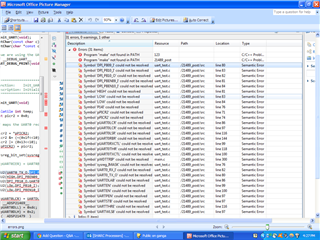
Can any one help regarding this?
Hi Mounika,
Were you able to get going?
Regarding "make not found in path"
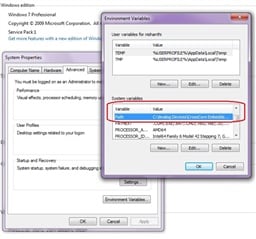
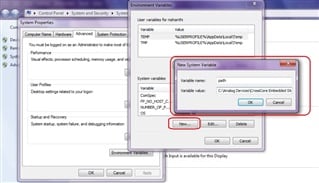
>> One thing is to try that, please make sure that the installation path of the CCES that you want to use(CCES x.x.x) is added in the "PATH" variable in 'windows environment variables' as shown in screenshot(Image_1.jpg).If 'PATH' is not found in system variables list, please add a new variable with the variable name 'Path' and add the installation folder path in the variable value field.Please refer screenshot(Image_2.jpg).
If you set the environmental variable CCES_HOME to a directory other than the CCES installation that you are using then Debug sessions will not operate correctly. CCES_HOME can be used to overwrite internal behavior but is not generally required to be set by the user.
The steps to set PATH are :
1. Go to Control Panel -> System and Security -> System
2. Click the Advanced system settings.
3. Click Environment Variables.
4. In the Edit System Variable (or New System Variable) window on the lower half of the screen, specify the value of the PATH environment variable to include "[Installation directory]\Analog Devices\CrossCore Embedded Studio x.x.x\".
Also please make sure that the "make.exe" file is available in the below CCES installation path.
[Installation directory]\Analog Devices\CrossCore Embedded Studio x.x.x
Regarding "Symbol could not be resolved"
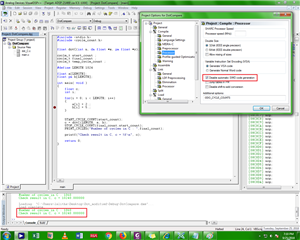
>> This errors are falsely reported in the problems view and in editor. Can you please confirm that executable file generated successfully, after the project builds.
You can workaround this by Close and reopen the project in IDDE Project Explorer to make the errors go away.
or
Unchecking "Symbol could not be resolved" checkbox in "Syntax and Semantic Errors" of "Code Analysis", in Preferences -> C/C++.
Best Regards,
Jithul
Please log in to reply.