Wishlist: DSP Parameter Read with input pin for address and output pin for data
It would be a nice feature to have a cell block with an input pin where you can connect a DC block with the address you want to read and an output pin to put out the data from the reading address. The block should be continuosly reading.
This way you could have the block to read everywhere the address point it to without the need to be physically connected within the algorithm.
I'm working on a digital synthesizer and i'd like to give it a "modular" feel, similar to what analog synthesizer can do with patch cables and let the user to configure the signal flow and create complex "wirings".
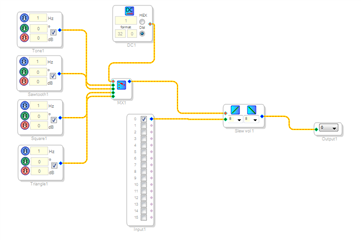
Example, in the following schematic you put a value from 0 to 3 in DC1 to select the source for modulation:
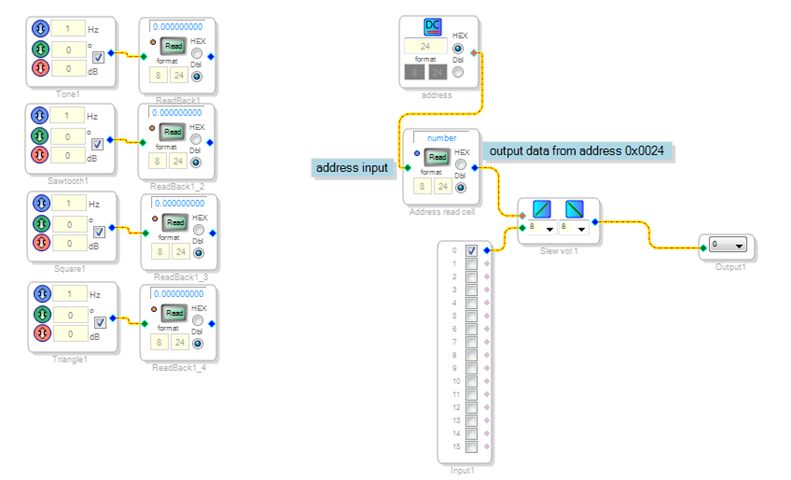
In the next one there's no physical connection but the "Address read cell" would read the address from "address" cell and output data from that address. This way the synth user can route the signal at its own taste (the same way as he's been using a modular analog synth with patch cables):
I know this can be done with an external MCU by reading and writng to DSP slave port but it would slow down things in a real time application considering that one normally would want to have multiple read/write instances. So i guess it's a job for DSP.
What do you think about?
Let me know
Thank you!
Omar
dsp parameter read
THAT IS A great idea.
Let me see how we can turn it into reality.
Miguel
Hey Miguel,
thank you. Let me know once you get to it!
Omar
Hello Omar,
I think you can do this already with available cells. See if this does what you are looking for?
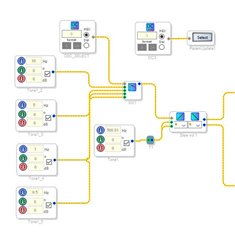
I setup the project like you did with a DC cell to drive the MUX. I gave this DC cell a logical name to easily find it in a list of cell names.
Then I inserted a Parameter Update cell. I am driving this with a DC cell so I can use it to drive the parameter update.
You have to compile this to get an updated list of parameters. Then once you choose the parameter, you need to compile it one more time to set it properly. This does work.
Now, I am wondering, What are you going to be driving this Parameter Update cell with? An AUXADC? This way you can have a pot to control the modulation rate? You can do this with an AUXADC driving the MUX control port directly and skip all these tricks? Anything that you are using to drive the Parameter Update can be driving the MUX directly so am I missing something here?
I would be glad to show you a project using the AUXADC to do this.
Another thing is you can use a VCO to make the modulation continuous between a range of frequencies. This is also easy to do. I can put that project together for you quickly as well. Let me know what you need.
Here is the project that is shown in the screenshot above. Works fine. :)
Dave T
ADAU1452 Parameter Update Selecting an Osc.zip
Hey Dave,
thank you for your reply.
Unfortunately with Parameter Update i can't do the same thing. Once compiled the DC (DC3 in your schematic) can only write to the linked cell parameter (OSC_SELECT).
My intention would be to route both audio signals as well control signals by reading a DSP readback cell data. This way if i had for example 40 DSP readback cell in my schematic i could select which one to get data from by simply selecting its address through the new (hope so!) DSP Parameter Read cell.
After all there's already a DSP Parameter Read cell in Sigma Studio but can only read selected address by selecting it with configure option and can only put data out to its own GUI or to a text file.
The only difference with new DSP Parameter Read would be the addition of input pin for parameter address selection (which can be done with a DC block) and output pin which outputs data from the parameter address it points to. Of course the reading should be continuous.
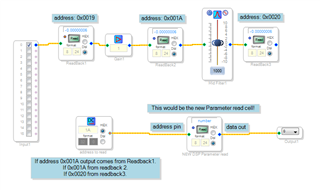
Guess the new cell could be useful for debugging purposes too, by having several readback cell and one DSP parameter cell connected to the output you can choose which point of the algorithm route to the output:
In my system i would write the address to the DC block through a MCU, the synth has a graphic LCD interface so the user can route the signal at its own taste through a matrix on the display. It's up to the user to create its own signal flow in the end.
It's not really a standard synthesizer but a guitar synthesizer. The algorithm detects which note is being played and drive several oscillators.
I guess the new DSP parameter read could find application in large projects where you need to think your system as separate blocks for mudalarity purposes or need to route signals from multiple sources in your program.
Hope my explanation makes sense!
What do you think about?
Let me know
Thank you
Omar
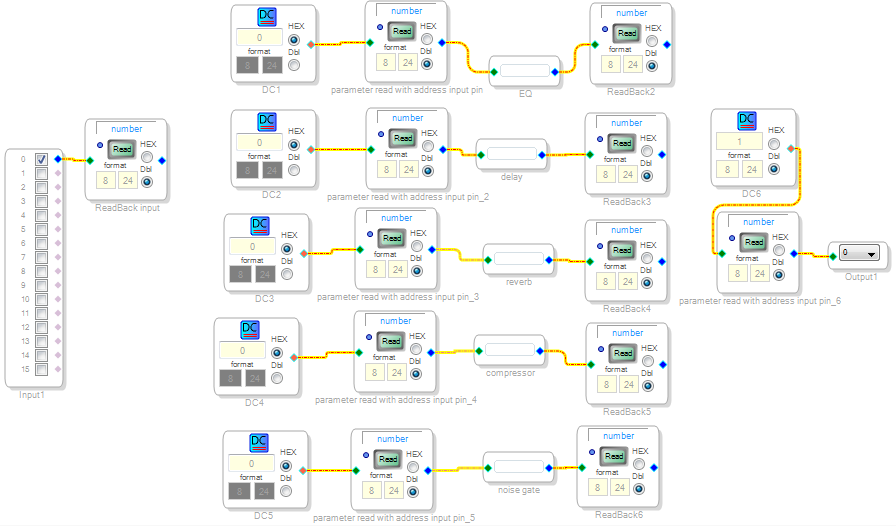
One more application could be inside an effects chain where you want to change the order of the effects.
Say you want the effects in the order IN->EQ->delay->reverb->compressor->noise gate->OUT:
You just write in DC1 the address of Readback input cell
in DC2 the address of Reaback2
in DC3 the address of Readback3
in DC4 the adddress of Readback4
in DC5 the address of Readback5
in DC6 the address of Readback6
In case you want to change the order and do for example IN->noise gate->EQ->compressor->delay->reverb->OUT
Write in DC5 the address of Readback input
in DC1 the address of Readback6
in DC4 the address of Readback2
in DC2 the address of Readback5
in DC3 the address of Readback3
in DC6 the address of Readback4
You can bypass the whole chain effect for direct IN->out by simply write in DC6 the address of Readback input.
Please log in to reply.