Writing a selfboot EEPROM (ADAU1701)
Hello folks,
I'm trying to write to my board's EEPROM directly with I2C and not use a USBi device with SigmaStudio (small project, not looking to invest in an expensive USBi/Eval board). However I'm running into some problems. Right now, I'm trying to go thru the Initialization section of the datasheet (http://www.analog.com/media/en/technical-documentation/data-sheets/ADAU1701.pdf, page 17), which says that to test a simple audio pass-through, all you have to do is turn off the default muting of the converters, clear the data registers, and initialize the DAC setup register. Specifically:
DSP Core Control Register (Address 2076) - Set Bits[4:2] (ADM, DAM, and CR) each to 1.
DAC Setup Register (Address 2087) - Set Bits[0:1] (DS[1:0]) to 01.
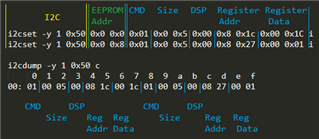
Following the Selfboot guide (pages 27-28), I'm writing to my EEPROM 2 messages that should be setting the DSP/DAC registers correctly and just passing audio through easily. I've verified that the EEPROM is being written to successfully (it is programmed while WP is held low). After programming the EPPROM & power cycling the board for good measure, it should be booting from EEPROM, and allowing audio to pass through. Here's a quick visual of my command structure:
Note: the rest of the EEPROM is filled with 0x00, which should end the selfboot.
When the board powers with this EEPROM configuration, nothing happens- no audio is being passed through. I've tried similar setups of writing the payload that is shown in the Selfboot section of the datasheet, writing SigmaStudio's exported save file data (with a simple passthrough program) but nothing seems to work. Not sure how I can really debug this more, so if anyone else has any experience in making selfboot EEPROMs and can help me figure out what I'm doing wrong, I'd greatly appreciate it!
Audio Signal Processors
programming
eeprom
SigmaDSP Audio Processors
selfboot
adau1701
Show More
Found it! According to the data sheet - By default with no program, input is passed through. But not as simple as I thought. ADC 0/1 don't get passed to DAC 0/1, but DAC 2/3 instead. Switching which line I'm monitoring, or writing a quick program into the EEPROM to pipe ADC0 -> DAC0 has things working again.
Now to figure out why the DSP isn't visible via I2C after selfboot like the datasheets say it should!
Good find.
After the device selfboots. I assume you are waiting sufficient time. Then if you are using SigmaStudio, Load the exact project that is stored in the EEPROM. Then click on Link/Compile/Connect. This will tell SigmaStudio to start communicating with the DSP without downloading the program. The only way this will work is if you have the exact program loaded so SigmaStudio knows the addresses of the all the objects in the DSP.
If you are using SPI then there is one other complication, you have to put the slave port into SPI mode by sending three dummy writes. What I do is find a Readback Cell in the project and click on it four times. The first three times you will get garbage but the fourth time you will get the correct data. However, in your case you are using I2C.
Dave T
Thanks for the reply Dave.
I'm giving the chip several seconds, if not even minutes after it selfboots and it still isn't showing up on I2C. I assume once audio passes through that selfboot has finished, but regardless I'm just manually running I2C detect and coming up empty (aside from the EEPROM).
My setup is pretty unorthodox I think. I'm not using SigmaStudio to program anything directly, as I don't have a USBi interpreter / I'm not using AudioDevice's eval boards. I'm using a random ADAU1701 minimal board that I got from some seller in China. So my flow right now is this:
1. Build design in SigmaStudio & export system files
2. Parse generated XML to build I2C calls (wrapping address/data sets in EEPROM write commands)
3. Use a BeagleBone Black to run the I2C calls to program the EEPROM
4. Powercycle the board
Ideally my next steps would be to setup a webserver on the BeagleBone and pipe some commands via I2C to change EQ params. I know I'll have to do some calculations to get the values I'll be writing into parameter addresses, but not being able to communicate with the DSP over I2C after it selfboots is the current roadblock.
And yes, since I'm using a microcontroller to program the EEPROM and hoping to control the DSP after, I probably should just be booting into I2C mode and programming the DSP directly each boot. My reason for not doing this is that the board I'm using has selfboot tied high. But according to the datasheet, what I'm hoping for should be possible still.
Hello Pojo226,
I assure you it is possible, I do it all the time. You just have to leave the I2C bus alone while the DSP is booting and the I2C port is in master mode. It cannot handle multi-masters on the bus. Once it is booted, some people use a GPIO line to signal that the boot is done, then the I2C port is back to being a slave port.
So look carefully with a scope as to what you are sending to the DSP. Just try sending a simple I2C read command and watch the communications with a scope. See if the DSP sends an "ACK" when addressed. Then check your command formatting carefully and compare it to the datasheet. It has to be something simple like the 7-bit address verses the 8-bit address with Read/Write? Or too many address bytes etc.
But you certainly can let it boot and then take control. This will simplify your uC code.
Now, you are making this MUCH harder on yourself by not having the USBi and using SigmaStudio for development. There is so much more that SigmaStudio does for you to help see how to communicate to objects etc. You really should get one.
Dave T
I tried a more controlled setup - after writing to EEPROM and verifying that the DSP boots from the EEPROM (audio successfully passes thru the chip), I removed power from everything and pulled out my I2C lines from my BeagleBone to the DSP. After powering the DSP board again, audio passed thru. After waiting 30 seconds for good measure (though I'd believe it to be much shorter than this), I hooked up my I2C connection again and probed the available addresses with i2cdetect.
I unfortunately don't have a scope handy as tinkering with hardware is only a hobby, and have never justified getting one yet. But, I try to make up for it with reading the data sheets thoroughly and testing as much as I can. To that note, I'm expecting from an `i2cdetect` invoke the address 0x34 to light up. The addresses reported are 7 bit, so shifting the datasheet's 0x68 down should yield that address. I know this should be expected since the datasheet refers to the EEPROM as 0xA0/0xA1, which shifted down is 0x50 - which is what the EEPROM on my board is returning as.
As for a USBi interface, I wouldn't mind picking one up, but I'm not quite sure what would work. I have a USB->i2C/SPI adapter from another project, but that fails since it requires wrapping payloads with extra information to set the adapter's output mode- which obviously SigmaStudio wouldn't support. Most of the documentation on any AnalogDevice's sites refers to using the EVAL boards which seem to come with their own onboard adapter. There is the USBi->EZ adapter which looks like it might work (and wouldn't be an unreasonable expense), but I wasn't sure if the EZ boards it connects to has special firmware unique to them, or if I would be able to just take the I2C lines from the pinout and connect it to my board.
For reference, the board I'm using can be found here. It's nothing fancy, essentially just a glorified breakout board for a ADAU1401/1701 chip. As I'm only really doing this for a small project, I was hoping to get away with being able to use a cheaper board like this and albeit having a harder development cycle :D
The EVAL-ADUSB2EBZ is the correct adapter. The signals at on the ribbon cable are standard I2C and SPI data lines, nothing required on the host PCB. There is also power available and a reset line but you do not need to use the 5V or implement the reset control. Since you are using I2C then all you need at three wires. SCK, SDA and ground.
Keep the wires short and wrap the ground around the clock and data lines or use a ribbon and use four wires, SDA, GDN,SCL,GND so ground is alternating between the two signals.
Then you will be able to use SigmaStudio to control the program running in the DSP. Get your program doing what you need then start working on adding the uC into the system.
Dave T
I picked up a EVAL-ADUSB2EBZ and finally got around to trying it out.
Good news: I can interact with my chip from SigmaStudio (designs download, registers/params can be changed on the fly, etc)
Bad news: Even though it is working, my chip still doesn't show up when I scan I2C addresses. Not really sure why, but if it's still responding to commands from SigmaStudio I guess it doesn't really matter. I don't think in any of my debugging before had I just tried to send commands even though the DSP wasn't appearing. So perhaps my round about setup before getting the USBi would have worked still.
Regardless, thanks for all your help!
For the output of that and the other settings which are getting failed and that you must know the process from the help to recover the error from the help of the fix error 0xc0036c4 for the entire help of that.
Please log in to reply.