losing faith in SigmaStudio V4.x
I have now experienced a problem with SigmaStudio V4.x (tried V4.1 and V4.2).
Built a design to use the ADAU1452, compiled it without error and saved it to hard disk. The next day I try to load it and SigmaStudio reports it is corrupted, the latest file I've tried reports the following:
Error reading graph from file
Item has already been added. Key in dictionary: 'z01R11.Gain 'min' Key being added: 'z01R11.Gain 'min'
and nothing gets loaded.
I really want to use V4 because the graphical drawing seems to be a lot improved over 3 but losing work like this is unacceptable, I think I will have to revert back to V3.14
I have tried to attach the project file to this, not sure if it worked...
regards
PhilipJ
Audio Signal Processors
adau1452
SigmaDSP Audio Processors
It looks as though the file attachment didn't work so I'll try again, Ahah, it has to be a ZIP file :-)
4667.attachment.zip
Hello Philip,
You will have to use Rev 4.2 because the delay cells you are using are new to this release and will not be there on release 4.1. As it turns out that is where the error was. You file will help us debug it. Any information you may recall about what you were doing around when the problem happened might be helpful. I do understand this is difficult.
I have attached the fixed file. You were quick to realize that the forum interface needs the files to be zipped. It took me a couple of days to realize that.
Thanks,
Dave T
4667.OutputPostMix Fixed.zip
Hi Dave, thanks for the quick repsonse.As far as I can remember, I had designed the graph, compiled it (I didn't have a USB connection to the target processor as I load the code into a PIC micro and the PIC loads it via the SPI interface) and SigmaStudio reported everything ok apart from the "no USB connection". I saved the file and closed the program for that day. The next morning, I started SigmaStudio Rev 4.2 and loaded the project file when the error was presented.
Thanks for fixing the file, I may go back to Rev 4.1 and give up the delay cells for nowt, or possible stay with 3.14 for a little while longer. That has been stable for a long while and I'm kind of used to the drawing quirks.
regards
PhilipJ
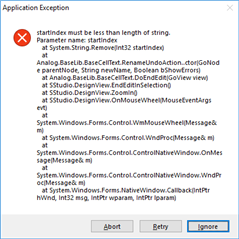
I can reliably reproduce an Application Exception in SigmaStudio V4.2, by zooming the "graph" using Shift Mouse Wheel, if there is an item of the graph selected (surrounded with a green box) then SigmaStudio produces Application Exception:
Sometimes it offers a report about the name of an element already being in use, even though I'm not trying to rename anything.
PhilipJ
Please log in to reply.