Sigma Studio DSP layout question (using ADAU1701)
Hi Bob,
I have 2 questions, but I'll start with this one: I created a 2 -way speaker EQ design a couple of years ago using Sigma studio, with the help of my supplier in China. We had some self noise in the amp design, so they addressed that problem with a lot of instructions in the file...(I don't even know what theyre doing, frankly). It seemed to help, so we left them in there, but I just want you to look at that design (see attached FPX7 file).
The reason I ask is that I'm beginning another design now (another 2-way speaker) and I want to avoid those (possibly)superfluous elements. I have attached the much more stripped down model (FX5). I guess I'm just wondering if you can make any suggestions with these, because I want to minimize instructions and resources.
Thanks again,
KevinDSP files to compare.zip
Hello Kevin,
Sorry I didn't notice that you have addressed your question specifically to me. There's room to simplify these projects depending on your speakers' hardware design and their final application.
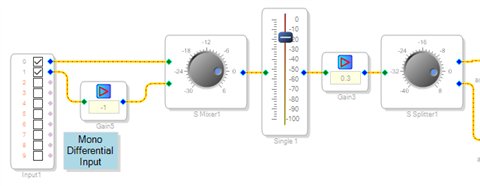
Starting with the FPX7: Its input section uses both ADCs to provide a differential input. There appears to be some redundant gains in the remaining blocks in the input portion of this signal flow.
For example, replacing the minus-1 gain with an inverter saves an instruction. The single-control mixer is set to 0 dB so we might as well substitute a simple adder. The gain block after the volume control may not be needed as well -- there's opportunity to insert gains in the filters and compressors which follow.
How are you arranging any user controls in your product? Are you using a uC with its own user interface to control the -1701 by I2C? Or running self-boot with Aux ADC and GPIO control? I'm thinking that you're running I2C to adjust the volume via parameter loading the GUI slider -- otherwise this isn't needed either.
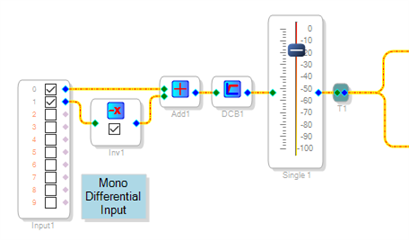
An alternative version is shown below. The redundant gains are removed. When both ADCs are driven to maximum, your signal at the adder output is 6 dB above full scale, +/- 1. The -1701's 5.23 format allows for up to +/- 15.999 or 24 dB above full scale, so you still have plenty of internal headroom. There should be no need to kill gain at this point in the flow.
I added a DC Block Filter as this is essential for any design including dynamic blocks such as envelope followers, sidechains or compressors. The ADCs have some DC offset equal to about -45 dB. Most dynamic blocks work down to DC, so this offset mimics a low-level signal -- preventing proper compressor operation for inputs below -45 dB.
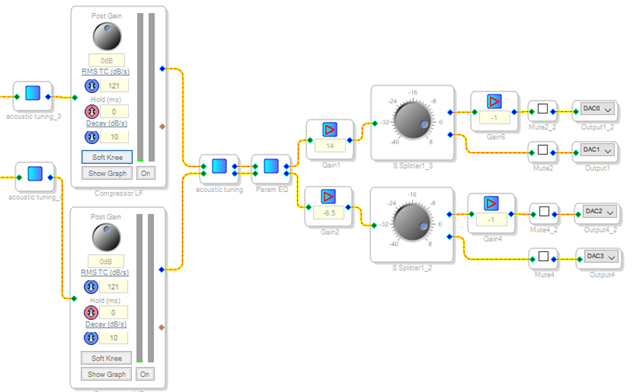
You said about all the extra blocks in this design, "I don't even know what they're doing, frankly." You're correct. I can't figure out what some of these blocks are doing, either. Moving from left to right in the output section shown below:
Filter Acoustic tuning_4 appears to be a highpass for tweeter crossover. I would suggest using one of the stock Linkwitz-Riley 2-way crossovers to handle this instead.
The two compressors appear to be doing nothing -- their tables are set for flat unity gain over a wide range. If desired, you can adjust their tables to limit very loud signals (for driver protection), and gate-OFF noise at no-signal.
The stereo filters labeled acoustic tuning and Param EQ could move before the signals split, where they would be mono filters -- saving half the instructions. Generally, only filters specifically to match phase between the drivers would go after the crossover -- since the L-R crossovers are designed to match phase already. Filters intended for frequency response tailoring would normally go before the crossover.
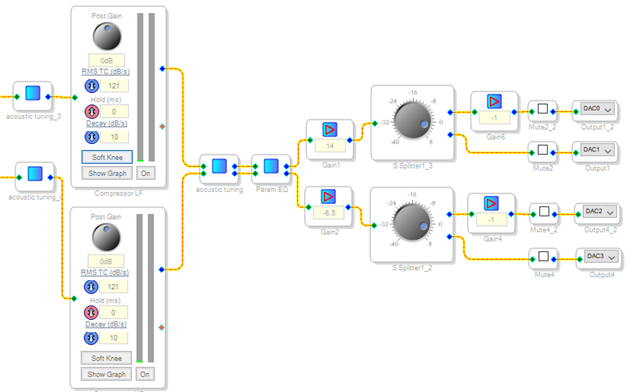
The output stage also develops differential signals via phase inversion before two of the DACs. Again, an invert function is cheaper than a -1 gain. And the splitters could easily be replaced with T-junctions which use no instructions. Set up your levels so the DACs clip at the same time as your amplifiers, using the gains in the compressors or filters.
FX5: Here, each ADC feeds a separate signal path, as if for stereo. If in fact the two ADCs get the same signal (as for an amplified speaker), it would make more sense to either make them differential (like the FPX7), or just add them together. This would give you 3 dB more S/N ratio -- the output doubled but the noise increases only 3 dB since the noise is uncorrelated. Again, a DC block filter is recommended.
The output portion of your project is similar to that of the FPX7, so my comments above apply.
Best regards,
Bob
Thanks for that, Bob. I will check those suggestions this week, but I have another issue right now... We changed the sampling rate from 48 to 96kHz, and everything works fine, except now the speaker outputs are out of phase with each other. Was because of the sample rate change?
Kevin

Hi Kevin,
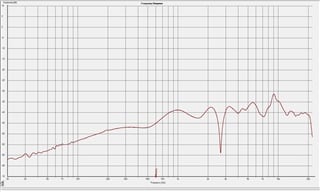
You've changed your Program Length correctly to 2x (512 instructions), corresponding to a 96K h/w sample rate. Looking at the earlier files you've sent, the s/w sample rate (atop the schematic window) was already set to 96K, while the Program Length was 1x (1024 instructions). This mismatch caused all your filters to work at exactly half the frequency they were set for. SigmaStudio had calculated all your filter coefficients for the selected s/w rate (96K), but the hardware was running at 48K so everything slowed down accordingly.
Now with your h/w and s/w rates together at 96K, your filters operate as specified -- but not according to the original acoustic design, which in effect was counting on the filters running at half speed. The most obvious result now is your crossover point moving to double its previously measured frequency -- yet unexpected consequences like phase inversion could also occur when multiple discrete filters have been pressed into service as a crossover.
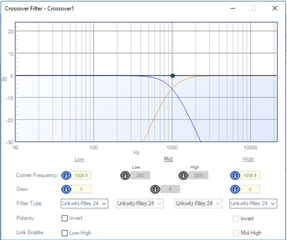
This is another reason to use the stock Linkwitz-Riley crossover. It's a breeze to set up and it automatically predicts and helps you resolve any phase problems by showing the two (or three) individual filters as well as their sum when added with phase accounted for -- as shown here:
Best regards,
Bob
Perfect. Got it.
I did notice that the stock L-Riley crossover allows you to reverse the phase, and I would like to use that, but if you notice my LF crossover is not using any crossover filter at all. That's because the driver doesn't go out far enough, so I'm just using the natural roll off of of the device.
I tried to turn off or not use the LF portion of the LR crossover, but could not see how to do that. Is there another way to skin this cat? I would say just set the rolloff way beyond the rolloff of the driver (like 10k) but that might do some funky things with the phase at the freq.
Thx again,
Kevin
Sliding the crossover rolloff well beyond the driver's rolloff is certainly one way to go. As you noted, the resulting change in phase ruins the predicted response -- yet your interest is in your product's acoustic response, which includes the LF driver rolloff. With the woofer's phase shift in play, the result may prove better (or worse) than that predicted in the crossover window. Another possibility is to lower your crossover frequency. As a result your woofer responds properly within this range, so the crossover works as designed. Of course for this to work your tweeter needs to handle a wider frequency range than before. I'm wondering if it makes sense in addition, to insert a short delay (a few samples) at the tweeter, since likely it responds faster than the woofer. Here we're getting into the art of design -- unfortunately I have no experience designing speaker systems. You could also re-tool your original design to its correct its filter frequencies according to the sample rate correction, to see how well it works.
Best regards,
Bob
Thanks, Bob. I have another question on another topic. Should I start another thread?
Yes, Start another thread.
Dave T
Please log in to reply.