ADAU145x Setting default volume
Hi,
After browsing the forum I have found, that people have been having a problem with the DSP resetting the volume to maximum after reboot and nobody seems to be answering that question. I just wanted to know, if I implement a rotary volume control, how can I set a "default" volume value (position in the lookup table)? So lets say that I want for the output to be attenuated at -30db at boot-up, is there a way to edit registry values on the EEPROM in such a way that the output starts at -30db and then can be increased/decreased to 0db/-60db respectively? Or is there an easy way to do it in Sigmastudio?
Thanks!
Anybody find a solution for this task?
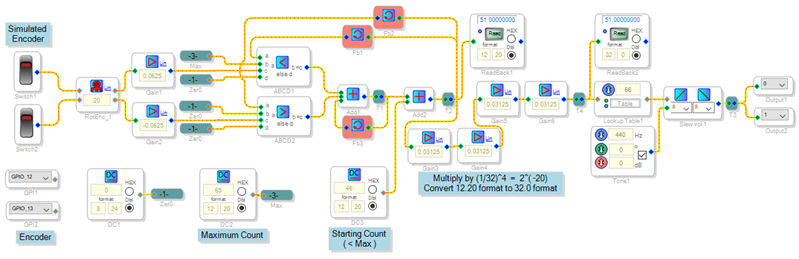
The Rotary Volume block uses the Interface Read and Interface Write locations in self-boot memory so that the system powers up into its previous volume setting. If you're not self-booting from an external E2PROM or you prefer to have the system start at a pre-defined volume, you could build this function from basic blocks. The circuit shown below appears a bit messy but tests out well. How it works is described in this thread, where I made a version for the ADAU1701. For your application I modified it to run on a ADAU1452MINIZ board:
Best regards,
Bob
Volume control_1452.zip
Please log in to reply.