ADAU1701 Low Instruction Level Detection Readback
Hi!
I need to read back some signal levels to the microcontroller in my current project via I²C.
This works as expected with an "Envelope Peak" block together with a readback cell.
These two cells need 22 instructions, but because I want to read back several signal levels, 22 instructions is a little too much.
To safe some instructions (use only 6 instead of 22) I want to use the "Low Data Instructions" level detection block.
Viewing the signal level with this block in SigmaStudio is not a problem but the "Capute"-Field with all the registers and data stays empty, so I am not sure how I can read back the values with my microcontroller?
It seems like some more people are interested in a solution, there is another very similar question from 2014 here:
https://ez.analog.com/dsp/sigmadsp/f/q-a/65803/adau1701-output-level-detection-over-i2c
And in this thread there seems to be a solution, but not for ADAU1701:
https://ez.analog.com/dsp/sigmadsp/f/q-a/65331/sigmastudio-level-detector-issue
Best regards
Jonas
Audio Signal Processors
sigma studio
i2c
signal level
microcontroller
SigmaDSP Audio Processors
adau1701
readback
Show More
Could someone please take a look at my question?
Even a simple "that's not possible at all because of xyz" would help!
Hello Jonas,
Sorry for the delay. Things have been busy and today I was planning on working on the backlog of questions.
Your question take a bit to describe in detail.
I do need to say here that these details are ONLY for the ADAU1701/2 and the ADAU1401A. What we call the Sigma100 core. This core was one of the early SigmaDSP cores designed and we have improved the interface and complexity of the designs with newer processors so what I am going to talk about here ONLY applies to the Sigma100 core.
I will start first by explaining the normal meters not the low instruction variety.
If you note in our newer processors, the meters have a number of parameters in the parameter RAM. There are settings for the envelope generator for the time constant, the hold and the release times (decay) of the signal as it is rectified and integrated into a DC level showing the level for a period of time. Then there are several parameters for the reading of the levels. The levels are stored in those RAM locations and can be read by a uC through the comms port.
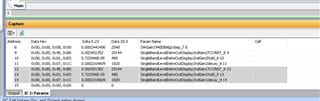
In the ADAU1701 there are only three Parameter RAM locations for the meters. Here is a screenshot:
The highlighted area shows the three parameters for one meter. There are two meters in this project.
So all you see are the three parameters for setting the behavior of the envelope generator that gets the absolute value and calculates the RMS level but no place for the result!
This is because in this processor there is no way to safely read RAM without possibly keeping the core from reading or writing to RAM. This will cause clicks and pops so the core has a feature called a trap register. In the datasheet it is called a Data Capture register. 0x081A and 0x081B. The core has the ability to safely "trap" the value of the accumulator at any moment (instruction) in the program. So to use this register all you have to do is insert the program counter value for the instruction result that you need and you will be able to read it safely from a register. You can read and write to registers safely, only parameter RAM is there a problem with the core.
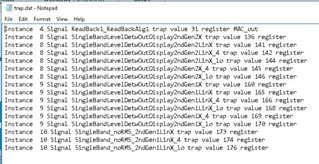
So now you are asking, "How do I know which instruction to ask for?". If you look inside the folder that SigmaStudio creates for the IC number when it compiles, you will see a file called "trap.dat" This holds the values of things that need to be read in the DSP program in text format. Here is an example:
So in this file you see all the program counter values for all the readbacks and meters in your project.
Here is one line:
Instance 9 Signal SingleBandLevelDetwOutDisplay2ndGen1LinX trap value 165 register
I made the trap value Bold so you can see that this is the value you will put into the request for data. So you put in the request and then read back the value after at least two frames. The reason you wait two frames is because the request may come in too late in the current frame so you wait for the current frame and the next frame before looking for the data.
Page 38 of the datasheet explains some of this.
Now there are five different addresses to read. There is one more detail to explain. This trap register read in hardware is only 24 bits. The accumulator is 56 bits. So the LinX reads the top 24 bits, the LinX_4 reads the next four bits so that is 28 bits total and then the LinX_Lo will read the next 24 low bits and the last four bits are not able to be read but that is not important anyway. Normally for level meters all you need is the top 24 bits.
By the way, this also explains why the READBACK cells in the 1701 are only 5.19 format instead of 5.23. It is because the last four bits are not able to be read. If you need to see the bottom four bits then you have to multiply by 16 to be able to see the bottom four bits.
So now on to the Low-Instruction meter.
This meter does no processing in the DSP. It only captures the level like a readback cell. So the number can be negative or positive. There is not calculation of RMS value and you can miss some peaks if they are really fast and you do not read the meter constantly. Even constant reads cannot be at the same rate as the sampling rate. So you can do a little processing in the DSP or accept that the meters are not super accurate but will still give you a reasonable reading of the level.
In the trap file I inserted above were these lines:
Instance 10 Signal SingleBand_noRMS_2ndGen1LinX trap value 173 register
Instance 10 Signal SingleBand_noRMS_2ndGen1LinX_4 trap value 174 register
Instance 10 Signal SingleBand_noRMS_2ndGen1LinX_lo trap value 176 register
These are the single Low-Instruction meter I placed into this project. You see all that is available are the LinX, high values, the 4 bits to get to the top 28 bits and then the lo value for the lower 24 bits. You also see their trap value. You also see by the name "noRMS" that these do not give you the RMS value.
If you look at the Params tab of the Capture window you will not find a single parameter for these meters. They use zero parameter RAM locations.
So once you get these values into your controller, you will need to get the absolute value and calculate the RMS value to come up with a level.
I would not bother to read the LinX_Lo value, it is too low for any meter and most of the time you do not need the LinX_4 either. So that simplifies your program.
So after all this, does this answer your questions?
Thanks,
Dave T
Hello Dave,
this answers my question in every way, thank you very much for all the details and explanations!
I'll try to get some code on the µC working which calculates the signal level.
The µC should have lots of resources left to calculate some values and of course the signal level does not have to be very accurate, just to light up some LEDs.
Again, thank you!
Best regards
Jonas
DaveThib said:
Now there are five different addresses to read. There is one more detail to explain. This trap register read in hardware is only 24 bits. The accumulator is 56 bits. So the LinX reads the top 24 bits, the LinX_4 reads the next four bits so that is 28 bits total and then the LinX_Lo will read the next 24 low bits and the last four bits are not able to be read but that is not important anyway. Normally for level meters all you need is the top 24 bits.
By the way, this also explains why the READBACK cells in the 1701 are only 5.19 format instead of 5.23. It is because the last four bits are not able to be read. If you need to see the bottom four bits then you have to multiply by 16 to be able to see the bottom four bits.
Hi Dave!
Can you please explain this so that a beginner like me can understand it clearly?
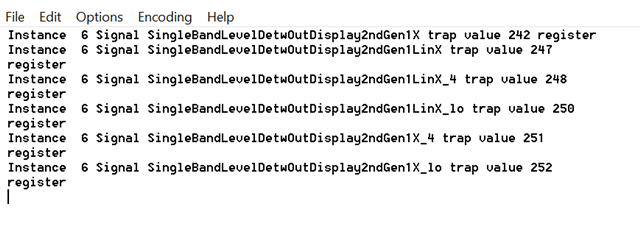
Here I have not 5 but 6 different addresses. A set with and another without the "Lin" part. What difference the "Lin" makes?
I have tried the first one with the address 242 in my example and it works but under let say -50(ish)dB I get nothing. This is probably because I loose all the resolution to go lower than that. Interestinlgy I'm reading 4 bytes as per the example here shows but to get a somewhat dB value I need to shift it by 26 bits and than take the 10*log10 of that value. Even so, sigma studio shows -3dB RMS for a full scale sine(this is to be expected) but I get exactly 0 dB with my forementioned math.
My question is, how can I properly read all 3 registers and how to "add them together" so that I end up with the exact value that sigma studio shows?
I'm thinking like, I can read the register under 242, 251 and 252 and somehow create this 56 byte number and end up with the same reading as in sigma studio even under well below -50dB. What is the exact math behind all this?
With register 251 ( _4 ) why would I want to read 4 full bytes just to get 4 extra bits of resolution? Where in those 4 bytes are these 4 bits are located?
Thank you very much!
Please log in to reply.