ADAU1452 - ADAU1452Reading signal level via SPI
Hi,
I am using SigmaStudio 4.2 to set up a circuit that includes reading signal level values from an ADAU1452 into a uC using the SPI interface.
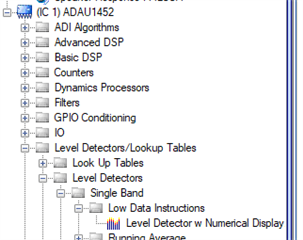
I've used the "Low Data Instructions" item (two of them for left and right of a stereo test) because eventually I will have 40 of them
Compiled the circuit and exported the System Files to pass to the uC and the level detectors appear in the parameter list _BUT_
they both appear to have the same address:
/* Module LevelLeft - Level Detector w Numerical Display.
Low DSP MIPS. Average Enable*/
#define MOD_OUTPUTSTRIP_LEVELLEFT_COUNT 1
#define MOD_OUTPUTSTRIP_LEVELLEFT_DEVICE "IC1"
#define MOD_OUTPUTSTRIP_LEVELLEFT_SINGLEBANDNORMSS3001_ADDR 0
#define MOD_OUTPUTSTRIP_LEVELLEFT_SINGLEBANDNORMSS3001_VALUE SIGMASTUDIOTYPE_8_24_CONVERT(0)
#define MOD_OUTPUTSTRIP_LEVELLEFT_SINGLEBANDNORMSS3001_TYPE SIGMASTUDIOTYPE_8_24
/* Module LevelRight - Level Detector w Numerical Display.
Low DSP MIPS. Average Enable*/
#define MOD_OUTPUTSTRIP_LEVELRIGHT_COUNT 1
#define MOD_OUTPUTSTRIP_LEVELRIGHT_DEVICE "IC1"
#define MOD_OUTPUTSTRIP_LEVELRIGHT_SINGLEBANDNORMSS3002_ADDR 0
#define MOD_OUTPUTSTRIP_LEVELRIGHT_SINGLEBANDNORMSS3002_VALUE SIGMASTUDIOTYPE_8_24_CONVERT(0)
#define MOD_OUTPUTSTRIP_LEVELRIGHT_SINGLEBANDNORMSS3002_TYPE SIGMASTUDIOTYPE_8_24
My questions are:
1) Is the best way to get signal level values for display by a uC ?
2) How can the uC read the values from the ADAU1452, via the SPI
thanks for any help, project file attached
PhilipJ
TestStrip.zip
Audio Signal Processors
adau1452
spi
SigmaDSP Audio Processors
Hello Phillip.
It does look like it is assigning the same address. I will check up on this but I think this is only a glitch in the system files output. If you compile the project and look at the capture window's params tab, you should be able to find it listed there and you can see what address it is really using.
If you build a simple project with an oscillator going to a meter you can see how the level detectors work. The Params tab of the capture window is very handy. You click on the refresh button on the top to see the new data. If it changed it is shown in red. It also shows the data in three number formats which is really handy.
The "normal" meters, not the "Low Instruction" meters, have an envelope generator in the code. So it takes the signal and gets the absolute value, and integrates it over time using a time constant for the attack, a hold time and a decay time. Then it computes the RMS value and sends that back out to memory where it can be read. So if you read the RMS parameter you will get the level. You have to set the hold time to hold the value for the length of time between the time that the uC reads the values. So it will not start to decay before the uC had read the value.
So the DSP is doing a lot of work but it is work that is well suited for a DSP to do.
The Low-Instruction type of meter is just that, Low instructions in the DSP. Which means it is off-loaded to the uC for it to compute. All the Low Instruction meter does is take the audio level during every sample and placing it into memory to be read. No absolute value, no integration, nothing. So if you read this every 10mS you will be missing a lot of the level peaks that has happened between the 10mS polling of the memory. Then you have do all the processing of the signal in the uC.
So this is fine for a few meters but not for 40. If you are using SPI it helps because you can read much faster but the memory locations will not be contiguous so you will have to do discrete reads with the new address which takes more time. Then do this often enough to get smooth data without missing too many peaks. The somewhere in there the uC has to have the time to get the ABS of the signal and do the attack computation and set up the sum-cells along with the decay of the sums. I did do this once in a controller where I kept a circular buffer and a running sum so that I subtracted the oldest value from the sum then added the new one in. However, I was doing the ballistics mostly in analog before the ADC.
So I think you will find that this is too much constant reading and too much calculating to be done on the uC.
You might want to think about sending out meter data over I2S to another DSP that would only compute the meter data. That is one possible option. You may also want to do a little but of processing in the DSP then send it to this Low-Instruction meter. This way the uC does not have to poll as often and will have less calculations to do. I don't have a good example for you right now.
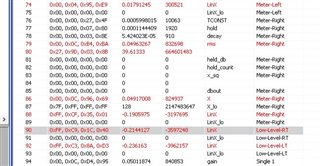
Here is a screenshot of the Params tab,
In here you can see the standard meter called "Meter-Right" and the low-Instruction meter I called "Low-Level_RT".
Reading the LinX parameter in the Low-Level-RT meter will give you the level of the audio in that one sample when it was read. The other meter has a large number of parameters to control the envelope generator and you will find the output value as the RMS parameter.
I hope this helps.
Dave T
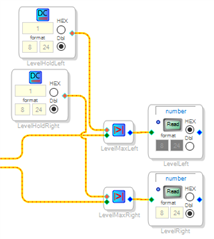
Hi Dave, thanks for the reply. I worked through some of the suggestions you put in but eventually I decided that I wanted a peak reading meter so I put in an AbsMax unit to catch the maximum value of the signal and a DSPreadback to get the value (the uC then does the linear to dB calculations, and time delays as required). I also had to put a DC entry in to reset the AbsMax after the uC had read it so my uC has to do a read and then two writes (write 0, write 1) to get the signal level.
Is there any other way to reset the AbsMax element when the DSPreadback is accessed ?
Thanks, as always, for your help
PhilipJ
Hello Phillip,
I have been trying to think of other ways to do this. No big Ah!-Ha! moment yet. You could use an external GPIO to reset both at the same time. You would have to read both as close as possible to each other then reset both. Not a big difference in code size but it would be faster than two messages.
Dave T
Please log in to reply.