Lookup table differences between Sigma3.11 & Sigma4.1
Hi all,
I'm translating a project for ADAU1450 to ADAU1452 and I need to use Sigmastudio4.1 to support it.
The previous project was compiled in Sigmastudio 3.11 and actually I'm finding some problems to convert a lookup table. If I open the older lookup table in Sigma4.1, all the values are automatically changed and the processing block does not work correctly.
Attached the old table taken from Sigma3.11 and the new one converted by the software Sigma4.1: is there a different MAX threshold between the to version of the software? Is there a way to mantain the same values in 4.1 using a different kind of table?
Please help me to convert the table in a right way without have to spend a lot of time to recalculate it...
Edit Notes
Text modified
[edited by: sec1980 at 10:32 AM (GMT -5) on 23 Nov 2018]
Audio Signal Processors
adau1452
adau1450
SigmaDSP Audio Processors
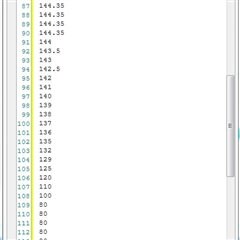
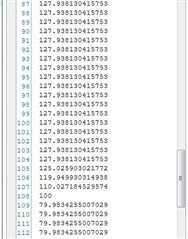
Hello sec1980,
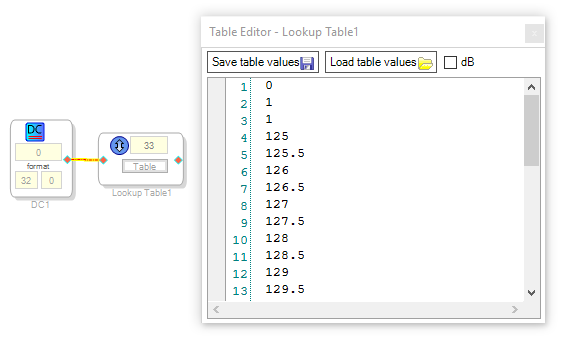
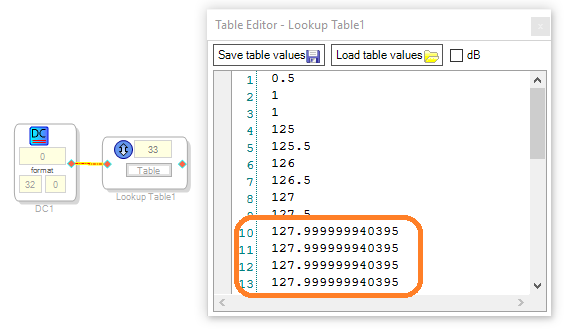
The ADAU1450/2's 8.24 format allows for values between -128 and approx. 127.9999. If your LUT is in this format (as opposed to the 32.0 integer format), it only allows numbers within this range. It appears that SigmaStudio 4.1 reduced all the higher numbers to the maximum allowable. Below I made a lookup table in SigmaStudio 3.10, then opened it in SigmaStudio 4.1. At first the table looked identical, but as soon as I modified the first entry from 0 to 0.5, SigmaStudio changed the illegal numbers as shown:
You can recover your original values by opening the table in the earlier SigmaStudio and "Save Table Values" the original table as a text file. Then restore the original table with "Load Table Values" in the SigmaStudio 4.1 version. However, this won't fix the problem of vaues larger than 128. I suggest you go ahead and scale your values so none are too large, then make any compensating changes elsewhere in your project.
Best Regards,
Bob
Please log in to reply.