Need help implementing multiplexer using external switch
Hello,
I have a custom ADAU1701 board which is working fine.
I have an SPDT switch to change the value on Input_GPIO5 between 0V (GND) and 3.3V (VCC).
I have cathode of an LED connected to Output_GPIO4. The LED anode is connected to VCC through a 1k resistor.
I want to achieve the below but am unable to do so.
Toggle switch LO: LED OFF, Sig1A and 1B appear on OUT1 and OUT2
Toggle switch HI: LED ON, Sig2A and 2B appear on OUT1 and OUT2
Kindly help me on how to go about doing this.
Thanks!!
Audio Signal Processors
SigmaDSP Audio Processors
adau1701
The MUX uses an integer (28.0) control input while the GP digital input blocks produce a decimal 1.0 (5.23 format). Use a Buffer Gate to connect one to the other, as shown below. Also, don't forget to set your HW registers to recognize MP4 as an output.
Best regards,
Bob
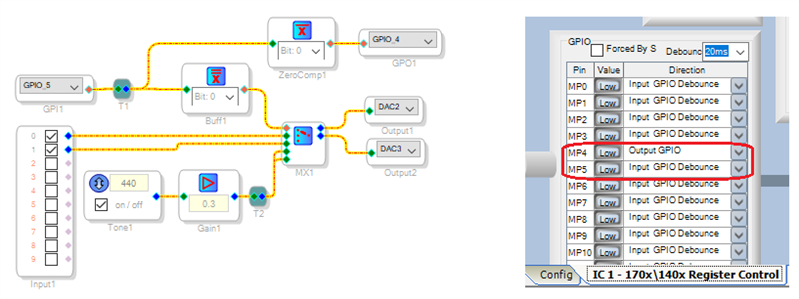
Thank you so much, Bob!!
I implemented the logic in my main application and it did not work.
So to verify the hardware, I created a new project and interfaced the toggle switch, Input_gpio5, output_gpio4 and the LED only. Nothing else. It works. So this tells me that there is nothing wrong in the hardware.
Now I am going to add my application step-by-step. It has 4 x AUX_ADC, an input_output pair that interfaces to a uC, one output that interfaces to another LED and so on. Let me see what causes interaction for the toggle switch logic to not work and I will come back to you again.
As always, thanks for your prompt and correct solution with some insight on the formats the blocks are using.
Regards!!
Hello,
I found out a few things about the multiplexer:
1. If I include the multiplexer in my signal chain, there is audio output only at 1X Program length. At 2X, the output is MUTE
2. If I include the multiplexer in my signal chain, I can toggle any GPIO (input) line with an external uC. But any I2C WRITE to Control Register (0x0820) will result in no sound on output.
Without the MUX, I did not face these restrictions.
At 1X program length there is significant loss of HF details as compared to 2X. Without the MUX, normal operation continues even at 4X with substantial increase in HF detail, though this setting is not in the datasheet specs for PLL settings of 256xfs per table 12 of datasheet.
Is this normal? Any more inforamtion would be much appreciated.
Thanks!!
Hello KKSL,
You may be running out of MIPS. Look at the files that the compiler produces. In the folders you will find the compiler_output.txt file. In that file it tells you what your MIPS usage is. Keep in mind that this is calculated for 48kHZ fs. So 1024 MAX instructions, ( a few less in reality for overhead and housekeeping at the end of the frames) If you are running at 96kHZ then it is 512 MAX and 256 MAX for 192kHz fs.
If you run out of instructions the program stops executing and goes back to the beginning. So there is code that is never reached during each frame. So often it is the code for stuffing the resulting data into the serial output port buffer that is missed and so no output.
Dave T
Hello Dave,
Your diagnosis is correct and perfect. I am on the edge of usage and hence cannot go higher on sampling frequency.
So I will have to skim my signal chain or move to a bigger processor. Hmm.....
Working on the sigmaDSP platform is so engaging that more often than not you are engrossed in your application and take the technicalities for granted.
Thanks again!!
Hello again, Dave,
I reduced some elements in the signal chain to bring the mips in range and was able to get the application working at 2X program length.
But the other problem remains:
I can toggle any GPIO (input) line with an external uC. But any I2C WRITE to Control Register (0x0820) will result in no sound on output.
Any idea why this could be happening?
Thanks!!
Hello KKSL,
I have been supporting this part for about three years now and this is one small thing I have not looked into. I mostly control these settings from SigmaStudio and not from a uC. The register map table 51 and 52 along with 53 are about the worse explanation I have ever seen. What I had to do is open up SigmaStudio and set it to SPI interface (so I don't need hardware) and then look at the capture window to see what is being sent to this control register when you change the settings in SigmaStudio.
Here is my quick attempt at an explanation without any fancy diagrams.
Table 53 is good in that it shows the 4-bit nibble that holds the setting for the function of any of the multi-purpose pins. So if you want it to be a GPIO input, inverted with no debounce you would set it to 0b1001.
If you want a GPIO output you set it to 0b0010.
So the setting for each port takes 4 bits.
There are 12 ports, 0 to 11. (it goes to 11 LOL) So this means 4 bits x 12 = 48 bits.
So 48 bits are needed to store the settings for all 12 MP pins. This is six bytes of data.
We are limited in this part for the communications port to 24 bits wide so they designers setup two 24 bit registers to hold all these 4 bit values.
So here is what Table 51 should show:
D0, D1, D2, D3 = setting for MP0
D4, D5, D6, D7 = setting for MP1
...
So register 0x2081, bits D20, D21, D22, D23 are for setting MP11. That is how it ends.
I have no idea where these MP numbers in these two tables come from.
Open up SigmaStudio and watch what goes across the capture window when you change the config registers for the pins.
What was interesting is that there are more setting listed in table 53 then are shown in SigmaStudio for choices. Like the Serial Data Port inverted? I will experiment with this when I get a chance because inverting the data input is a quick no-MIPS way to invert the signal coming in! So I experimented once more. When you click the "Inv" check box in SigmaStudio, and it is set to be the serial port function, it sends a 0b1100 which is the inverted serial port. So the feature is implemented a little differently then just a pull-down box.
So thanks for pointing this out to me. See, there is always more to learn!
Dave T
Hello Dave,
Till I saw your answer above, I assumed that looking at the capture window and making the uC to what I see in the capture window was the way to do it.
However, your references to the datasheet made me look deeper into it.
I now understand that there are Core Control Settings like the AACW, GPCW and IFCW that are important if I want to access the GPIOs through the control port i.e. by using a uC.
I will spend some more time doing that and come back to share my results.
Thanks!!
Hello Dave,
Short story: Its all sorted out!
Long story:After selfboot, I configured the core control register to allow GPIO control through control port by setting GPCW. Then I did all the GPIO settings that I wanted to do using I2C WRITE and finally again re-set the GPCW to allow external control and control through DSP core of GPIO.
So its all sorted out.
One thing still baffles me:
Before I got into this toggle switch interface with GPIO5, GPIO4, Buffer and MUX, the application worked at 4X program length (192KHz sampling) with 414 MIPS consumed
But with the MUX logic implemented and the application optimized so that the MIPS is 398, I still have to use the 2X setting as the program mutes for 4X setting.
Any thoughts?
Thanks!!
Hello KKSL,
Yes, this part is one of our early parts and there are some interesting features that we refined in later products.
Now the registers you referred to should only cause issues if you want to write to the GPIO registers or the interface registers etc. Reading them should not be an issue.
Let me know what you find.
Dave T
Hello KKSL,
What I think was probably happening was that the code that was not being reached was not that noticeable. The part that sent data out of the port was still being reached. Then when you made changes the compiler moved it to a later place in the program and so then it was not being reached. I have seen this before and went looking closer and found parts of the program that was not working but I was still getting audio out.
With 398 MIPS you will have to run at 2X setting.
Dave T
Hello Dave,
I would have loved to run my application at 4X setting. But then I would rather have a stable code than have issues surface in the field.
I am glad that this is now ironed out.
My single board layout for ADAU1442 + ADAU1962/66 is ready. I am excited to explore some new features there. One of them is block processing. Are there any worked out examples and/ or tutorials available for the same?
Thanks!!
Hello KKSL,
Unfortunately, I have not worked out any good examples using block processing. Right now I have too much on my plate to put anything together.
Dave T
I apologize for the uninteresting topic for the post.
Hi Bob, I wanted to get in touch with you privately, but since the organization of the forum has changed, it's no longer possible.
You can send an email to sanfilippo@pspelettronica.com so we can get in touch.
Thanks
Hello Piero,
I think all users have this functionality. If you hover over a person's user name, a pop up will appear and there is a choice to send a private message. Users have sent me private messages so I think it is open to all users.
Dave T
Hello Dave,
Yes the PM system works as you described.
Best regards,
Bob
Please log in to reply.