ADAU1452. Instruction per sample, how calculate?
Hi.
I building the project with many audio channels (14 channels amplifier).
For this project I used ADAU1452 + STM32 microcontroller
I used 96kHz sample rate.
Each channel have independent filters (I used Parametric EQ with two type of filters) and Delay block.
For each channels I need 7 variants of presets:
-some channel have different frequency and gain settings for filters for each variants
-some channel have different type of filters (and settings)
-all channels have different delays.
The system have integrated MCU. We try to dowload all filters and delay setting from MCU (I2C bus) but it need many times (about 2 second for changing 1 presets to other). It`s not good for our system.
Then I try to make all variants of filters and delays inside SigmaStudio Project. I realyzed presets for Delay block with DC parameters and Voltage controlled Delay block. Its work and I can change setting by switch. From MCU I control only this switch,
But I cant find filter block, wich I can use in all channels and just switch setting.
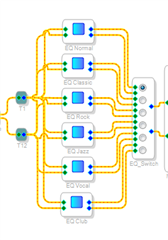
I try to make many Parametric EQ block and switch it, but after I added >20 blocks (with 2 filters inside each blocks) the sound is destroid.
The realizasion like this:
At this time, the utilisation of resources less than 100%, so theoreticaly it`s should work.
This is output from compiler:
##### Summary #####
DM0 RAM used: 00764 (of 20480)
DM1 RAM used: 05522 (of 20480)
PM RAM used(Data): 00000 (of 8192)
PM RAM used(Inst): 01780 (of 8192) 1140 instructions (32bit: 500 64bit: 640)
Total PM used: 01780 (of 8192)
--------------------------------------------------------------------------------------
STREAM Inst Inst DM0 DM1 PM
Instance (cycles) (size)
--------------------------------------------------------------------------------------
STACK - - 16 0 0
FRAMEWORK 126 91 12 790 0
EQ Normal 36 52 41 49 0
EQ Club 36 52 41 43 0
EQ Vocal 36 52 41 43 0
EQ Rock 36 52 41 43 0
EQ Classic 36 52 41 43 0
EQ Jazz 36 52 41 43 0
Left Subwoofer 11 20 10 14 0
Right Subwoofer 11 20 10 14 0
FR Tweeter 11 20 10 14 0
FL Tweeter 11 20 10 14 0
RL Midrange 11 20 10 14 0
RR Woofer_3 11 20 10 14 0
Surrounf Left 11 20 10 13 0
Surround Right 11 20 10 13 0
RR Midrange_9 11 20 10 11 0
RR Midrange_8 11 20 10 11 0
FR Woofer 11 20 10 11 0
FL Woofer 11 20 10 11 0
RL Woofer 11 20 10 11 0
RL Tweeter 11 20 10 11 0
RR Tweeter_7 11 20 10 11 0
RR Woofer_2 11 20 10 11 0
RR Tweeter_5 11 20 10 11 0
RR Tweeter_2 11 20 10 11 0
RR Midrange_2 11 20 10 11 0
RR Woofer_4 11 20 10 11 0
RR Woofer_7 11 20 10 11 0
RR Tweeter_4 11 20 10 11 0
RR Tweeter_3 11 20 10 11 0
RR Woofer_5 11 20 10 11 0
RR Woofer_6 11 20 10 11 0
RR Midrange_3 11 20 10 11 0
RR Midrange_7 11 20 10 11 0
RR Midrange_4 11 20 10 11 0
RR Tweeter_6 11 20 10 11 0
RR Midrange_6 11 20 10 11 0
RR Woofer_8 11 20 10 11 0
RR Midrange_5 11 20 10 11 0
Woofer Delay 11 14 1 252 0
Midrange Delay 11 14 1 252 0
Tweeter Delay 11 14 1 252 0
SUB Right Mute 9 13 4 2 0
SUB Left Mute 9 13 4 2 0
EQ_Switch 10 12 13 2 0
Rear Shelf Volume 7 11 1 2 0
Nx1-1 7 10 17 1 0
Main_Volume 9 9 4 2 0
Input Mute 9 9 4 0 0
Delay RL 7 9 1 252 0
Delay Surround Right 7 9 1 252 0
Delay FL Woofer 7 9 1 252 0
Delay FR Tweeter 7 9 1 252 0
Delay RL Midrange 7 9 1 252 0
Delay RL Woofer 7 9 1 252 0
Delay FR Woofer 7 9 1 252 0
Delay RL Tweeter 7 9 1 252 0
Delay Left Sub 7 9 1 252 0
Delay Right Sub 7 9 1 252 0
Delay FL Tweeter 7 9 1 252 0
Delay FR 7 9 1 252 0
Delay Suround Left 7 9 1 252 0
Delay FL 7 9 1 1 0
FR Tweeter Mute 6 8 4 1 0
FR Woofer Mute 6 8 4 1 0
RL Tweeter Mute 6 8 4 1 0
RR Tweeter Mute 6 8 4 1 0
RR Woofer Mute 6 8 4 1 0
RL Midrange Mute 6 8 4 1 0
RL Woofer Mute 6 8 4 1 0
FL Woofer Mute 6 8 4 1 0
FL Tweeter Mute 6 8 4 1 0
SL Mute 6 8 4 1 0
SR Mute 6 8 4 1 0
RR Midrsnge Mute 6 8 4 1 0
SUB_Volume_Left 5 7 1 0 0
FR_Volume 5 7 1 0 0
FL_Volume 5 7 1 0 0
RL_Volume 5 7 1 0 0
SUB_Volume_Right 5 7 1 0 0
Sub1_2 4 7 0 0 0
Sub1 4 7 0 0 0
Inv Right Sub - 4 6 1 1 0
Inv RR Midrange_8 4 6 1 1 0
Inv RR Woofer_8 4 6 1 1 0
Inv RR Woofer_3 4 6 1 1 0
Inv RR Midrange_5 4 6 1 1 0
Inv RR Midrange_6 4 6 1 1 0
Inv RR Woofer_6 4 6 1 1 0
Inv RR Woofer_4 4 6 1 1 0
Inv RR Tweeter_3 4 6 1 1 0
Inv RR Midrange_4 4 6 1 1 0
Inv Left Sub - 4 6 1 1 0
Inv RR Tweeter_6 4 6 1 1 0
Inv RR Tweeter_7 4 6 1 1 0
Inv RR Midrange_7 4 6 1 1 0
Inv RR Tweeter_5 4 6 1 1 0
Inv RR Midrange_2 4 6 1 1 0
Inv RR Woofer_5 4 6 1 1 0
Inv RR Woofer_7 4 6 1 1 0
Inv RR Midrange_3 4 6 1 1 0
Inv RR Tweeter_2 4 6 1 1 0
Inv FR Woofer 4 6 1 0 0
Inv Right Sub 4 6 1 0 0
Inv RR Woofer_2 4 6 1 0 0
Inv RR Tweeter_4 4 6 1 0 0
Inv FL Tweeter 4 6 1 0 0
Inv FL Woofer 4 6 1 0 0
Inv RL Tweeter 4 6 1 0 0
Inv RL Midrange 4 6 1 0 0
Inv Left Sub 4 6 1 0 0
Inv RL Woofer 4 6 1 0 0
Inv FR Tweeter 4 6 1 0 0
Level Left_5 3 5 2 1 0
Level Left_2 3 5 2 0 0
Level Left_3 3 5 2 0 0
Add1_2 4 5 0 1 0
Add1 4 5 0 1 0
Add1_3 4 5 0 1 0
Level Left 3 4 2 0 0
Level Rigth 3 4 2 0 0
DC1_7 2 3 1 1 0
DC1_6 2 3 1 1 0
AsrcIn1 3 3 0 2 0
SUB1+ 2 3 0 0 0
SUB1- 2 3 0 0 0
SUB2- 2 3 0 0 0
SUB2+ 2 3 0 0 0
FL_TW 2 3 0 0 0
RL_TW 2 3 0 0 0
FR_WO 2 3 0 0 0
FR_TW 2 3 0 0 0
RR_WO 2 3 0 0 0
SL 2 3 0 0 0
RL_WO 2 3 0 0 0
RL_MID 2 3 0 0 0
FL_WO 2 3 0 0 0
SR 2 3 0 0 0
RR_TW 2 3 0 0 0
RR_MID 2 3 0 0 0
DC1_2 2 2 1 1 0
DC1_3 2 2 1 1 0
Door Delay Value 2 2 1 1 0
Tweeter Delay Value 2 2 1 1 0
Midrange Delay Value 2 2 1 1 0
Voofer Delay Value 2 2 1 1 0
--------------------------------------------------------------------------------------
Total 1192 1726 760 5518 0
--------------------------------------------------------------------------------------
(% Fs=96.0kHz) 39% 22% 4% 27% 0%
We can see, that all resource is OK, but no sound output.
If I delete just 1 any blocks, the sound is played OK.
If I understand correct, acording the datasheet, the maximum possible instruction should be not more than 3072 at 96kHz. But according the compiler information, I have only 1140 instruction. But its dont work..
Edit Notes
corrected
[edited by: AlexandrIlushin at 3:15 PM (GMT 0) on 6 Dec 2018]
Audio Signal Processors
adau1452
adau1452 sigmastudio
SigmaDSP Audio Processors
You are correct. Since you are using only blocks that are completely deterministic, the instruction utilization shown is accurate. You are using well under half the core cycles and memory. If you send your project to me by IM, I would be happy to look at it.
That said, given that you have a microcontroller in your system, it may be simpler to have the microcontroller modify the coefficients for the filters on a program change rather than switch between so many filters running all the time. A mute block after the filter would allow you to still make use of the hardware volume slew (as with the mux switch). You can read the biquad filter coefficient for each of your blocks from the parameter window or your current exported parameter file.
Ken
The simple project, which have the same problem attached
Temp3.zip
I used SigmaStudio 3.17
Input sound from SPDIF, output to the I2S (TDM mode).
I used 12.288MHz quartz.
PLL output should be 294.912MHz.
Start Pulse is 96kHz (for 48kHz base sample rate)
There are no sound output. If you delete only 1 any block (for example DC2), The sound output is restore.
Maybe I make mistake with Core Frequency?
I check it many times and dont found anythink...
If I change Sample rate to the 48kHz, the sound restored and I can add other blocks.
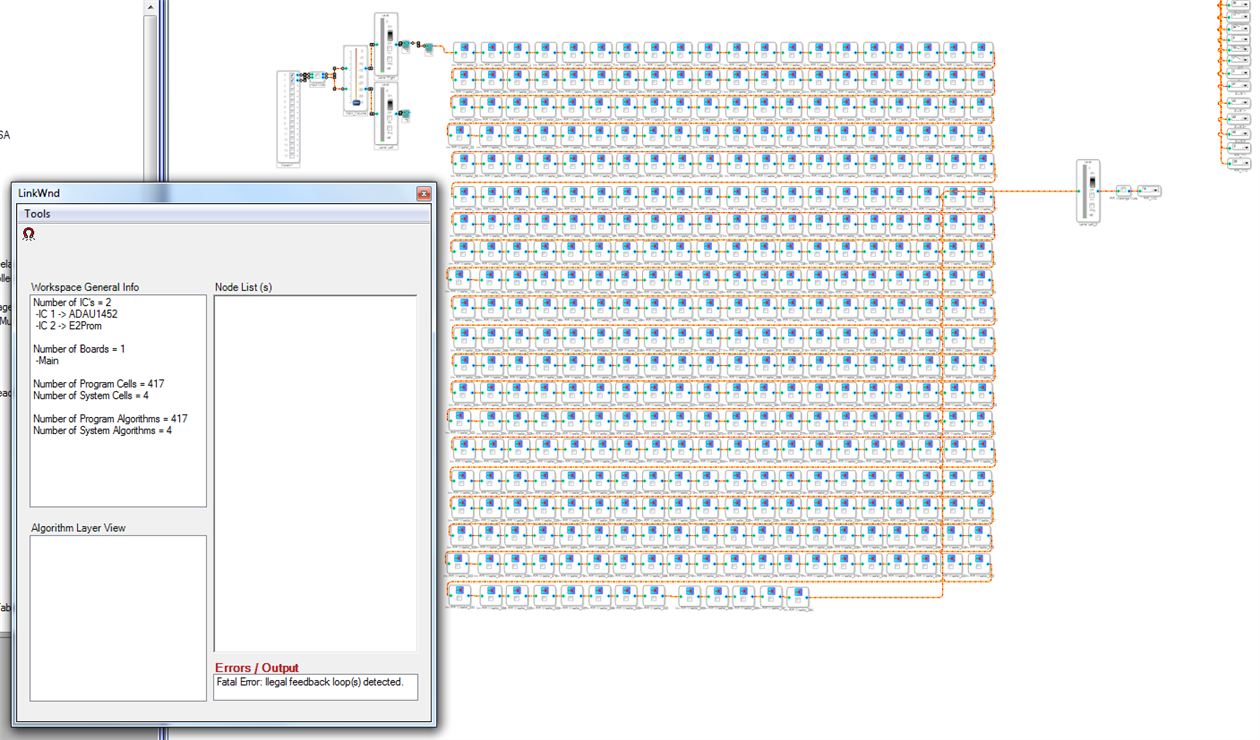
Also I try to make test project, where I add many simple series blocks (in my case it was inverter). And after some blocks the sound OFF too. But I added more blocks and after ~392 blocks (total is 417) I receive error message from compiler..
Ken.M said:
That said, given that you have a microcontroller in your system, it may be simpler to have the microcontroller modify the coefficients for the filters on a program change rather than switch between so many filters running all the time.
To re-write all filter parameters we need to download 560 byte. But its only for filters. Totaly we need ~600 byte.
We used I2C bus and we need ~2 second to write this parameters. User can switch between the presets faster than we download only one preset. So, while we download only one preset, user can switch 7 presets. We can wait while user dont stop switching, but its no good, because we need audible effect when presets switched for user feedback.
Any case, we choose very powerfull DSP (and expensive) and whant to use it at 100%.. My project with all blocks used around 90% of DSP resource, and should work.
But the main problem, I cant understand, which resource I can use. I dont know, if I add some elements and dont see any error messeges, how I can understand thats program dont work or work but not like I need? Its possible, that I can listen audio but, some filter, f.e. dont work right.. And we found it only after many times..
Hi Ken
Do you check my project?
I dont understand whats happen.. If I crossed 39% resource of DSP (first column of compiler output), the sound stopped.
I apologize. I assumed that you were using SPI. I2C is clearly too slow for this application.
The linker window is indicating an illegal feedback loop. Do you have a feedback block in your project? The feedback loop introduces a one sample delay that is only necessary in cases where the output is based on a variable calculated in the prior sample frame. It's unclear to me (and the linker) why this would be necessary.
My best guess as to your problem is either (a) the feedback block, or (b) the memory paging introduced in the '6x parts. the latter should be transparent if you are using the latest version of SigmaStudio (v4.2), but I can investigate further.
This is not likely you problem, but it would reduce you processing resources considerably. By right-clicking a filter, you can grow either the number of channels or the number of filters. If you have cascaded second order filters, combining them into a single block will allow the processor to pipeline and optimize the filter calculations with SIMD instructions. Note that this is a quad-MAC architecture. Having separate blocks eliminates this possibility.
If you have the same filter coefficients on multiple channels, you should grow the number of channels and use a single block in that case, too. Both types of consolidation will reduce the number of coefficients to be downloaded.
I apologize for my delay and your obvious frustration. Feel free to send me a PM, and we can set up a phone call if need be. The time zone difference is not a problem for me.
Ken
Thanks for answer
but I think you dont clear understand me (or I you).
Ken.M said:
The linker window is indicating an illegal feedback loop. Do you have a feedback block in your project?
This screenshoot demonstrated the error only, which I found while testing. There are no loop. In this example only serias connection between inverters. You can try this simple scheme and see this error.
I think its because too many series element and compiler not desined for this.
But its not my problem.
Ken.M said:
My best guess as to your problem is either (a) the feedback block, or (b) the memory paging introduced in the '6x parts. the latter should be transparent if you are using the latest version of SigmaStudio (v4.2), but I can investigate further.
a) I think it is not my case, I not used the previuse calculation.
b) I dont understand about memory paging.
I used 3.17 SigmaStudio. I was try 4.2, but it have some problem with Hierarchy Board blocks. I cant added the inputs and outputs to this block. I was received errors and SigmaStudio was closed.
Ken.M said:
This is not likely you problem, but it would reduce you processing resources considerably.
I think about optimitation many times. At this moment I was delete all switched filters and left only 2 filters on each channels. But I still need different delay and sound level for each channel for changing the zone of listening.
But again. After I crossed this recource values, the sound not going to the output.
##### Summary #####
DM0 RAM used: 00571 (of 20480)
DM1 RAM used: 04266 (of 20480)
PM RAM used(Data): 00000 (of 8192)
PM RAM used(Inst): 01662 (of 8192) 1162 instructions (32bit: 662 64bit: 500)
Total PM used: 01662 (of 8192)
--------------------------------------------------------------------------------------
STREAM Inst Inst DM0 DM1 PM
Instance (cycles) (size)
--------------------------------------------------------------------------------------
STACK - - 16 0 0
FRAMEWORK 126 91 12 787 0
EQ Classic 36 52 41 49 0
EQ Club 36 52 41 43 0
EQ Vocal 36 52 41 43 0
EQ Jazz 36 52 41 43 0
EQ Rock 36 52 41 43 0
Right Subwoofer 11 20 10 14 0
Left Subwoofer 11 20 10 14 0
Surrounf Left 11 20 10 13 0
Surround Right 11 20 10 13 0
RR Woofer_Door_Crossover_2 11 20 10 13 0
RR Tweeter_Door_Crossover 11 20 10 13 0
RR Woofer_Door_Crossover 11 20 10 10 0
RR Midrange_Door_Crossover 11 20 10 10 0
RR Midrange_Door_Crossover_2 11 20 10 10 0
RR Tweeter_Door_Crossover_2 11 20 10 10 0
RR Inverters Switch_TW_and_WO 11 17 14 2 0
RR Inverters Switch_TW_and_WO_11 17 14 2 0
SUB Right Mute 9 13 4 2 0
SUB Left Mute 9 13 4 2 0
EQ_Switch 10 12 13 2 0
RR Inverters Switch Midrange 8 12 7 1 0
RR Inverters Switch Midrange_28 12 7 1 0
RR Delay Value switch Midrange8 12 7 0 0
RR Delay Value switch Midrange8 12 7 0 0
Rear Shelf Volume 7 11 1 2 0
Main_Volume 9 9 4 2 0
Input Mute 9 9 4 0 0
RR Midrange Delay FLZ_8 7 9 1 252 0
Delay Left Sub 7 9 1 252 0
Delay Suround Left 7 9 1 252 0
Delay Surround Right 7 9 1 252 0
RR Tweeter Delay FLZ 7 9 1 252 0
RR Tweeter Delay FLZ_23 7 9 1 252 0
Delay Right Sub 7 9 1 252 0
RR Midrange Delay FLZ 7 9 1 252 0
RR Tweeter Delay FLZ_2 7 9 1 252 0
RR Woofer Delay FLZ 7 9 1 252 0
RR Tweeter Delay FLZ_26 7 9 1 252 0
RR Woofer Delay FLZ_13 7 9 1 252 0
RR Midrange Delay FLZ_7 7 9 1 1 0
RR Midrange Delay FLZ_12 7 9 1 1 0
RR Midrange Delay FLZ_10 7 9 1 1 0
RR Woofer Delay FLZ_7 7 9 1 1 0
RR Woofer Delay FLZ_6 7 9 1 1 0
RR Tweeter Delay FLZ_7 7 9 1 1 0
RR Tweeter Delay FLZ_15 7 9 1 1 0
RR Midrange Delay FLZ_6 7 9 1 1 0
RR Tweeter Delay FLZ_11 7 9 1 1 0
RR Tweeter Delay FLZ_9 7 9 1 1 0
RR Midrange Delay FLZ_5 7 9 1 1 0
RR Midrange Delay FLZ_13 7 9 1 1 0
RR Woofer Delay FLZ_5 7 9 1 1 0
RR Tweeter Delay FLZ_13 7 9 1 1 0
RR Woofer Delay FLZ_14 7 9 1 1 0
RR Woofer Delay FLZ_12 7 9 1 1 0
RR Midrange Delay FLZ_4 7 9 1 1 0
RR Woofer Delay FLZ_4 7 9 1 1 0
RR Woofer Delay FLZ_3 7 9 1 1 0
RR Midrange Delay FLZ_3 7 9 1 1 0
RR Tweeter Delay FLZ_5 7 9 1 1 0
RR Woofer Delay FLZ_2 7 9 1 1 0
RR Midrange Delay FLZ_2 7 9 1 1 0
RR Tweeter Delay FLZ_3 7 9 1 1 0
RR Tweeter Delay FLZ_25 7 9 1 1 0
RR Midrange Delay FLZ_11 7 9 1 1 0
RR Woofer Delay FLZ_11 7 9 1 1 0
RR Midrange Delay FLZ_14 7 9 1 1 0
RR Midrange Delay FLZ_9 7 9 1 1 0
RR Woofer Delay FLZ_9 7 9 1 1 0
RR Tweeter Delay FLZ_19 7 9 1 1 0
RR Tweeter Delay FLZ_17 7 9 1 1 0
RR Tweeter Delay FLZ_21 7 9 1 1 0
RR Woofer Delay FLZ_10 7 9 1 1 0
RR Tweeter Delay FLZ_16 7 9 1 1 0
RR Tweeter Delay FLZ_20 7 9 1 1 0
RR Tweeter Delay FLZ_24 7 9 1 1 0
RR Tweeter Delay FLZ_22 7 9 1 1 0
RR Tweeter Delay FLZ_18 7 9 1 1 0
RR Tweeter Delay FLZ_28 7 9 1 1 0
RR Tweeter Delay FLZ_4 7 9 1 1 0
RR Tweeter Delay FLZ_8 7 9 1 1 0
RR Tweeter Delay FLZ_10 7 9 1 1 0
RR Tweeter Delay FLZ_12 7 9 1 1 0
RR Tweeter Delay FLZ_6 7 9 1 1 0
RR Woofer Delay FLZ_8 7 9 1 1 0
RR Tweeter Delay FLZ_27 7 9 1 1 0
RR Tweeter Delay FLZ_14 7 9 1 1 0
SR Mute 6 8 4 1 0
SL Mute 6 8 4 1 0
RR Midrange Mute 6 8 4 1 0
RL Midrange Mute 6 8 4 1 0
RR Woofer Mute 6 8 4 1 0
RR Tweeter Mute 6 8 4 1 0
RL Tweeter Mute 6 8 4 1 0
RL Woofer Mute 6 8 4 1 0
SUB_Volume_Right 5 7 1 0 0
SUB_Volume_Left 5 7 1 0 0
Sub1_2 4 7 0 0 0
Sub1 4 7 0 0 0
FR Tweeter Mute 6 6 4 1 0
FL Woofer Mute 6 6 4 1 0
FL Tweeter Mute 6 6 4 1 0
FR Woofer Mute 6 6 4 1 0
Inv RR Tweeter FCZ 4 6 1 1 0
Inv RR Tweeter RCZ 4 6 1 1 0
Inv RR Woofer RLZ 4 6 1 1 0
Inv RR Midrange RLZ 4 6 1 1 0
Inv RR Tweeter RLZ 4 6 1 1 0
Inv RR Woofer CZ 4 6 1 1 0
Inv RR Midrange CZ 4 6 1 1 0
Inv RR Tweeter CZ 4 6 1 1 0
Inv FR Woofer FRZ 4 6 1 1 0
Inv RR Midrange FRZ 4 6 1 1 0
Inv FR Tweeter FRZ 4 6 1 1 0
Inv RR Woofer FCZ 4 6 1 1 0
Inv RR Midrange FCZ 4 6 1 1 0
Inv RR Tweeter RRZ 4 6 1 1 0
Inv RR Woofer FLZ 4 6 1 1 0
Inv RR Midrange FLZ 4 6 1 1 0
Inv RR Tweeter FLZ 4 6 1 1 0
Inv RR Midrange FLZ_3 4 6 1 1 0
Inv Left Sub - 4 6 1 1 0
Inv RR Woofer RRZ 4 6 1 1 0
Inv RR Midrange RCZ 4 6 1 1 0
Inv Surround Left 4 6 1 1 0
Inv Right Sub - 4 6 1 1 0
Inv Surround Right 4 6 1 1 0
Inv RR Tweeter FLZ_2 4 6 1 1 0
Inv RR Midrange FLZ_2 4 6 1 1 0
Inv RR Woofer FLZ_2 4 6 1 1 0
Inv RR Tweeter FLZ_3 4 6 1 1 0
Inv RR Midrange RRZ 4 6 1 1 0
Inv RR Woofer RCZ 4 6 1 1 0
Inv Right Sub 4 6 1 0 0
Inv Left Sub 4 6 1 0 0
Level Rigth 3 4 2 0 0
Level Left 3 4 2 0 0
DC1 2 3 1 1 0
AsrcIn1 3 3 0 2 0
RL_TW 2 3 0 0 0
RR_WO 2 3 0 0 0
RR_MID 2 3 0 0 0
RR_TW 2 3 0 0 0
SUB2- 2 3 0 0 0
SUB2+ 2 3 0 0 0
SUB1+ 2 3 0 0 0
SUB1- 2 3 0 0 0
SL 2 3 0 0 0
SR 2 3 0 0 0
RL_MID 2 3 0 0 0
RL_WO 2 3 0 0 0
DC1_2 2 2 1 1 0
FR_TW 2 2 0 0 0
FR_WO 2 2 0 0 0
FL_TW 2 2 0 0 0
FL_WO 2 2 0 0 0
--------------------------------------------------------------------------------------
Total 1206 1608 567 4262 0
--------------------------------------------------------------------------------------
(% Fs=96.0kHz) 40% 20% 3% 21% 0%
Do you try my sample project from my message?
AlexandrIlushin said:
I used SigmaStudio 3.17
I've just noticed this comment. I would strongly recommend that you update to the latest version of SigmaStudio. There have been bug fixes for the ADAU146x processors.
Ken
Hi.
I have looked through your project, and I have found a couple of issues, none of which have to do with the schematic. I don't have your exact hardware, so I can't test everything. I can give you a few clues that should help, though.
Working at different sampling rates can be confusing. The selection box at the top of the page only changes the function of the cells so that the compiler can keep track of the number of samples used. It does not actually change the core rate. The correct place to adjust the sampling rate is in the Hardware Configuration / Clock Control tab. If you are using a 12.288 MHz crystal, PLL_CTRL1 should be 96 (the default), PLL_CTRL should be Divide by 4 (the default), and CLKGEN1 should by 3/1 instead of 6/1. This runs the entire core at 96 kHz instead of 48 kHz.
On the serial port page, the sampling rate should stay at Fs (not Fs*2 as in your project). Fs*2 will sample-double on the output. Fs will output at the same rate as the core. Similarly, it is recommended to set the ASRC output rate to core Fs rather that the START_PULSE rate. These are usually the same, but not always. Fs is safer because it is guaranteed to be synchronous to the core.
Please try these settings, and let me know if this helps. If not, please send the project again and describe the behavior.
Best regards,
Ken
Please log in to reply.