the command "Check Last Compilation vs E2PROM" is crashing
Hello,
Everything is working fine with my project on ADAU1701
But I have an issue with the command "Check Last Compilation vs E2PROM".
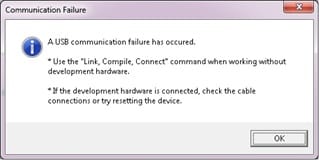
It crashes USB communications with error message "A USB communication failure has occured".
I need to reset the iUSB interface by disconecting/conncting USB cable for SigmaStudio 3.16 to recover from this error.
SigmaStudio 4.2 is able to recover just by fresh use of "Compile Link Download" F7.
Same time I am able to see (read back from memory) the content of EPROM by use of "Read E2Prom to Display" in "Hardware Configuration/ IC2 - Win E2Prom Loader" tab.
And it is same as .hex file loaded by use of "Display file".
What is wrong with "Check Last Compilation vs E2PROM" if communications are OK to read back from EPROM?
Second thing, the command (button) "Upload E2Prom To File" is not working without any kind of response. Any advice?
Thanks,
Raimonds
Edit Notes
Second issue added
[edited by: Raimonds at 1:07 PM (GMT 0) on 18 Dec 2018]
Audio Signal Processors
SigmaDSP Audio Processors
adau1701
Hello Raimonds,
Which version of SigmaStudio are you using? You mentioned 3.16, That is an older version and I recall some issues with writing to EEPROMS using the ADAU1452 but not with the 1701. Have you tried this with REV 4.2?
Are you using I2C or SPI?
Can you disable the selfboot on the 1701? If the board happens to be reset then it will try to boot when you try to check it.
Also, make sure the WB function is not being triggered.
Dave T
Hello sir ,
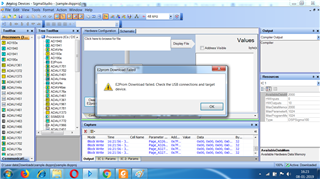
I am working on Adua 1401 .I am using sigma studio but when I download program then following message continuous on screen .It means program download in progress how to resolve it please help me.
If I Abort then

Hello,
I just find why the crash is happening - no sufficient power from USB connection to the iUSB module.
I used USB cable with 2 wide USB connectors to connect to 2 USB ports to use the power from both.
It works ok now!
I had crash on "Check Last Compilation vs E2PROM" on at lest 5 different PCs when using simple USB cable.
I did not find any reference in documentation that the sufficient power is critical. Or I am wrong?
BR,
Raimonds
Hello,
Unfortunately I was too much quick with good news.
I have two projects. One is small, another one is large.
Everything is ok with them in terms of processing.
But, the function "Check Last Compilation vs E2PROM" is working well on small one and crashing for large one.
Even both of them are opened in same SigmaStudio instance.
Versions 3.16, 4.2 and 4.33 were tested.
Please, correct this issue!
BR,
Raimonds
Hello Raimonds,
How long ago did you purchase this eval board? There was a software update on the USBi that fixed an issue with larger files. Where are you located?
Dave T
Hello Raimonds,
I have not seen this error before. How have you resolved the power problem? If your board is drawing too much power for one USB cable then it needs to be powered from a different source and not through USB. I will inquire with one of our programmers to see if he has any ideas.
Dave T
The EVAL-ADUSB2EBZ iUSB board was purchased in December 2017 from Farnell.
My location is Estonia.
Raimonds
Hello Raimonds,
I will look into our options and get back to you.
Meanwhile, what is the clock speed in your EEPROM setup? Try using a slower clock speed. Are you using SPI or I2C? How many devices are on the bus?
Dave T
Hello Dave,
There are 2 devices on bus - adau1701 and eprom, I2C interface.
I see only write speed setting for eprom in its properties.
Is there place to set the read speed?
One more curious thing, possibly bug?
There is problem with function "upload E2Prom to File".
There is same activity (information) in "Capture" window from function "upload E2Prom to File" and from "Read E2Prom to display"
but no information is stored into respective file.
If the file`s path is to the existing file, the button "Display file" works correctly.
But the "upload E2Prom to File" shows the activity in the Capture but not saving data into the file.
I am using such not nice procedure to check the content of the eprom now:
click the "Read E2prom to Display"
select all the content of the Display
take it into clipboard
paste it into the file
save it
run the Matlab script to check is it correct or not.
The "upload E2Prom to File" should save lot of time ...
But the "Compare E2Prom to File" should be very nice : )
BR,
Raimonds
Hello Raimonds,
This part does not have a selection for the speed that it reads the EEPROM. However, this is in the datasheet inferring that there is a way to change the speed. I have to admit that I have not investigated this to see how it works. This is an older part that was developed before I was at ADI.
From the datasheet:
The ADAU1701 is a master on the I2C bus during self-boot and writeback. Although it is uncommon for an application using self-boot to also have a microcontroller connected to the control lines, care should be taken that no other device tries to write to the I2C bus during self-boot or writeback. The ADAU1701 generates SCL at 8 × fS; therefore, for a fS of 48 kHz, SCL runs at 384 kHz. SCL has a duty cycle of 3/8 in accordance with the I2C specification.
Dave T
Hi Dave,
I have 2 eval board from Mouser. Both have same problem. So how to solve this issue ?
Hello WiselyD,
There were a couple of different issues discussed on this tread.
Can you check something for me on your boards? Find R6, it is located near the power input. It is supposed to be 78K7 (78.7K ohms). A little while back we had a production issue where the contract manufacturer installed 78 ohms into R6. Can you measure it to see if it is close to 78K?
Which version of SigmaStudio are you using?
If you would like to send your SigmaStudio project over I can test it here.
I don't think we came up with a solution in this tread.
Dave T
Hi Dave,
I have 2 pcs EVAL-ADUSB2Z. I got them when I bought 1452 and 1702 evaluation board from Mouser September 2016.
Written in the board :
EVAL-ADUSB2Z
121005_1
1.3
I got this error message when checking last compilation vs EEPROM :
I have my own board, EEPROM installed is 8kB (24xx64)
I have 3 file with different memory usage 7%, 43% and 61%.
Just for checking; the 7% and 43% is fine.
When the memory usage 61% this error show up.
I try the same file on EVAL-ADAU1701MINIZ board and the same error show up only with the largest file.
I think the data written to the EEPROM is correct since the board can selfboot with correct function.
So how to solve this ?
Are there any EVAL-ADUSB2Z firmware upgrade ?
Hello WiselyD,
Yes there was a firmware update that helped prevent lockup for larger file transfers.
Where are you located? You can send me a PM and reference what it is about.
Dave T
Hello Raimonds and all others on this post.
We finally have been able to track down this issue. The problem was in the ADAU1701 DLL. I will attach an updated version of the DLL. You will need to place this into the program folder with all the other DLLs and restart the program. It is always a good idea to save the old DLL in a safe place in another folder in case there is some unforeseen issue.
This fix will be in future revisions of SigmaStudio. The current revision as of this post is Rev 4.5
Sorry for all the trouble and thanks for the reports that helped us find this.
Dave T
Sigma100Protected.zip
Hi Dave,
thanks for great support from you and your team.
I already replace the DLL and try : the Check Last Compilation vs EEPROM is working perfectly.
DH
Hello Dave,
i will PM you.
Thanks for your reply.
BR.
Please log in to reply.