Help needed to configure serial ports on ADAU1466
Hello!
I previously opened a thread about communication problems with the ADAU 1466.
That problem couldn't really be sorted out, but avoided by using I2C communication instead of SPI.
I have been able to configure the DSP to output a sine wave on the DAC chip (Cirrus Logic CS4398), but haven't been able to get any signal from the ADC chip (Cirrus Logic CS5361)
Since I don't know if this problem is still related to the previous one, and to exclude the possibility of a hardware issue, I would be thankful if somebody could compose a sigma studio programm for this system.
The DSP should operate at 96kHz and be the ADCs and DACs master.
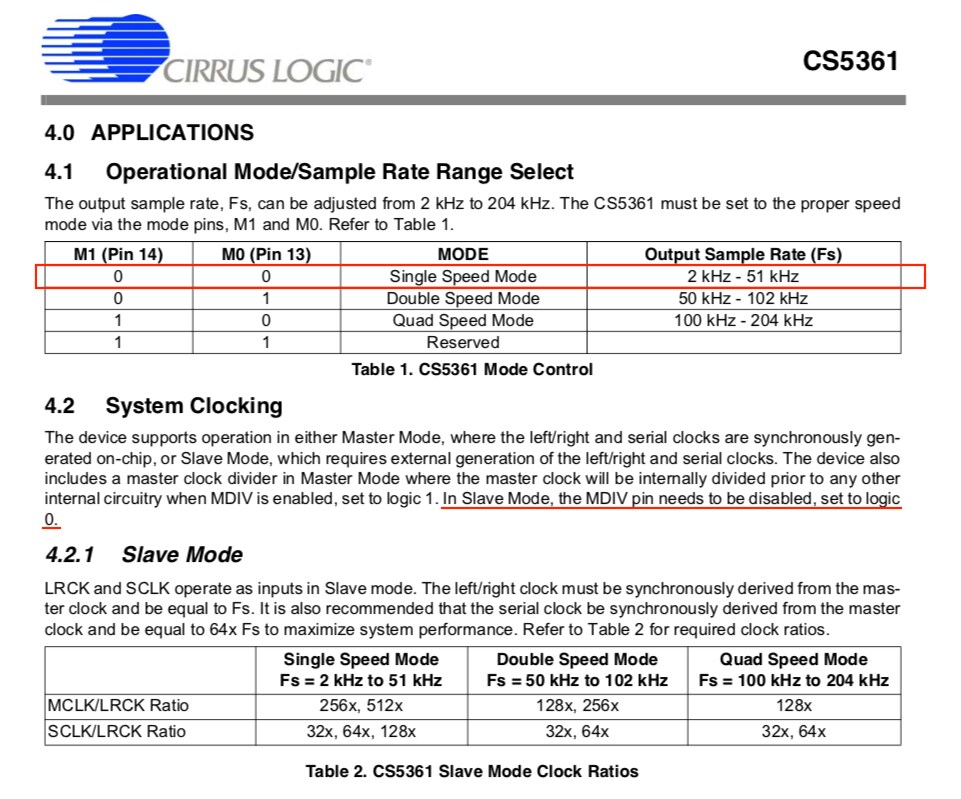
The DAC and ADC chips are both hardware configured to run in double speed mode and I2S data format.
The ADC is connected to serial input 1 and the DAC is connected to serial outputs 0 and 1.
Thanks in advance for your help !
Audio Signal Processors
problem
serial port
SigmaDSP Audio Processors
serial audio input
adau1466
Show More
Any help is appreciated...
Hi. I'm not sure I understand the problem, but I expect it is a clock master/slave issue. Would it be possible for you to post your SigmaStudio project? If you don't feel comfortable with that, you can PM me.
Ken
Hi Ken,
sorry for getting back on this so late.
What I have tried since last time, is to change the ADCs and DACs hardware config to run at 48khz.
Again, the DAC works fine, the ADC doesn't work at all.
The idea was, that I wouldn't even have to change the default Sigma Studio project, since the default project is set to this sampling rate.
Any more ideas ?
Since this isn't the only problem I have experienced (see https://ez.analog.com/dsp/sigmadsp/f/q-a/100997/adau1466-core-not-running), I still have the suspicion that the ADAU has been damaged during production.
Is there any way to find hard evidence to support or confound this thought ?
Best regards,
Noel
Hello Noel,
Zip up your project and send it over.
Then let us know how you configured the ADC serial port? What format is it expecting for the I2S communication?
This is the easiest way to quickly figure out if you have everything set properly.
Dave T
Hi Dave,
Here is the test project. I have also attached the relevant manual section of the ADC and highlighted what is set as hardware configuration.
I hope this is all the information your need.
Best regards,
Noel
Test.dspproj.zip
Hello Noel,
The page you sent had some info but not all the info I needed. Page 13 of the datasheet has the serial audio interface details. You should use the one in figure 19 which means that pin 12 has to be set properly, (High) to set it into that mode. (Cirrus really should have answered these questions for you. )
The serial port on the SigmaDSP was already setup properly for that mode.
Now I was not able to get your project to work. It took a while and a lot of fiddling to get it to respond properly. Something was corrupted with the file but I am not exactly certain what it was.
I zipped up my file and will attach it. I had to change it to SPI to make it work on the eval boards but I changed it back to the I2C address you had in the original project you sent over.
Another thing I should point out is that you are using the wrong meters in your project. You are using the RTA meters and the default filter is a 100Hz bandpass so you are only metering the energy around 100Hz. I inserted the proper wideband meter you should use to give you a better idea of the level in the DSP.
You also will need to setup the SPDIF so that it mutes when lock is lost. If you have the MIPS to do it in the DSP then it is good because the ASRC will put out DC when it has never had clocks and sometimes when it loses its clocks. I have an example file somewhere up on the forum of how to do that. It is easy enough for me to attach it here.
Test-DT-Edits.zip
7115.ADAU1452 ASRC Lock Detect Example.zip
Dave T
Hi Dave,
Thanks for looking into the project.
Pin 12 was set correctly; I thought that was too obvious to include.
I now have a different situation, unfortunately no better than before.
On the ADC input, the meter you inserted says that there is a signal, even if there isn't. The meter I used doesn't.
There seems to be a lot of DC coming from the ADC, no matter of the actual analog input.
Anyways. Do I understand correctly that everything was set up correctly, despite the meters and the file being corrupted ?
Best regards,
Noel
Hello Noel,
First do you see the meter changing at all? Does the meter on the output side change when you select the oscillator and turn it on and off? I just want to establish that the program is indeed loaded and communication is happening between SigmaStudio and the DSP.
Assuming you have communication.
ADCs can put out a DC offset. They pretty much all do this for various reasons and one of them is to keep down idle tones. There is a HPF built into the part, pin 11. Looks like pulling that low will enable it. I suggest you do that.
If you cannot then just drag a DC Block cell and insert it right at the input (well the output of the input cell). You can find the DC Block in under Filters-->Miscellaneous.
If the DC offset is really huge, then you may not be interfacing properly to the ADC. They almost all sit at a common mode voltage and so if you do not interface to it properly you will get a huge DC offset and distortion. Talk to Cirrus about that or look at the applications section of the datasheet.
Yes, the serial input port 1, was properly setup to be a master and with a standard I2S signal with a one BCLK delay. It was set to 48kHz and all the clock polarity settings looked good. I did not change anything on that.
By the way, On the RTA meters you used, if you click on the little tiny red dot inside the square on the lower left of the GUI, it will open up the level detector designer and you will see the filter applied to the signal. You will see there is quite the roll-off at DC so it would not show DC components very well.
Dave T
Hi Dave,
I think this solves the problem.
Ive been getting this offset with no distinguishable signal since the beginning, but never thought it would be caused by anything else than improper configuration, or a defective DSP; especially since SPI communication has been such a problem.
For evaluation purposes, I first wanted to see if this board works as desired, before I build the ADC input stage suggested by Cirrus.
But since that seems to be the case, I might as well go on ;)
Thanks for your time and support!
Noel
Hello again,
I double checked I had my input set up correctly and according to cirruses specification, which was the case. Still no luck.
I found the mistake however.
For some reason I connected the quiescent voltage pin to A3V3.
After scraping away the according trace, everything seems to work fine.
Best regards,
Noel
Please log in to reply.