FIR enable causing "Error Setting Control Value" window to pop up in SigmaStudio 4.2
I have a project with a few FIR filters in it, one of them is set to disabled. When I open the project in SigmaStudio 4.0 Build 2 rev 1759, things are ok.
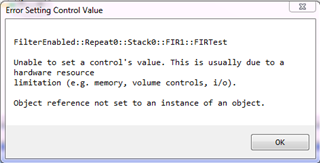
If I open it in SigmaStudio 4.2, a window pops up
Also, with SigmaStudio 4.0, when I disable one of the FIRs, I can see the message in the Capture window, and as I enable it, it sends the FIR coefficients, and when I disable it, it sends the "disabled" coefficients (coef 1 is 1, all the rest are 0)
When I do the same thing in SigmaStudio 4.2, changing the enable causes the error window to come up, and no messages are sent.
Is the FIR just broken in 4.2?
Hello McBoy,
It sure looks that way. I loaded several projects each with a FIR filter into SigmaStudio 4.2 and got similar error messages when toggling the FIR's enable. ADAU1701- and ADAU1452-based projects were both affected -- significant because each of these has a unique compiler. Also it didn't matter whether hardware was connected or not. I was hoping to find a workaround for you, but unfortunately, all I managed to do is verify that something's amiss with FIR filters in SigmaStudio 4.2
Best regards.
Bob
Hello McBoy,
Thanks for taking the time to report this.
I also did an experiment and I get the same results. The error pops up. However, there is a workaround, actually a couple.
What I found is that when I click on the bypass button it actually does change the parameter but it throws the error and stops communicating with the DSP. So if I then did a Link/compile/Download it compiled and loaded the project with the FIR filter now in bypass or out of bypass depending on the current state of the switch.
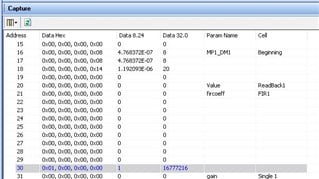
The other workaround is to manually change the control using the Params tab in the Capture window. In this window you can find the FIR filter and manually change the parameter to bypass it. Here is a screenshot of the program I tried this on:
Now the filter I chose are all zeros. I did not take the time to calculate an actual filter. I changed the default bypass coefficients with "1" as the first coefficient with a zero so they are all zeros. This way I could easily tell when the filter was bypassed or not. I would have signal or no signal.
The last parameter in memory is not a coefficient but it is the bypass value. I highlighted it in the screenshot.
Clicking on the Data 8.24 column I could easily enter a 0 for bypass and a 1 for engaging the filter. You can do this real time and it updates the DSP memory. If you change the name of the filter in SigmaStudio it will help find the correct filter. For instance, instead of FIR1 I would rename it as EQ-RT or perhaps EQ-SUB, whatever makes sense in your signal flow. This way you do not have to remember which one is FIR3-2.
I will put in a bug report. The next revision is due to release soon so the fix will most likely not be in the next revision unless the programmers found it themselves and fixed it.
I hope this helps.
I only tried this fix on the Sigma300, an ADAU1452
Dave T
thanks Bob!
Thanks Dave, knowing a workaround helps.
I have been using version 4.0 and not had the issue, but our development and builds are currently done using 4.2. I'll have to check version 4.1 to see if it has the issue and if it's ok, will probably just recommend that people use it until a fix comes out. (I can't seem to find a link to download v4.0 on the Analog Devices SigmaStudio page)
Mike
Hi Dave,
Was this issue resolved in the newer versions of SigmaStudio? We still do observe the same problem when I try to open a SS 4.5 schematic from a SS 4.6 IDE.
Hello vumesha,
It was marked as fixed for Rev 4.3 but it appears that it is still an issue. I have reopened the work ticket for this bug. Sorry for the problem.
Dave T
I just tested this is SigmaStudio Rev 4.6 and it is fixed.
Dave T
Thanks Dave, will give this a try soon!
Please log in to reply.