Measured Filter characteristic is half
I'm using ADAU1466, where is used coefficient calculations filter 2nd order.
When I test output/input signal with frequency analyzer, I measure only half dumping, like is set in block.
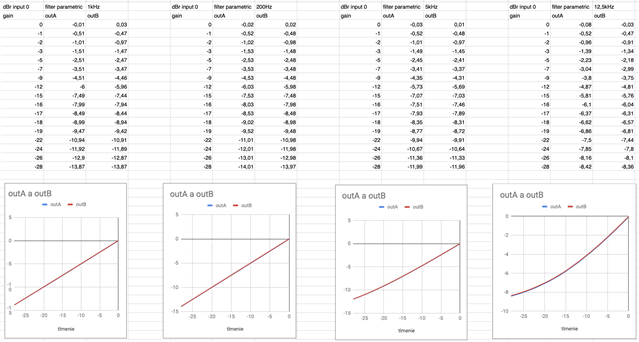
For example, when I set parametric filter, 1kHz, and slide dumping to -10, analyzer shows -5dB. Setting to -6, analyzer shows -3dB.
Simulated response in Sigma Studio shows right magnitude, but measured is half.
Audio Signal Processors
SigmaDSP Audio Processors
adau1466
Hello Andrej,
You probably have the sampling rate in the box on the top of the SigmaStudio window set differently than the sampling rate that is actually running in the DSP.
Are you using an evaluation board?
Zip up and Attach your project.
Dave T
Yes, I'm using evaluation board for ADAU1466. Frequency is OK, some days ago I found problem with frequency - when I had set 96 kHz but core has been set to 48kHz it causes all filters computes dumping in half frequency.
But, maybe in the core is set anything bad yet. Because I have this problem too: ez.analog.com/.../strange-standard-rms-gain.
send.zip
Hello Andrej,
Did you find the problem? The link to the other post seems to go nowhere. I get a server error.
Dave T
No, I didn't find problem in scheme or dip setting. I have still the same problem. Characteristic has been measured with device http://www.advancedaudiorentals.com/products/details/productid/206
Maybe this is similar problem like in next link, measured with the same device.
https://ez.analog.com/dsp/sigmadsp/f/q-a/106813/strange-standard-rms-gain/317021#317021
Hello Andrej,
You know, you are reminding me of an issue I had with my AP Portable one many years ago. If I did not properly ground the input and output when sending to a single ended device I get a lot of low frequency roll-off. If I remember right it started at around 200 or 300 Hz or higher! The AP has a transformer so I found I had to short pin 1 to pin 3 and then voila it worked. I built a set of XLR barrel adapters where I did the wiring internally and could quickly attach them to my cables coming into the AP. They were VERY useful and I used them a lot in my travels from recording studio to recording studio.
Take a picture of a sweep from like 20Khz down to 10 Hz. Switching the AP to Single ended output did not fix this.
Dave T
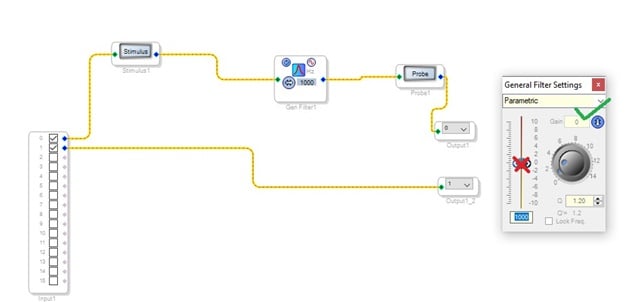
You can see block scheme in Sigma Studio. Parameter of filter - changing of gain - changes dumping OK, but in whole frequencies. When I change Value (Red Cross in value slider), output is dumped only half, like is in next text and measured data.
The connection cables of measurement is next:
In AP Portable is used XLR connector. for both channels minus and ground pin is connected together and connected to 3,5 jack ground pin in ADAU1466 eval. board. XLR plus pin is connected to left channel of given jack. Similary - B channel from AP Portable output pin is connected to jack right pin.
output from eval board is connected to AP Portable input with the same connection. Minus and ground together and left (right) pins to plus pins.
Scheme is easy - Input0 - filter - output0. Filter is used Filters/Coeff Calculations/Second order/Single precision/General 2nd order.
I attach measured values in the file..In all measurement I get half gain in output to set gain in filter In frequencies from 5kHz I get not lunar characteristic even.
Input from AP Portable is set sinus with given frequency like set in filter and always with 0 dBr.
Archiv.zipI found the problem ! I think, there is error in your block - Filters/Coeff Calculations/Second Order/Single Precision/General (2nd order).
I need to use this block, because parameters will be set by SPI - you recommend me this block here: https://ez.analog.com/dsp/sigmadsp/f/discussions/104695/calculating-filter-coefficients-in-dsp
But I test now other filter (Filters/Second Order/Single Precision/No Slew/General Eq (2nd order) - and changing of dumping value will set output OK !
Why in first block is bad output? Isn't there error in filter block? I include scheme, you can try to both channels send 1kHz signal and measure output. Filters are set to -6dB but output is not the same ...
Hello Andrej,
Thanks for attaching your project. It helps to understand what you are asking about. I see the problem now. I do not have any suggestions to fix this that you have control over. I did not see a work-around.
I do need to mention something with your project that is wrong. You have SigmaStudio setup for 96kHz fs, you have the core start pulse properly set to 96kHz in the DSP so the core is running at 96kHz. However, you have the serial input and output ports all setup to 48kHz. So this means that it will be picking up and outputting only half of the samples. Interestingly enough, it will work but you will only have the bandwidth of 48kHz. So you probably want to fix that.
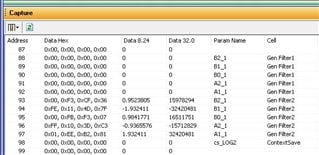
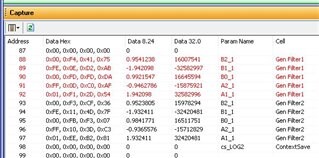
I will put in a bug report for this. I did look at the filter coefficients, they are very similar but not exact. I guess it does not take much to get the 3dB difference. I will show you my screenshots:
The screenshot above are the coefficients for the two filters when SigmaStudio is first loaded. You can see the one that is calculated by the DSP are all zeros because it is not the compiler that did the calculations.
When I click the refresh button I get the coefficients that are in memory that the DSP calculated. You can see they are similar but not exact.
Thanks for pointing this out.
Dave T
I send you simplified scheme, where has been used only bad filter block and normally works filter block. The filters are set to the same value, bud output is not the same. Input frequency of ADC not causes problem in filter.
Becouse I can not use now Coeff Calculations Filter, is there any other filter or method, how to set direct parameter of filter over SPI interface ? I think filter parameters, not polynomial transfer function parameters.
Hello Andrej,
Andrej said:
I send you simplified scheme, where has been used only bad filter block and normally works filter block. The filters are set to the same value, bud output is not the same. Input frequency of ADC not causes problem in filter.
Yes, I understand and your program worked very well to show me the issue. I was just pointing out this error in case you were not aware of it so your final product is not actually running at 48kHz when you think it is running at 96kHz. That was all.
Andrej said:
Becouse I can not use now Coeff Calculations Filter, is there any other filter or method, how to set direct parameter of filter over SPI interface ? I think filter parameters, not polynomial transfer function parameters.
I do not know what you need to do for your application. The Holter's Filter allows you to change the gain of the filter without sending the filter coefficients. This may be enough for your application. If you need to change the frequency, or other changes, then you would need to send the coefficients. We also have index selectable filters where you can select from many pre-compiled filters.
The Holter's EQ also has a version with external control so the gain can be operated from an AUX ADC to make a graphic EQ. This EQ is listed in the Tree toolbox as a High Order Shelving filter and the optimized one has the external control version. I have made this screenshot so you can see what it looks like and where it resides.
So tell me more about your application needs?
Dave T
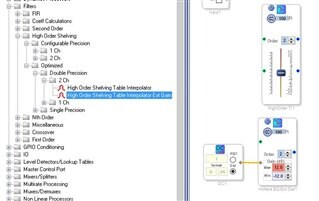
Du you have any informations, when will be fixed problem with bad coefficient calculation 2nd order filter? I need to my project, and now is impossible to use it. I have request to set given filters with SPI, but dumping value frequency must be set as 2times higher value.
Hello Andrej,
Sorry, No new information at this point. It is in the queue but no estimated completion date.
Dave T
Is this (still) an issue in SigmaStudio 4.6 on the ADAU1452? I want to use this block because I want to conrol filters via SPI and send Q factor, frequency etc. directly.
If so, what would be the best workaround? Can I do any kind of compensating calculation in my MCU on the parameters which will be entered by my user?
Hello danielschenk,
Have you tried it with Rev 4.6? I just looked at our internal work assignment system and it shows it has been fixed and should be in Rev 4.6 release. Let me know if it is not.
Thanks
Dave T
Hello Dave,
Thanks for the quick reply. I do not have the equipment at hand to verify the fix. For now I will assume that it is correct. As soon as I know more I will let you know.
Regards,
Daniël
Please log in to reply.