E2PROM: FAILED TO WRITE / ADAU1452
Hello,
we have a sporadic problem with an ADAU1452 processor that is configured in selfbootmode with a Microchip 24AA512 EEPROM (http://ww1.microchip.com/downloads/en/devicedoc/21754m.pdf).
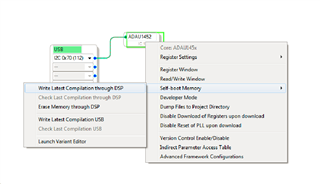
When we write the compiled program to the Self-boot Memory
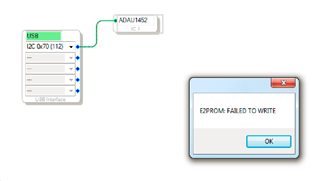
we always get the error message "E2PROM: FAILED TO WRITE".
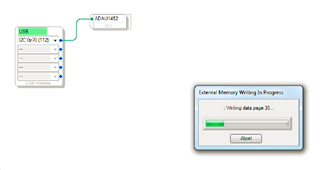
After clicking OK in the error message window it always starts the "External Memory Writing In Progress"
in some cases the program is loaded successfully to the EEPROM but very often not.
It would be very nice if someone could recommend a debug scenario to be able to find the source of the problem.
Thanks and kind regards
Audio Signal Processors
adau1452
E2PROM: FAILED TO WRITE
SigmaDSP Audio Processors

Hello logoho,
I have seen an issue when the selfboot pin is high when you try to program the EEPROM. What happens is that SigmaStudio must load in a program into the core that configures the master port, then takes in data from the slave port and sends it to the EEPROM. Etc. Just before this program is loaded, SigmaStudio performs a soft reset. Well, when you perform a soft reset with the Selfboot pin high, it will selfboot. So now you have the selfboot program taking over trying to read from the EEPROM and load the program and then you have SigmaStudio trying to write its program into the core. You end up with a mess. Usually it does not work because there is a program on the EEPROM that starts loading. If you can zero out the EEPROM you can sometimes get it to work because the Selfboot program does not see the correct first byte and quits trying. This happens fast and does not interfere with SigmaStudio loading a program so you can successfully load in the new program.
So find a way to pull down the selfboot and I think you will see an improvement.
Dave T
Hello Dave,
disabling the self-boot pin after the DSP has been booted solved our issue.
But the "E2PROM: FAILED TO WRITE" is still there, any idea what this is about and how we could get rid of it?
Thanks and kind regards
Hello logoho,
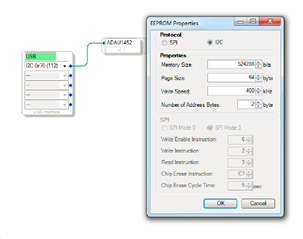
Oh! I think I see what the problem is. You do not have an EEPROM in the configuration. Drag in an EEPROM and set it up with your EEPROM details. I know this does not make any sense since the USBi cannot directly "talk" to the EEPROM but what it does is tells the compiler that you will be selfbooting. Then it produces a HEX file in a directory called "IC2" that you can use to burn EEPROMs for production if you like. So this message is saying it was not able to write a HEX file. I know, it is not clear but all the other SigmaDSPs the EEPROM is on the same comms bus and so when you configure an EEPROM it will create a HEX file. So that mechanism is still important. So this is a way to fit this more advanced DSP into the SigmaStudio framework.
I think this will solve the issue.
Dave T
Thanks, that did the trick!
Please log in to reply.