External word clock for ADAU14XX
Hi all!
I have an external DAC (a 19" studio grade converter with AES/EBU inputs) that receives digital audio from ADAU1467 and/or ADAU1452 eval boards. Between ADAU and external DAC is an I2S to AES converter.
The DAC should be the clock master in the system. However, it only provides a word clock signal on a BNC output (48 kHz, 96 kHz ...). How do I properly clock an ADAU14XX in this case, when only a LRCLCK is available?
Thanks very much in advance!
Audio Signal Processors
adau1452
adau1467
SigmaDSP Audio Processors
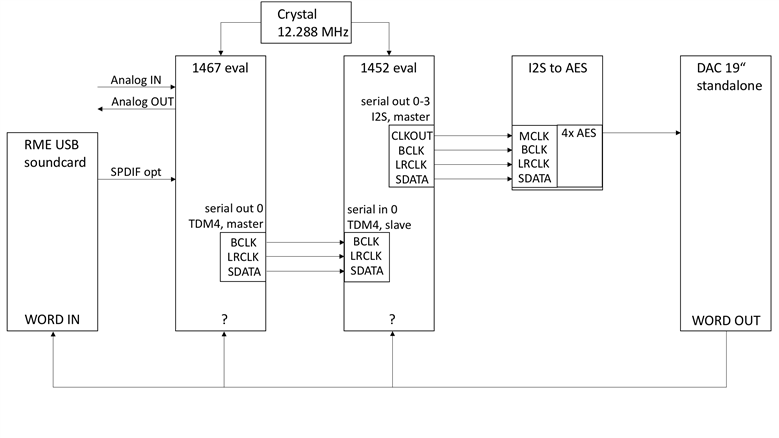
Here's a schema of the whole thing. Questions:
1) How to feed the DAC word clock to the ADAUs?
From what I have read on the forum I would route a 1467 serial output BCLK to serial inputs of both ADAUs and set the inputs to master, while connecting the word clock out of the DAC to both LRCLK INs set to slave. Am I on the right path? Can the SDATA INs remain unconnected?
2) Should I use two I2S lines between the ADAUs instead of one TDM4 line or is it all the same?
3) Are there any disadvantages in feeding the CLKOUT of the ADAU1452 to the MCLK of I2S to AES converters compared to directly feeding the crystal?
I already had the system running with only one eval board. It was clocked to the SPDIF with an ASRC. However, the system should be working without the USB sound card connected as well.
Thanks very much for guiding me in the right direction!
Hello WPF,
I would try this. Use the Clock Generator 3 as a clock source for the input and output serial ports. Setup Clock Gen 3 to use an external reference. It can be connected to the LRCLK pin of an unused serial port or you can use MP6 or MP7 as the input pin for the reference. Then feed the word clock reference from the DAC into that pin.
Then on the serial port register setups you select Clock Gen 3 as a source.
Then you will have to setup the start pulse of the core to one of the serial ports that is using Clock Gen 3 and is a master. Or I suppose you can use the LRCLK input pin of the word reference clock. I think it is better to use the serial ports but you can experiment with it to see if there is an advantage of one over the other. In theory it should make no difference. The start pulse just tells the core when to start executing instructions at the start of the frame. The actual clocking in and out of the serial ports is handled at the serial ports. you just need to be certain the core is processing the correct samples.
Regarding two I2S lines verses one TDM 4 line? This comes down to frequencies and board space etc. If you are going between eval boards then you will have long wires. If you want to operate at sample rates higher than 48kHz then it is a good idea to keep the frequency down so I2S will give you more timing margins on the signals. You are likely to have reflections and other signal integrity problems so I vote for I2S.
CLCKOUT is the best way to distribute the master clock. It is after the PLL so it is cleaned up clock. You cannot take the signal from the crystal and distribute it easily. Crystals generally cannot drive much of a load so you are asking for issues with the master clock not starting up. Using an oscillator module helps a little. The XTAL_O pin is a buffered copy but it is still not a good idea to use that pin. Stick with the CLKOUT.
Dave T
Please log in to reply.