SigmaStudio 4.2 Missing MOD_SAFELOADMODULE_NUM_SAFELOAD_ADDR
Hi,
I am using the SigmaStudio 4.2 with an ADAU1452. Compile the project and export to C files
In the list of records in Safe Mode, the record MOD_SAFELOADMODULE_NUM_SAFELOAD_ADDR has disappeared.
My question is:
Has the mode in which Safe Mode is changed changed? or is there an error in the compiler and does not report the registry?
With version 4.1 everything worked correctly.
/* Module SafeLoadModule - SafeLoadModule*/
#define MOD_SAFELOADMODULE_COUNT 6
#define MOD_SAFELOADMODULE_DEVICE "IC1"
#define MOD_SAFELOADMODULE_DATA_SAFELOAD0_ADDR 10536
#define MOD_SAFELOADMODULE_DATA_SAFELOAD1_ADDR 10537
#define MOD_SAFELOADMODULE_DATA_SAFELOAD2_ADDR 10538
#define MOD_SAFELOADMODULE_DATA_SAFELOAD3_ADDR 10539
#define MOD_SAFELOADMODULE_DATA_SAFELOAD4_ADDR 10540
#define MOD_SAFELOADMODULE_ADDRESS_SAFELOAD_ADDR 10541
MOD_SAFELOADMODULE_NUM_SAFELOAD_ADDR is missing
regards
Audio Signal Processors
adau1452
SigmaDSP Audio Processors
Hello Carlos,
I think you have run into a change we did a little while back but kept it backwards compatible.
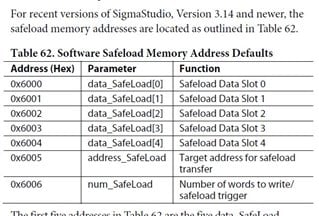
By popular request we setup the Safeload address to be fixed. When this is done the location is at the start of DM1. This is detailed in the newest Rev of the datasheet.
If you have an older project that was started before Rev3.14, then we detect this and keep the Safeload address as it was, assignable by the compiler. The reason for this is for customers who are using a uC and are only going to recompile to change a few default parameters they can still compile the project and none of the addresses will change. This way they do not have to change their controller code except for the new program.
Some customers have the DSP boot up itself then they have to make no changes to the controller code. If we had it change to the fixed table then the addresses of parameters and the safeload will change. They would have no warning so we made it an option.
If it is an old project it will default to "Off" where the table is NOT fixed. If you start a new project then the default is to have it fixed.
You can find this selection by going to the hardware config tab and right clicking on the DSP GUI. Then click on the Advanced Framework Configuration. Then the first item is to select the indirect parameter table and fixed safeload address. On an old project you can check this option and the table will now be fixed or if you do not want this on a new project you could uncheck it if you like.
Let me know if this is not clear.
Dave T
Please log in to reply.