VC-delay
Hello,
Using Elektor adau1701 DSP board and Sigma Studio 4.2 64bit I don't understand
the behaviour of "MultiTap Voltage Controlled Delay" (see attached "Schematic.jpg")
If the MAX-Value ist lower than 15 samples everything works fine, but if I try to increase
MAX-Value there is no further change in max-Delay (about 350 microsec).
I know, that there are limitations depending on RAM-size, but in my case, this cannot be
the limitation, because if I cascade a 2nd VC-delay with the same MaxValue, the total
delay is double. If I use (not VoltageControled) normal Delay I can realize any delay up
to the RAM-Limit !
If you have any solution to get more delay with only one VC-delay, please let me know.
sencerely KNadun
Audio Signal Processors
SigmaDSP Audio Processors
adau1701

Hello KNadun,
First let me start by explaining that this externally controlled delay cell requires a bit of a strange external input. Most of our external inputs use a signal between 0 and 1 in 5.23 format. This will give you a min to max control. However, this cell takes in an integer value which is the number of samples to delay by. This number has to be between the MAX set in the cell and zero. This is the real-time control of the delay.
Now, the MAX setting in the cell is a setting that has to allocate memory and so if you change this MAX setting, you must recompile for it to take effect. I am not sure if this is what you are experiencing but it may be part of the issue.
The second issue is that you are multiplying the AUX ADC input signal by a really small number. So I think you are not actually setting the delay to the max.
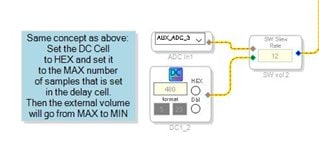
There is a much better way to do this. Have a look at this example:
I took a DC cell and set it to the MAX delay number that is in this project. (This should be changed to whatever you have in your project for a MAX)
Then you run it into a volume control. The volume control will go between full volume and some divided value all the way down to zero. This will give you the range of MAX to MIN. Then as you see I used an externally controlled volume control and I am running it off of the AUX ADC.
I will attach a project below that shows how this works and it functions on the MINI eval board and uses the pot on the board for the control of the delay. It shows a few other things that might be of interest.
Hope this helps.
Dave T
ADAU1701 Voltage Controlled Delay Example.zip
Hello Dave,
thanks for your explanations and advice ! Now everything works fine !
best regards
KNadun
Hello James,
You are asking somewhat of a general question so it is difficult to answer. There are so many ways to control parameters. If you know exactly what you need a control to do then that will help. I will attach a couple of projects to show you some ways to do this. There are some other simpler ways if all you need to do is control a table of values.
ADAU1452 AUXADC Controlled Multitap delay.zip
ADAU1452 AUXADC Controlled Fractional Multitap delay.zip
Hope this helps.
Also, search the forum. There are many examples on the forum for controlling DSP objects from GPIO and AUx ADCs.
Dave T
Please log in to reply.