ADAU1467 Sample Rate Converter (Synchronous SRC) generates an error.
Hi,
The following design generates an error at compile time.
This is a simple example using a SRC.
I cannot found to avoid this error.
Is there any way to avoid it.
Is there any settings to be aware of using this block?
Thanks and Regards,
Audio Signal Processors
ADAU1467 SigmaStudio SigmaDSP
adau1467
SigmaDSP Audio Processors
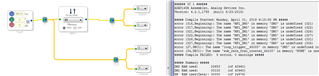
Hello Takumi3952,
I was able to replicate this on my system. I am checking with the rest of the team to see if this is a known bug and if it has been fixed. So I am working on it.
Dave T
Hello Takumi3952,
It is a bug that seems like it was introduced with REV 4.1. It will compile correctly with Rev 3.17 so it is a bug. Rev 4.1 and 4.2 were each a large improvement so going back to Rev3.17 may not be a good idea. I have reported the bug to the software team.
Dave T
Hi Dave,
Thanks for your reply.
I understood well.
Is this bug to be fixed by the next release?
Thanks and Regards,
Hello Takumi3952,
I reported this as a task on our work request system. Since work has not started on it I do not know a projected completion date. Since the next release is due out soon, and we have to perform all the regression testing before release, I think this fix will not make the next release. There may be a workaround. Can you tell me a few details of the application?
What rates are they going from and to?
Will they be sending this new rate out to a serial port?
How many channels?
Dave T
Hi Dave,
Thanks for your reply.
I’ll continue this discussion by email directly.
Regards,
Hello Takumi,
I found out that there is a work-around.
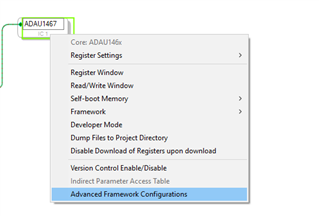
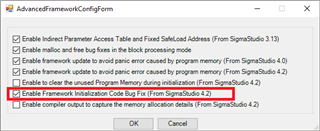
You can remove these errors by disabling the option 6 in the Advanced Framework Configuration.
Right click on the IC. And select ‘Advanced Framework Configurations’
2) Disable the option 6. Press OK.
It will now compile correctly.
Now I do want to mention that in your example project there is an issue with the output ports. You show them going to outputs 0,1,2,3. So this means that 0&1 are at one sample rate and 2&3 are at another rate. This is not possible since 0-3 are all on the same serial port. So you must have them going out on different ports. I am guessing that you only put this project together to show the compile issue.
I have put together a similar project with the serial ports properly set and the clock generators properly set to produce 48kHZ when using a core rate of 44.1kHz. Although, I still think there may be an issue here. I will study this further. Going from 48kHz to 44.1kHz I can see would work. The serial port will request samples (read the output memory location) at a slower rate from the core. But, in the case of the core rate being 44.1kHZ means that the program will be run at the start pulse rate which is 44.1kHZ so I do not see how the output rate is updated at a faster rate. I have a guess how this might happen. I will inquire and test.
Dave T
Here is the project I setup:
SRC Compile Error.zip
Please log in to reply.