ADAU1467 Parametric EQ coefficient calculation
Hi
The coefficient calculation method of the parametric EQ seems to be inconsistent with the data sent to the actual device.
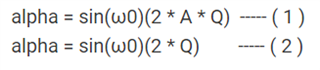
The above equation (1) makes the result be different.
The above equation (2) makes the expected result.
Is there any problem in the recognition that the equation (2) is correct?
Thanks and Regards,
Audio Signal Processors
ADAU1467 SigmaStudio SigmaDSP
adau1467
SigmaDSP Audio Processors
Hello,
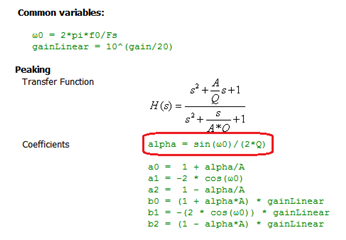
The Toolbox Wiki shows the coefficients for parametric (peaking EQ) filters as:
The calculation for alpha highlighted above is correct.
Best regards,
Bob
Hi Bob,
Thanks for your reply.
I confirmed.
There is one additional question.
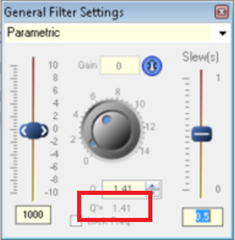
In the filter GUI, there is an element " Q' " is displayed as below.
What does this mean?
Please tell me the exact definition.
Thanks and Regards,
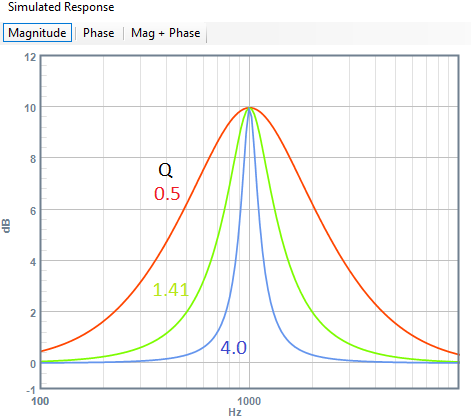
Q is short for Quality factor, a measure of the resonant quality of a circuit or system.. This Wikipedia article describes Q in detail. In a parametric filter, a higher Q provides a sharper peak in the frequency response, as shown in the graph below. Each of the three filters shown has a center frequency of 1 KHz and a boost of +10 dB, the only difference is their Q. We see that the higher Q filter has the sharpest curve:
Parametric filters are often specified by bandwidth (BW) in octaves instead of Q. We see from the graph that the higher the Q, the lower the BW. To find the Q required to achieve a desired BW, use this formula:
For example, a 1/3 octave bandwidth corresponds to a Q of 4.32.
Best regards,
Bob

Hi Bob,
Thanks.
What I wanted to confirm is regarding to not " Q " but " Q' "(Q-apostrophe) mainly.
This(Q apostrophe) value appears to be dependent on Q and gain.
Please let me know the correct definition.
Thanks and Regards,
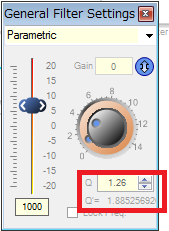
Sorry for my confusion. Experimenting with the settings suggests this relation:
Q' = Q * ( 10**( boost / 40 ) ) Yet I don't know what Q' is used for.
Best regards,
Bob
Hi Bob,
Thanks a lot.
Do you know where is the documentation for Q' ?
Thanks and Regards,
Hello takumi3952,
There is some on the Wiki, I found this:
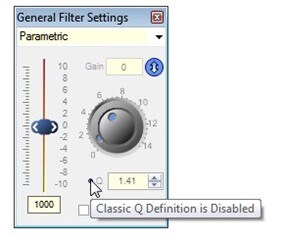
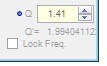
By default, the Q is shown with the value adjusted (from the classical EE definition) so that a boost of N dB followed by a cut of N dB for identical Q and f0/Fs results in a precisely flat unity gain filter or “wire”. This is equal to A*Q, where A = 10^(dBgain/40).
The “Classic EQ” version of Q can optionally be shown by clicking the small circular button next to the Q control.
Then there are also some details on the forum.
This discussion was a long time ago and I think this lead to the addition of the little button to click on for the classical EQ version of Q. This would keep the cell backwards compatible.
Dave T
Good find, Dave. I tried searching both EZ and the wiki without success.
Please log in to reply.