ADAU1452 : Value Hold
How can I write the value from the "value hold" block to EEprom , and then read back the value from EEprom after reboot or download and then pass this to the external input of a volume ?
Audio Signal Processors
adau1452
SigmaDSP Audio Processors
No idea ?
You can use the DSP Readback Block and read the value with your uController.
Regards
Bernd
Hello stmoeller60,
There are probably a few different ways to do this. Can you explain more about what exactly this value is being used for? How often is it updated? What is the volume control being used for? How is the value changed that you are holding?
I started to think of an example and realized I needed to better understand the problem before I suggest a solution.
Dave T
Hello Dave,
I'd like to measure one time the audio level P1 from an ADC-Input, put this level to a "value hold" block, to multiply this P1 value with another signal.
I would like this level value P1 to be saved in the EEPROM, so the next time download or selfboot, the value P1 is read and used.
Any idea Dave ?
The interface write block (IO > GPIO > Output > Interface write) may be used to write the a value to the EEPROM at run time. The interface read block (IO > GPIO > Input > Interface Read) may be used to read the value back. Note that the EEPROM write, particularly using I2C, may or may not not update the value every sample. It writes as fast as the interface and free instructions allows. If you would like to insert a sample-and-hold block, which has a control input to sample the value, you can use the value hold block (Basic DSP > DSP Functions > Value Hold).
Ken
How can I prevent after one value has been written to interface, that after reboot the interface is overwritten with zero ?
See also my reply here :
https://ez.analog.com/dsp/sigmadsp/f/q-a/64644/master-control-port-interface-r-w/175940#175940
Do you have an idea Ken ?
Cheers
Stephan Moeller
Stephan,
The information at the link you provided is good. Can you describe your problem in a little more detail? Can you upload a project that shows the issue?
Ken
1452_ValueHoldWriteRead.zip
Ken,
here's a project where it shows, that if I set switch1=on , and I Switch1_2 = ON I want that the value 0.5 is written to interface0. Then I make a download from Sigmastudio again, I would expect to read the value 0.5 at interfaceread1, but it shows 0.
Any progress so far for an idea ?
Stephan,
The trigger input appears not to be working correctly. I'll report the bug to the developers.
Ken
Hi stmoeller60,
i use the following method for writing/reading to EEPROM without MCU via SPI master control port.
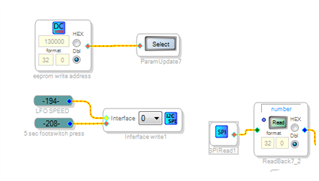
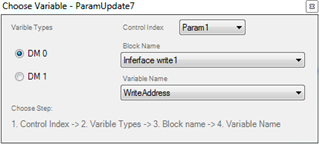
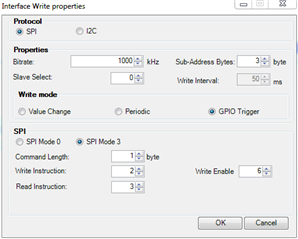
For writing i use Interface write and parameter update cells, parameter update has a DC cell connected with EEPROM address (pick the value based upon your eeprom, mine is 25AA1024 and i set up 130000, high enough to make sure i'm not writing to the selfboot image, could be lower by the way). Parameter update points to Interface write cell (variable name WriteAddress). I use GPIO trigger for writing, when orange pin goes high the value coming from LFO SPEED is wrote to the EEPROM at address 130000.
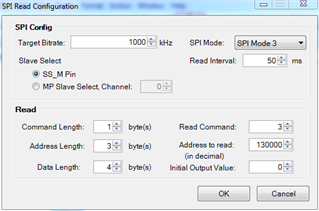
For reading back i use SPIread cell, set address to read at 130000 and data lenght to 4 bytes.
Hope it helps!
Omar
Hello OP-ELECTRONICS,
thanks very much for your help !
Hello,
I am using an MX25L2006EM1I-12G SPI Flash memory on a different board,
but the method that worked previously with the 25AA1024 EEPROM doesn't seem to work anymore.
Any ideas ?
Hello Stephen,
I am going to repeat what I posted on the PM here for others.
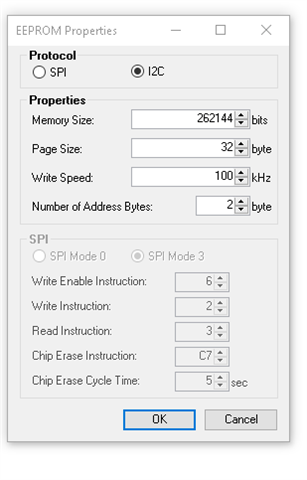
I am not a memory expert but it looks like the commands are different with this part. You can define some of them in SigmaStudio. but I am not sure if it will work.
It looks like most of these are correct with the defaults except the "Write" command. In the part an 0x02 is a Page Program command but I see no command listed called "Write". So I am confused?
You may be able to just change that one instruction but I have no idea what it needs to be?
Dave T
Please log in to reply.