ADAU1701 with MCU STM32 fail to work .
Hi
I had took the advice to use a MCU to protect the ADAU 1701 program. After we done the design and code the firmware. We build the PCB board with AMP and then we ran into the problem that the MCU is not boot ADAU at all. There is no I2C be send to the ADAU? Our engineer can not seems to find out why? I had two MCU ST32 engineer looked the code and both say that is right!!
One thing I find odd is that the board is actually playing sound very very quiet. And the weirdest part is that it don't need MCU firmware as I erased the firmware and that ADAU still can play music but very very quiet.
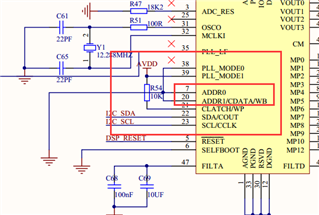
I share the schematic here so if anyone can help ?
Edit Notes
REmove
[edited by: Tomdy at 10:37 AM (GMT 0) on 13 Jun 2019]
Audio Signal Processors
SigmaDSP Audio Processors
adau1701
Hello Tomdy,
Since I wrote to you I have received your schematics and other files from Ken. I do not see anything obvious as to why it is not working.
The quiet music you are hearing may very well be crosstalk somewhere on the board. I do not see that as a problem at the moment.
Have you placed a scope on the I2C clock and SDA to "see" the transactions? This way you can see if the 1701 is actually responding and the ST MCU is actually sending. Some MCUs you are able to instruct the I2C routines to ignore a NAK and continue so we really do need to see if the writes are happening and the 1701 is responding.
I do not see a port for the USBi in your design. Since you are using I2C it is not too difficult to rig one onto your board for testing.
I suggest you wire up a 10-way male header to be able to connect a USBi. You only need to connect three pins. The rest are not needed for your testing.
Here is the pins you need to connect on the 10-way:
Pin 1 --> I2C_SCL
Pin 3 --> I2C_SDA
Pin 10 --> to ground
Keep the wires short and it is a good idea to wrap a couple of ground wires along with the I2C signals. In fact, I like to use a cut-down ribbon cable where I peel off four wires. Then alternate the I2C signals with the grounds on the ribbon so that you have CLK, GND, SDA, GND as a ribbon pinout. Then tie the two grounds together. This will help your signal integrity but still keep the wire as short as you can.
So then you can use SigmaStudio to test your PCB. You can use a meter in your project to see if the signal is coming into the DSP at a good level. You can setup a signal generator in the DSP to send out a known full scale sine wave out of the DSP. It is a HUGE help in trouble shooting. If all this is working then go to the scope and see if your I2C comms is working from the MCU. Then see where the symptoms and results of your tests take you.
Let us know how this goes...
Thanks,
Dave T
HI Dave
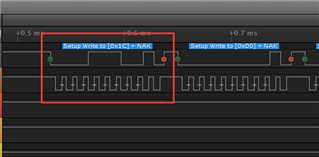
I attached some photos here. The I2C address is wrong I think. But we don't know how to fix it.
The test schematic on the Sigma studio is just a straight in to outs. The ADAU is not function at all after the I2C trigger. The manufacturer did some screen shots as you see here.
If you could advice some ideas. Will be appreciated.
Thanks
Hello Tomdy,
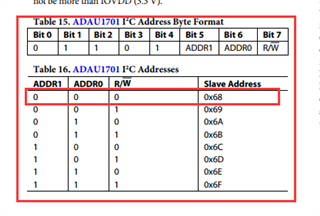
You are correct that the I2C address is wrong. Often all that needs to be done is to shift it over one bit but this is not the case with your example.
You do have the two address bits set to low so you do not need to change this. This is all in the software that is sending the I2C data.
0x1C cannot be shifted to be a 0x68. So you need to send out an 0x68 or an 0x69.
Dave T
Hi Dave
The problem has solved and I am not going to share here. As I am very very disappointed. The answer is right in front of you and I am surprised this take 4 engineers and even the level of you who is working for the manufacture who design the chip can not solve it. I am use your products and feels very disappointing on this level of support. Serious man. THIS IS RIDICULOUS!!
Hello Tomdy,
We troubleshoot many problems at the same time with lots of different levels of information. It is VERY difficult to do remotely. I apologize that we missed it. I have solved many problems that were very simple solutions by asking the right questions. Please share what the cause was so that we can see where we messed up and so that others reading this forum will not fall into the same trap.
Dave T
Did someone forget to put pull ups on the SDA and SCL lines?
That's what I was thinking. Regardless, I'll use this opportunity to say that I think that the OP is being overly hard on the remote diagnosticians, here. Diagnosing interchip communication issues from a distance is miserable. Code problems are bad enough.
Things like pullups - even if not on the supplied/posted documentation - can be overlooked due to expectation and/or incomplete schematic views. So, in regard to issues like that... if someone has a gripe with the folks at their company, fine. Flame away. ...but the online people who can't actually see the physical circuit and put a probe on it are at a distinct disadvantage.
Any willingness to help on their part should be considered a blessing.
What about the rest of us? We all share and try to answer each other's questions so it is a bit unfair for you to let others read through this, contemplate whether they can help and then not tell us what you figured out.
Please log in to reply.