ADAU1701 toggle Nth order filters with GPIO
Forgive me if the answer is obvious because this is only my 2nd project in sigmastudio.
I want to have selectable Nth order filters using a GPIO. So far I have not used any GPIO in my project.
I see there is the example called "IndexLPFSelect_SinglePushButton", but it seems this is only available for 2nd order filters. How do I do this with Nth order?
It is OK if it uses a different GPIO for each filter. I will only have 4 or 5 of them.
It would also be nice to know how to toggle the enable/bypass option using GPIO. Is this possible?
Thanks in advance,
Ogre
Audio Signal Processors
filters
gpio pins
SigmaDSP Audio Processors
gpio
adau1701
Show More
Hello Ogre,
Sorry no one has answered for you. Although there's no drop-in Index-selectable Nth order Filter, you can build your own from a Index Selectable Independent Multiple Band Filter (now that's a mouthful!). Find it under the Lookup filter branch. An Nth order filter is nothing more than several cascaded First and Second Order Filters (for example, a 6th Order filter is three Second Order stages). Now the only problem is choosing the frequencies and Qs of the individual stages according to the overall filter's specifications. With the Nth Order Filter, SigmaStudio does the math for you -- with the workaround I'm suggesting, you're on your own. But it's easier than it looks, as well as providing insight into how these filters have worked since the early days of radio.
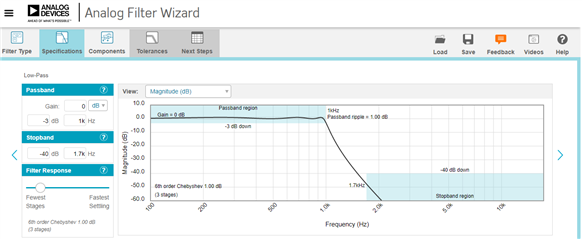
This example is for a 1 KHz lowpass filter with very sharp corners in only three stages (a 6th order filter). To get those sharp corners I chose a Chebyshev response with 1 dB ripple. Any filter design program can help you with the stage Fs and Qs; if you don't have a favorite, use the Web program AD provides at https://www.analog.com/designtools/en/filterwizard/ Chose your filter type and enter the desired cutoff frequency. A slider lets you trade-off between the filter's time response and the number of stages required:
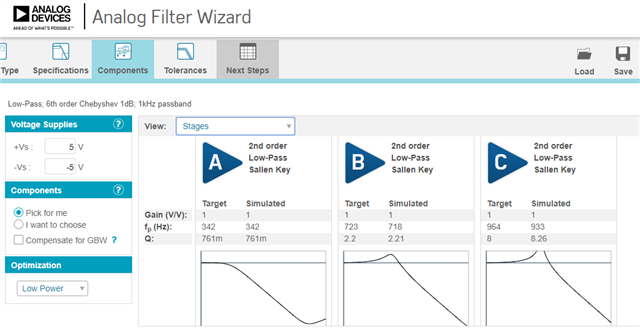
Once selecting the desired filter type, proceed to the Components tab, choose Stages from the drop-down box, and you've got the needed info to build your filter in SigmaStudio:
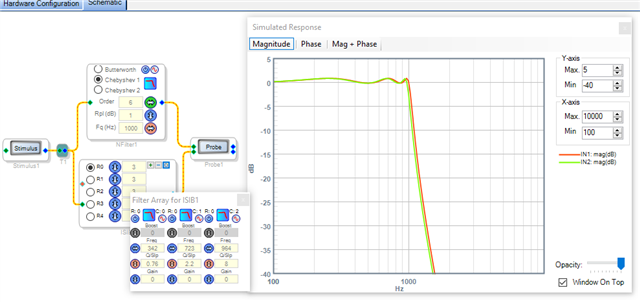
Place a Index Selectable Independent Multiple Band Filter in your project, grow it to the number of filter choices you need, and enter the number of filters you need in each selection. Then click the tiny square which opens the box where you enter their individual filter parameters:
Notice how the homemade 6th-order filter's response matches that of the Nth-Order Filter.
To enter the numbers for the remaining Index choices, click the associated round button. if all the filters share the same characteristic while differing only in frequencies, you need not re-do the Filter Wizard. The remaining filters have the same Qs, and you merely change all the frequencies proportionately. Finally, only the first index filter will graph -- this is a limitation of SigmaStudio's Stimulus-Probe tool. For a more detailed procedure for building your own high-order filters, see this thread.
Of course an alternative method is to include all needed Nth-Order Filters in your project and select among their outputs, but this method wastes instructions.
Best Regards,
Bob
Please log in to reply.