Help with safeload of ADAU1701
Dear All,
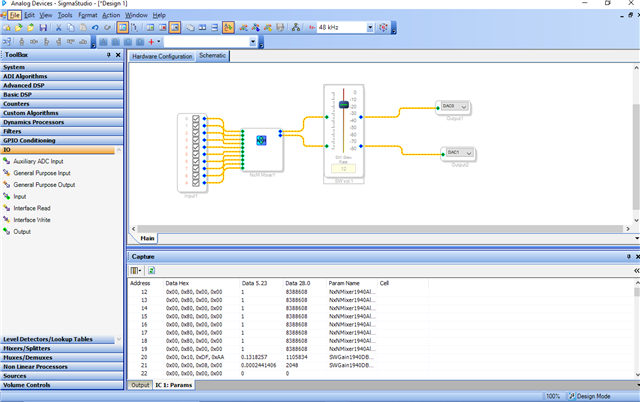
I have read the FAQ about how to implement safe loading of parameters in the ADAU1701 and I thought I had got it spot on. But I have a weird bug. I'm trying to implement a simple volume control. I am mixing all the inputs (I have also been having trouble with the inputs but that is for another question). Please see the attached image of my sigma studio schematic.
As far as I understood, the volume gain level is at parameter address 0x20. If I use this address and send:
08 10 00 00 80 00 00
...then...
08 15 00 20
Nothing happens. However, and this is the weird bit; If I send:
08 10 00 00 80 00 00
...then...
08 15 00 14
It works?!?!?!?
If I look at the *.params file I see:
Cell Name = SW vol 1
Parameter Name = SWGain1940DBAlg1target
Parameter Address = 20
Parameter Value = 1
Parameter Data :
0x00 , 0x80 , 0x00 , 0x00 ,
I can also see this in the parameter data, the 20th line is:
0x00 , 0x80 , 0x00 , 0x00 ,
Have I misunderstood something in the way that safe loading works?
1. send "08 10" (safe load data address), then the dummy byte 00, then your data to be written into the parameter memory.
2. send "08 15", (the safe load address that corresponds to "08 10" where you wrote your data), then the dummy byte 00. Then send the parameter address where you want that data to be loaded.
3. set IST high.
So surely I should be sending "08 15 00 20" given the parameter address is 20 during step 2?
What am I missing?
Hello,
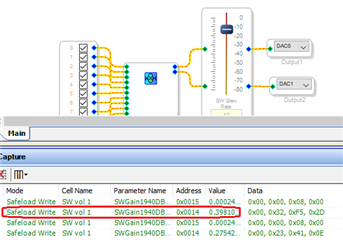
The good news is you've successfully safeloaded your volume param, showing that your uC code is working. That's the hard part. The address difficulty may be as simple as a decimal-Hex conversion. It appears that the Capture Window's IC1:Parameters list shows addresses in decimal -- ... 19, 20, 21 .... I drew up your SigmaStudio schematic, performed a Link-Compile-Download, and adjusted the slider while viewing the Capture Window's Output tab to obtain the results shown below:
The Output display provides parameter addresses in Hex, as seen by the -1701. The volume address, 0x0014, is the same as what works for you. Thus, either get your addresses from the Output display, or convert the addresses from the Parameter display to hex.
Best regards,
Bob
That's exactly what it is is! Thank you very much Bob! 20 = 16 + 4 = 0x14 I should have realised.
I don't have a programmer to be able to see what is being actually written from Sigma Studio to my DSP chip. So I can only use the output window, not the capture window. I've been doing it directly from the uC its a bit slow, but it works.
Thanks again Bob, & enjoy the rest of your weekend!
Tim
Please log in to reply.