Sigma Studio signal detector hold time is too long
The signal detector block in Sigma Studio has a minimum hold time of 2 seconds. This is way too long for my application. Is there a way to decrease the hold time to around half a second or less? Ideally I'd like to read the input level in real time so I can switch instantly between two audio inputs.
I'm using Sigma Studio V3.17 with an ADAU1442 DSP.
Audio Signal Processors
sigma studio
adau1442
SigmaDSP Audio Processors
Hello,
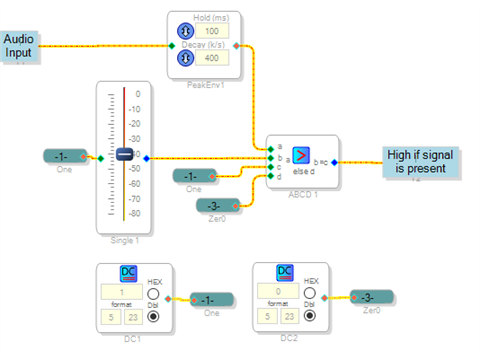
ADI's Signal Detect block works well for automatically shutting down a powered speaker when no longer needed. For your application there's several solutions. You could build up your own detector using Peak Envelope and ABCD Comparator blocks, as shown below:
The Peak Envelope block holds your input signal's last peak for its Hold time -- here you can set your holding time in milliseconds instead of seconds. The ABCD Comparator outputs 1 if the signal is above the threshold set by the Volume Control -- you can easily invert this logic as desired,
If your application is for speech, use ADI's Voice Activity Detector instead. This is designed to look for speech in the presence of background noise,
Best regards,
Bob
You can also manually edit the hold time as described in ez.analog.com/.../adau1761-signal-detection-time_constant-algorithm and ez.analog.com/.../can-signal-detection-block-be-modified-for-smaller-trigger-time
Does https://wiki.analog.com/resources/tools-software/sigmastudio/toolbox/dynamicsprocessors/envelopepeak only respond to positive peaks? So it needs to preceded by a Absolute Value block to capture positive and negative peaks?
Actually if you hover over it in the Toolbox, it says "Absolute Value Measurement Envelope Generator", so maybe it doesn't need it. I really wish there were better documentation for these blocks...
Please log in to reply.