How to read a parameter from I2C on boot time - ADAU1462
Hello,
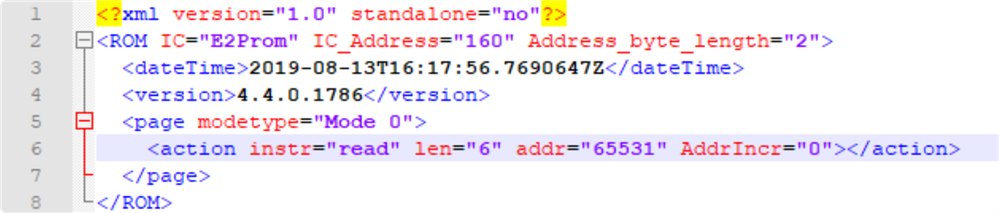
Let me first explain what I want to do; During production a few calibration parameters will be saved to the upper page (64kB eeprom) of the I2C eeprom connected to the Master I2C port of the ADAU which is also used for self booting the DSP. Now we want to read these parameters from the eeprom during boot time and write them in the correct parameter in RAM, say the value of a DC source. Reading of this parameters is easy using the "Startup Boot - Master Control Port IO" block together with a sequence file.
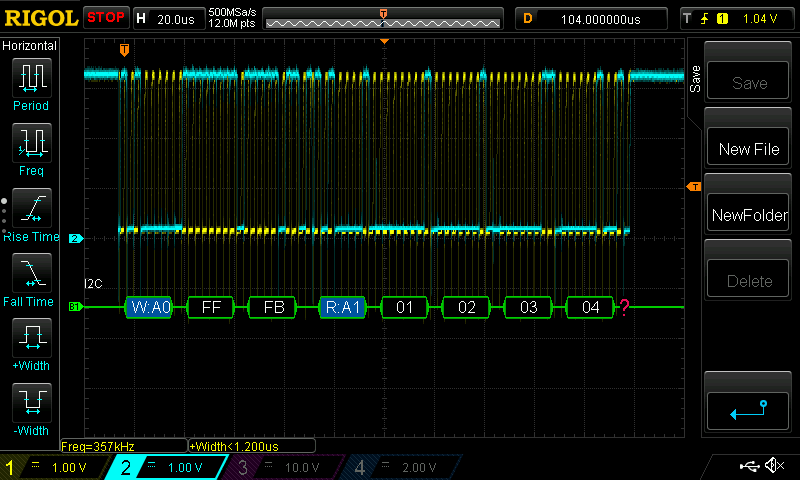
I checked the I2C lines with an oscilloscope and it does indeed read the correct data from the I2C EEPROM.
The problem I am facing is that I cannot find any documentation on how to instruct the DSP to copy this read data to a parameter, in this case the value of the DC source. Some assistance would be very helpful.
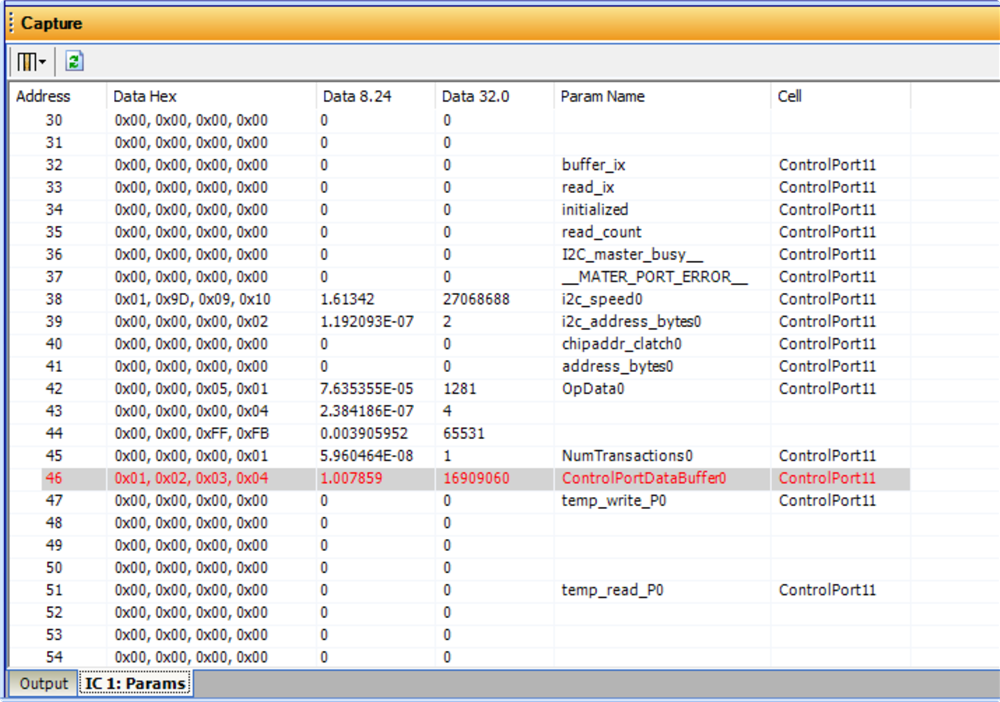
I can also see the data is read into the "ControlPortDataBuffer0" parameter of the corresponding Control Port So I am very close it only has to copy it to the DC value parameter.
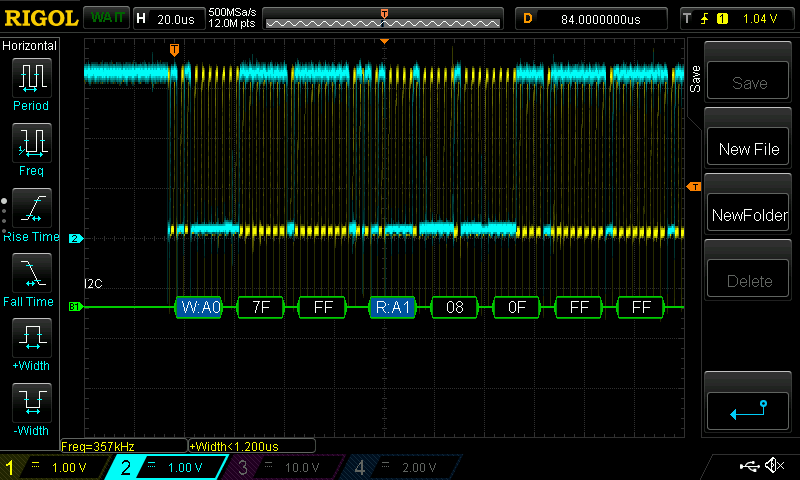
I should probably make another entry but while I was experimenting with the different I2C read functions in Sigmastudio I noticed I was not able to read any memory address in the eeprom above 7FFF, when trying to read an address above this it would just read the value from address 7FFF (checked the lines using an oscilloscope). All I2C read functions seem to suffer this issue except for the "On Boot Time".
Thanks & kind regards,
Nand
Audio Signal Processors
SigmaDSP Audio Processors
adau1462
Hello Nand,
Have a look at this. I think this is what you need:
With this cell you can setup different variants. It was designed for products like a crossover/amp that may be used in several products. In one product it may be a three way and a 2 way in another. Or one has an 8-inch woofer and the other a 6" so the EQ parameters would need to be slightly different. Each product PCB would have different settings on the two GPIO pins and that would trigger the loading of a different set of parameters.
In your case it would only be one set but you would update the EEPROM location of the data and then load it in.
This cell is good because the code is only run once during the startup code and then it does not use up MIPS during normal operation.
Have a look and see if this might help you.
Dave T
Hi Dave,
Thanks for your response and suggestion.
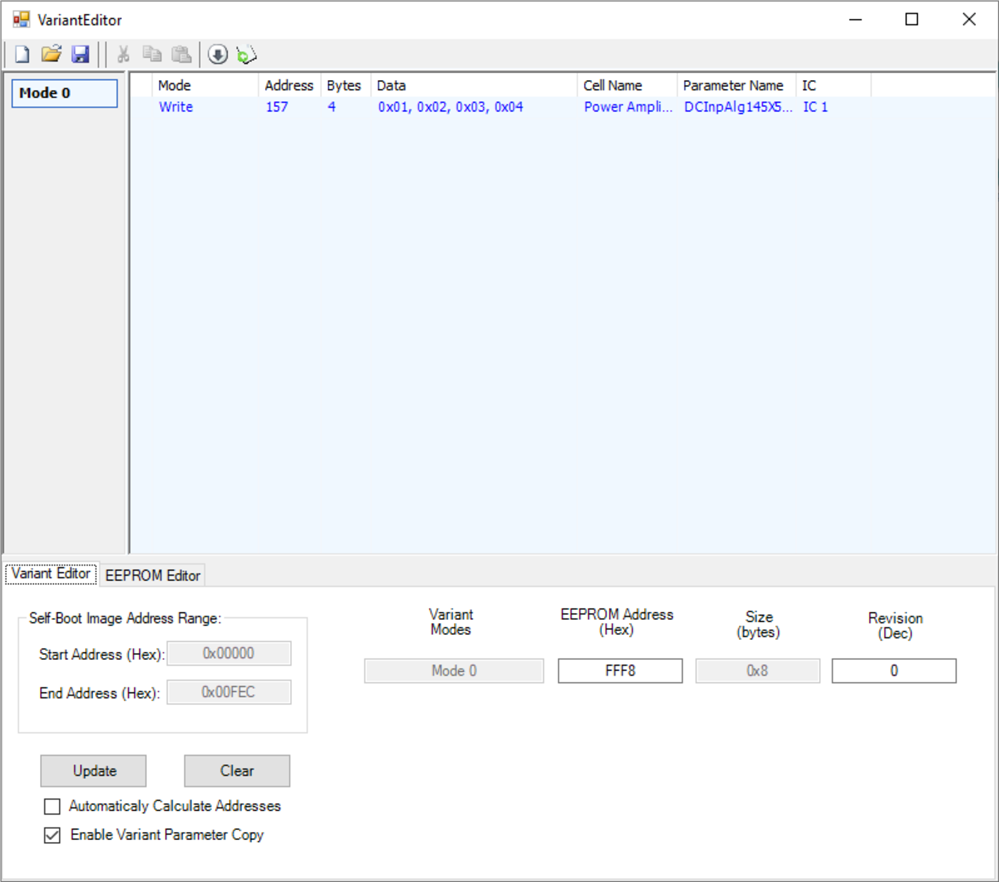
While this function might be a workaround for the problem I am facing it suffers from the same bug it not being able to read above EEPROM address 7FFF which I mentioned in the last paragraph of my initial post. Below you can see the variant editor where it is supposed to read from address FFF8 while monitoring the I2C lines with an oscilloscope shows it limits the address to 7FFF.
I did verify the functionality with addresses lower than this and then it functions properly. Although for the purpose I want to use it not quite ideal. Let me explain the drawbacks I am seeing. The main concern is that this variant parameters not only store the value of the parameter but also the address of where the parameter is located in the RAM. This is an issue since these addresses can change each time the program is amended and compiled. A workaround would be to use the indirect parameter access table but this creates a lot of overhead (32 bytes to store a 4 byte parameter).
Anyhow would the regular master port I2C read functions work properly and be able to read above 7FFF there are more simple solutions (a triggered read for instance). I guess there is not much to do for me but wait until the bug gets fixed.
Or is there any way to go further with my original thought of using the startup boot function with a sequence which does not seem to suffer from this bug?
Thanks & kind regards,
Nand
Hi Dave,
Do I need to report this bug somewhere or is mentioning it here sufficient?
Thanks & kind regards,
Nand
Nand,
Sorry for the delayed response. I'll try this out on the bench here and report back. I'll also report the bug to the developers if need be.
Ken
Hi Ken,
Did you manage to replicate the behavior i am seeing?
Thanks & kind regards,
Nand
Hi Ken & Dave,
Any news on this issue? We are waiting for this to be solved to finish our production software.
Thanks & kind regards,
Nand
Hello Nand,
I verified your findings here on my bench. I will be reporting it right away. I have not been able to think of a work-around at the moment. I will see what the programming team says once they have investigated.
Dave T
Thanks Dave! Just keep me posted as soon there is news on this.
Nand
Hello Nand,
I just received word that the issue is fixed. It will be included in the next release scheduled for 1st week of November. If this is too late for you then let me know.
Dave T
Hi Dave,
That is great news! However is there a possibility to get a beta version with this fix included so we can already finalize our DSP code?
Thanks!
Nand
Hello Nand,
I am not certain if that is possible. I did ask them in anticipation of your question. I will not hear anything back until tomorrow at the earliest.
Dave T
Hi Dave,
Correct me if I'm wrong but isn't it just an updated dll file in the Sigmastudio program directory. Namely ADAU146X.dll that needs to be replaced to solve this issue?
Nand
Hello Nand,
Sometimes yes, it is only the DLL. Sometimes it is supporting methods that is in the SigmaStudio code that is the problem. I think this case may be one of these. It may have been an issue for all processors. The programmers did not explain where they found the error but I think it would have been for the Sigma350 and Sigma300 processors so it may be in the common code and not in the DLL.
I did ask but have not heard back.
Dave T
Hi Dave,
Did you hear back from the software team? We want to start shipping out our first products but we cannot because of this issue. Can you please look into the possibilities of getting a short term solution? Your help would be greatly appreciated.
Thanks,
Nand
Hello Nand,
This will be fixed with the release of Rev 4.5 due out in November 2019.
I will send you an email with some other details.
Dave T
Hi Dave,
I received the temporary patch and now the i2c read routines work as they are supposed to. We can now finalize the firmware and start shipping.
Thanks for your support!
Cheers,
Nand
Great news!
Thanks for being our field test case so we can move forward with including this in the new release.
Dave T
Hi Dave,
we have noticed the same issue when trying to read the i2c eeprom trough the "i2c bridge code" (the code you have to load into the ADAU to be able to program/read the eeprom on the master port). While programming works flawless, reading an address above 7FFFh from the eeprom will always read the value at address 7FFFh very much the same as we noticed using the I2C read block in sigmastudio which has already been fixed since release V4.5. Can you please try and get this issue resolved in Sigmastudio? Or could we get updated "bridge" code that doesn't suffer this issue?
Many thanks!
Nand
Please log in to reply.