DSP core not synchronized to I/O ports?
Is it possible to have the inputs and outputs of the DSP clocked (B/LR CLK) by an external system, but the DSP core is running from its own x-tal not synchronized to the external system?
SDATA_IN1 can be setup to use the clocks(B/LR) from IN0 as clock sources, and setup SDATA_OUT1 to use the clocks(B/LR) from OUT0 as clock sources.
Requirements:
My system must receive a TDM stream from an external system where the external system is clock master.
My system must return an TDM stream to the external system
My system must interface to an ADC and a DAC
Is this possible?
Or will it require either a external PLL+VCXO to lock the core frequency to the incoming BCLK or use the build-in ASRC with the added delay to the audio (which I am not sure is accepted to have in the system)
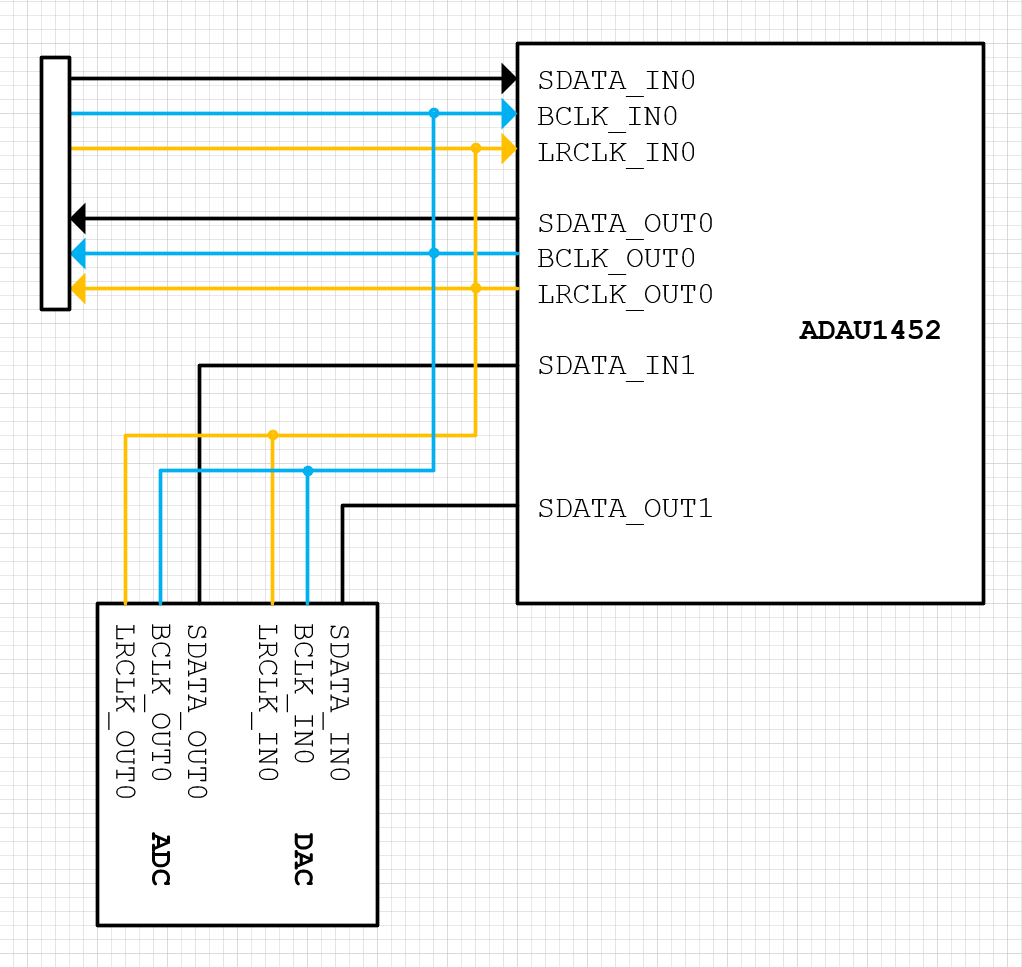
Hello Mr.Q,
Thanks for the good drawing. It helps to understand what you are asking.
Yes, you can clock the system in several different ways. You did ask several questions and all of them are possible. You certainly could use the ASRC to bring the audio into the core rate but that is usually only required when you have to mix other sources of audio that are on other clock domains. In this case you only have one clock domain so you can operate the part without using the ASRCs. So what I will talk about below is all without using the ASRC.
Your diagram shows correctly how the clocks need to be connected. You have to send the BCLK and LRCLK to both the serial input and serial output section. There is no internal way to connect them.
Set up the registers for the following:
1) Setup the serial ports as slaves to slave off of the clock domain 0 since that is where you show the clocks connected.
2) In the Core_Control tab of the registers in SigmaStudio, set the Start Pulse to either the Serial Input 0 Rate or to the Serial Output 0 Rate. Since they both have the same clock it does not matter. This sets when the DSP program will start its execution. This synchronizes it to the incoming rate.
3) In the Clock_Control tab, Set the PLL CLK SRC register To PLL Clock. This register has a misleading name so I am mentioning it here. It is really the Core clock source.
So now let's talk about the master clock.
The MCLKIN pin either needs to be setup with its own crystal. Consult the datasheet for those details, or you can feed a clock to it.
You can use the BCLK signal to also feed the MCLKIN pin as long as the bit clock will always be present and you can wait for the part to initialize and be loaded with the program before audio will be available. So the bit clock will have to be on soon after power up and it should never go away or quickly change rates. If the sample rate needs to change it would be best to disable the PLL, change the BCLK rate then restart the PLL.
The BCLK has to be a minimum of 2.375MHz and if it is around 3MHz then the PLL lock time will be a little bit slower.
If you have another clock in the system you can use it and setup the PLL to produce the core rate around 294.912MHz. This sets up how many instructions you have per sample period. Divide the core rate by the sample rate and that is how many instructions you have per sample period. If the clocks are not synchronous, then the number of instructions will vary slightly from frame to frame based on the drift of the two rates. This will only be a problem if you have a very large program that is close to maximizing the MIPS available.
Another thing to remember is that if the LRCLK stops, the core will stop running the program. I think this should not be a problem for you but I thought you should be aware of this.
Let me know if you have further questions.
Dave T
Thank you for your thorough answer. It answered all my questions and all the next ones I would have asked.
Please log in to reply.