In ADAU1452, inbuilt algorithms supported in Block schematic & schematic to be combined
We are using Sigma studio version 3.17 in our project for ADAU1452 processor. Modules implemented in our project is block based, we need to use the filters modules supported in schematic(Sample based) with this. Here my question is, Can we combine the sample based algorithm supported in Sigma with block based algorithms, and what we need to handle for this.
Kindly share your suggestion.
Thanks,
Kalaiselvi
Audio Signal Processors
adau1452
SigmaDSP Audio Processors
Hello Kalaiselvi,
I think I know what you are asking?
How do I send audio (samples) between the sample based domain and the block time domain?
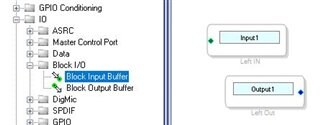
You use the Block IO on the schematic page to send the samples to a buffer for the block domain.
So pull out the Block IO out of the toolbox:
This is in the Schematic Tab for the sample based processing:
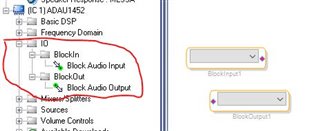
Then in the Block tab for block processing pull out the IO cells in there.
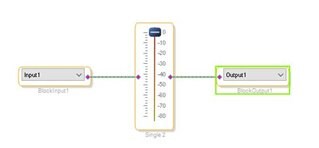
Here is my simple block processing flow:
I also took a screenshot of the sample based schematic using the input and output buffers but I am having issues with the forum software not letting me post the picture?
I think you should understand how to use the block buffers in the sample based schematic. Sorry about the glitch here.
Dave T
Hi Dave,
The new logo atop Engineer Zone suggests that the forum software has been updated. I've been having image posting problems as well. Like you, the system quit after two pictures as if there's a limit on image posting.
Best regards,
Bob
Dear Dave,
Thanks for the reply, We have verified block processing with Volume control module. In our project, We need to add volume control + Mute in block based processing. But mute module is not available in block schematic. Can we use mute from schematic with the block based volume control module.
i.e: Volumecontrol(block) + Mute/Filters (schematic ) is possible??
Thanks,
Kalaiselvi
Hello Kalaiselvi,
It is not possible to "Copy" and cell from the Schematic section of SigmaStudio and insert it into the Block Schematic section. There are some different ways to do the same thing.
A "Mute" cell is the same exact DSP code as a volume control with no slew. There is one parameter that is a gain factor. The audio is multiplied by the gain factor and that is the result. So for a Mute cell in SigmaStudio, there is only a button, it will set the gain parameter to either 1 or 0. So it is on or off. The volume control with slew is the same as the mute button with slew.
So you can do two things,
1) if you have a microcontroller you can write to the gain parameter of the volume control to set it to zero. This will mute it. You have to remember what it was previously set to so that you can unmute it properly.
2) You can change the range of the GUI object in SigmaStudio to go lower than -80dB. I usually use -144dB and then you can simply set the volume control to -144 and it will be muted.
3) There actually is a third option. This would be to route the audio out of the Block Schematic and then use a mute in the main program thread to mute the audio and then route the output back to the Block. I have not tried this, it might throw an error about illegal feedback. The other issue is that the timing of the mute is a little strange. The Block is processed over many frames but the main program thread is of course run every sample period. So the mute may show up at a different time then you would like. It would be best to use the volume control in the Block Processing thread.
Let me know if you have further questions.
Dave T
Please log in to reply.