EVAL-ADAU1452: Unable to get the I2S#2 input working
Hello everybody!
I'm very new to this forum and to digital audio (PCM, TDM, I2S and so on) so I may ask stupid questions. Don't be mad at me :-)
I have an ADAU1452 evaluation board on which I'm trying to configure a 2-way stereo crossover (2 inputs, 4 outputs). The audio stream comes from the 3rd I2S bus and the outputs are OUT1 and OUT2 analog jacks (respectively Ch 0-1 and Ch 16-17 ; AD1938 codec in use).
I have checked with an oscilloscope the input signal and it seems OK :
* BCLK @ 3.072 MHz
* LRCLK @ 48 kHz
* SDATA is "alive"
This comes from a Raspberry Pi 3 B on which I use the HiFiBerry DAC driver ('dtoverlay=hifiberry-dac'). The RPi drives both BCLK and LRCLK lines.
I don't use an ASRC at the moment because I may not need to. The audio stream is sampled at a fixed 48kHz.
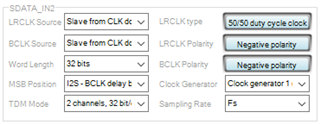
After many tentatives to configure the serial input correctly I still have no sound at the output. The project file is attached for further investigation.
I must say that everything works OK when I replace the I2S input by an analog input (thus from the AD1938 codec).
I'm sure I'm doing something silly but I'm not able to figure out what.
Can anybody help me?

Hello.
Sorry for my post, my original problem is solved: I think the input volume was slow enough to only hear the analog output noise. Because of a previous issue I thought it didn't work, but it did!
Have a good day.
Hello justinmassoit,
Your post was fine! This is why we are here to help. Sorry that I am a bit behind in responding.
I have a couple of comments.
First is to use SigmaStudio as a troubleshooting tool. You have the ability to "see" the level inside the DSP at any point in the signal flow by adding a meter to your project. This will help you see if the signal is there and if the level is OK. You should send a 0dBFS signal into the DSP (turn down the speakers) and see if it is coming in at -3dB on the internal meters. Our meters will show a 0sBFS signal as -3dB. If it is distorted or if it is at -9dB then you have a setting wrong in the serial port settings. It is good that you have some mutes so you can check to see if the channels are the ones you expect them to be.
The second thing is that if you are not sending a master clock from Raspberry Pi board, then you will probably get some clicks and pops and some samples will be repeated or missed due to the sample rates are not exactly the same. You have a choice, you can use the ASRCs to convert to the core sample rate, or you can simply have the core start the frame processing after a new sample has arrived. This is done with the Start Pulse register setting. You can set this to the serial port you are using.
The down side is that the number of instructions will slightly vary from frame to frame but most applications do not have the code that close to the limit to be a problem with a few instructions.
This screenshot shows you where the register is located.
Dave T

Hi Dave,
Thank you for your follow up!
I've now added meters at both the input and the outputs so that I can "see" my audio stream.
DaveThib said:
you will probably get some clicks and pops and some samples will be repeated or missed due to the sample rates are not exactly the same
What do you mean by "not exactly the same"? Doesn't the DSP take the Bit Clock as a reference rate for the input signal? I suppose there is some sort of hardware FIFO memory between the input and the core, am I right?
Thank you for the tip about the "Start Pulse" feature.
In my final system I would probably use the ASRC as this is probably the way to go to avoid any clock rate mismatch issues.
Have a nice day.
Hello Justin, (I assume your name is Justin)
About the sample rates.
No, there is no FIFO with the exception of a 1 sample period hold to align the incoming samples. IF you think about it you cannot use a FIFO. It may work if the rates are very close and keeps running slightly faster then slower then faster etc... But even then it will be a problem unless the FIFO is huge.
For an example, imagine the situation where the DSP core is running at exactly 48kHz fs but the incoming signal is running at 47.9kHZ fs. If you had a FIFO it would empty out and a new sample would not arrive in time to pass it to the core. So you would get samples for a short period of time until the error catches up with you and you miss a sample. The core would read the previous sample since it was not updated yet so the sample would repeat. If it is the other way around where the incoming is faster then you would miss samples every once in a while depending on how different the sample rate is.
The bitclock is only used to clock the bits into a shift register.
If the two parts are running off of the same master clock then the divided down sample rate will be exactly the same. The actual LRCLK edge can be different since the dividers will most likely start counting from a different master clock edge but they will be the same frequency. The one sample hold in the DSP will align this difference in the edges of the LR clock.
If you need to follow an incoming sample rate then you simply set the Start Pulse register to use the serial input port as the source of the start pulse. So the part does have that capability but you have to set it up properly. If you only have that one clock rate and you do not have a master clock to use then have the DSP use its own crystal and set the start pulse for the incoming rate. The only side-effect is that the number of core clock cycles will be slightly different based on the difference between the two clocks. This is usually not a problem unless you have a very large program that is close to the edge of MIPS usage.
If you have several different incoming rates then the ASRCs will come to the rescue.
Dave T
Please log in to reply.