SigmaStudio force readback controls subsequent i2c addresses
Hello all,
I was wondering, is it possible to have a few readback controls in SigmaStudio (for a ADAU1452 DSP) with their I2C addresses forced to be subsequent?
What I would like to do is implementing two readback controls, which can be read by an external microcontroller in one I2C read command by reading 8 bytes from the DSP. This instead of sending a start I2C addres, read 4 bytes and the writing again an I2C address and read another 4 bytes...
With kind regards,
Reini
Audio Signal Processors
adau1452
SigmaDSP Audio Processors
Hello Reini,
Great question...
You caused me to try to think creatively!
So what you need is two storage locations that we will know WILL be placed consecutively in memory by the compiler.
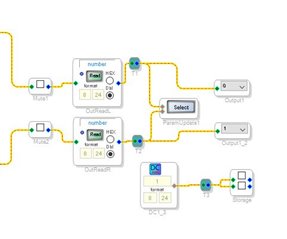
My first thought was to use two DC cells and use the Parameter Update cell to take data from somewhere else in the schematic and update the value in the DC cell.
This is very efficient. However, I am not sure if the compiler will always place these DC cells next to each other. There is no guarantee even though it did in my small example program. So this did work but I do not think it will always work.
So what I came up with is to use the Mute cell with no slew that is the multiple control variety. Then grow the cell to have two mute buttons. Since they are in the same cell they will always be placed next to each other.
Then I pointed the parameter update to update the value of the mute.
Now the audio will be multiplied by this value, a Mute cell is basically a volume control but we will not be using the audio. In fact you have to place a DC cell to allow it to compile. As I am writing this I realized that I should have set the DC cell to zero so it will constantly be multiplying zero by the number we are stuffing into the control.
So this will give you consecutive locations. I named the cell "Storage" and the parameter update is taking the audio from the stereo path after the signal path mutes so you can see the noise and you can mute the audio and see that the values are indeed being stored into these locations. Use the Params window to see this.
This will use a few MIPS but it is not too bad. The mutes do not have slew and it is only one fetch and multiply.
So give this a try. I will attach the project file.
Perhaps someone else has other ideas?
Dave T
ADAU1452 Consecutive Readback Locations.zip
Hello Dave,
Thank you for your suggestion.I see that the compiler gives both readback sets consecutive i2c addresses :-) I will try this in my DSP application too.
Thanks again for this suggestion!
With kind regards,
Reini
Hello Dave,
I did some experimenting with your suggestion. What I want is to read a few values (for example, from your project the left and right audio signal). How can I read them from the Mute control?
What I see in the IC_x_PARAM.h file is:
/* Module Storage - Mute*/
#define MOD_STORAGE_COUNT 1
#define MOD_STORAGE_DEVICE "IC2"
#define MOD_STORAGE_MUTENOSLEWADAU145XALG1MUTE_ADDR 13300
#define MOD_STORAGE_MUTENOSLEWADAU145XALG1MUTE_FIXPT 0x00000001
#define MOD_STORAGE_MUTENOSLEWADAU145XALG1MUTE_VALUE SIGMASTUDIOTYPE_INTEGER_CONVERT(1)
#define MOD_STORAGE_MUTENOSLEWADAU145XALG1MUTE_TYPE SIGMASTUDIOTYPE_INTEGER
I do not think I can readback an audio value from it?
With kind regards,
Reini
Hello Reini,
The key to this is the parameter update cell. It will take the number coming into it and stuff it into the parameter you select. So the program is taking the audio and stuffing it into the mute parameter. This is not the normal values you would use to do a mute but you are not using the actual mute. It ends up being a storage location. The reason why I used a mute is because I could grow it to two locations and it uses few MIPS.
This is why I explained the mute cell earlier. It is actually a gain cell. It multiples the audio in the mute cell with the number in the parameter. With the MUTE GUI it only stuffs a 1 or a 0 into that parameter. However, if you stuff a 0.5 into that cell it will lower the audio by 6dB. So the parameter is a 32 bit storage location. We are using it only as a storage location.
The parameter update is updating this parameter with the audio.
Now, are you wanting to meter the audio? The best meter to use actually integrates the audio level for a short period of time so you will not miss audio peaks and it also rectifies it. So then you need to do this a different way.
The way to do this if you are only wanting to meter the audio.
You can setup the Indirect Parameter Access Table. You can then place two or more meters in this table. Set it up to be a read of the parameter and you can then access the table with consecutive reads. The cost of this is 13 instruction cycles for every parameter you read. So unless your program is really large, this is an option. I can go into more detail on this if needed.
Dave T
Thanks again Dave, I will give it a try!
With kind regards,
Reini
Hi Dave,
I now understand what your application does.The "Parameter Update" cell writes every sample the audio value to the "Storage" value, which I can readback with the microcontroller. So, say, the left audio (on "OutReadL" cell) is 0.123, this value is written to the value of "Storage.mute0". And when I do an I2C read of Storage.mute0, I won't get a 0 or 1 but will read 0.123
That's brillant! It does cost a little cpu cycles, but that would do the job for me!
Apart from this, I tried also the "Indirect Parameter index table", but that option is grayed out in my application. What reason can there be, when it's disabled?
I already have the answer about the grayed out "Indirect Parameter Table", you must compile the project after loading, before you can add or change the table.
Thanks,
Reini
Hello Reini,
Check that the Indirect Parameter Table is enabled in the Advanced Framework Configurations. Then it will be greyed out until you link/compile/download. Then you should be able to click on it. It needs to have all the information about the program so it needs to be compiled. Let me know if you still have issues.
Thanks,
Dave T
Hello Dave,
I found that you have to compile your project first, which seams logical to me :-)
Thank you for the tip, I'm trying it out right now!
With kind regards,
Reini
Please log in to reply.