Problem using the multiplexer with the ADAU1701
Hi, I'm a newbie to the world of DSP, and I'm stuck on getting the multiplexer with indexing to work. The circuit below is just to get my head around indexing, and not a project in itself. ADC0 has a potentiometer connected to it, input voltage is adjustable between 0 and 3v. I was hoping that the frequency on DAC0 would step to the next value as the voltage was increased, but the output remains 100Hz.
Any help would be appreciated. Martin
Audio Signal Processors
SigmaDSP Audio Processors
adau1701

Hello Martin,
Welcome to the SigmaDSP world!
The issue here is with number formats and a few details that you just simply have to "know" about. It is detailed on this forum but it would take some digging.
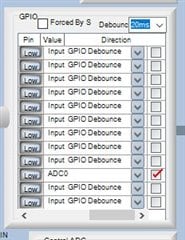
First, on the register controls, be certain that the Control ADC is enabled. It is just below the screenshot you gave.
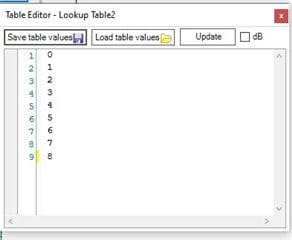
The index table has more functionality than is apparent. The inputs and outputs can be either fractional or integer format. They have individual controls that are somewhat hidden. It is the small little "buttons" to the left of the table button. If you fly over them it will report what it will do if you click on it.
So if it says "Set Integer Input" . This means it is currently set to Fractional and if you click it the input will be changed to Integer format. Likewise, if it says "Set to Fractional" then it is set to Integer and clicking it will set it to fractional.
The output of the AUXADC is a fractional number from 0 to 1, well almost to 1, in 5.19 format. It will only go to around 0.999 as a max and never actually reaches 1.
So the input of the table needs to be in fractional mode.
Now on to the MUX,
The control output of the MUX needs to be in integer format. So this is a 28 bit HEX number where 0x000001 is a "1". It is unsigned. This is used as a pointer offset to the location of the audio data in memory. Most of these tables are NOT range checked since that takes too many MIPS to do in a DSP so if you send it a number higher than 0x8, in your case, then it will be pointing to some memory location that is above the set of inputs and it can be anything in that location. This can cause some interesting bugs. So your approach of using a table is a good start.
You then have to scale the AUXADC output to give you a whole number between 0 and 9 not including 9. So multiply it by 9 and you will be good. The table will take care of dividing the 0 to 9 range properly.
Then one more thing. In this part the readback functionality is limited to 24 bits. It will only give you the most significant 24 bits so the bottom 4 bits are truncated. If you want to "see" the index control numbers you have to multiply the signal going to the readback cell by 16. Then you will be able to see it.
One more thing added to the one more thing... In 5.19 format you will only be able to represent a whole number of 15 or less. So if you need more than 16 selections for a MUX, you will need to do things differently. I will not go into that here but to say that 0 to 15 will be the max whole number you can store as a 5.19 number.
I have attached an example project that shows you how this is done. The table and the readback. It is using an index selectable filter but the same issues are present with the filter.
Dave T
5672.ADAU1701 AUXADC Index Selectable Filter.zip
Please log in to reply.