Reading indirect registers on ADAU1466
Hello,
I'm using an ADAU1466 and am successfully accessing registers to read and write parameters over I2C.
I can read a sensible value for the rms level of a single level detector with numerical display object via the normal register at 1757.
I'd like to read a block of meters more efficiently, so I thought the indirect register table would be useful for this.
Having added this register to the table at the first location, it gives an indirect address of 24586 (0x600A).
This location returns zeroes. I tried to set the second page flag (writing 1 to 0xF899) and I get another fixed value of 0x8008002f.
What am I doing wrong?
Thanks
Audio Signal Processors
SigmaDSP Audio Processors
adau1466
Hello Matt,
The Indirect Parameter Table needs to be properly setup and there is plenty of room for error there. If you have not already looked at the help files, they are located here:
Note that the first part of this file describes writing to the parameters, you will be reading not writing. So you need to scroll down to the "Reading a Parameter" section.
The table has to be setup to either read or write and it cannot do both unless you setup two instances in the table for the same parameter with one setup for writing and one for reading.
For entries setup for reading the values will be read every sample period weather you read them or not. So the memory locations at the 24586 range of address locations will hold the values and be updated every sample period. So if you place all the meters there in a row you could do a block read and pick up many meters at the same time.
Now there are some other things to check up on if what I said above you already know about and properly setup.
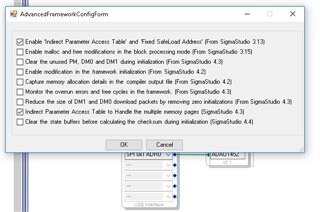
In the advanced framework selections, you need to enable the table and also enable the upper memory page capability.
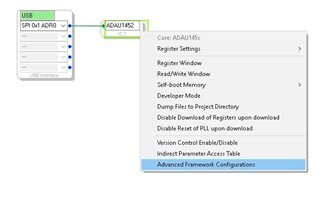
You can find the framework config by placing the mouse over the DSP block and right clicking as seen here:
Then this table pops up and make the selections shown:
Then after you compile you can easily add objects to the table by using this handy shortcut from the actual objects.
In this screenshot I right clicked on a meter and made these selections.
Let me know if you are still having issues.
Dave T

Thanks for the detailed reply.
The one step I was missing was the "Indirect parameter access table to handle multiple memory pages" selection.
As I was on SigmaStudio 4.2, this wasn't present, so I updated and it worked.
Please log in to reply.