IIR filter coefficients interprating ADAU 1772
Hi,
I am facing a problem implementing a few IIR filters into the ADAU1772...
I am running my script with GNU/Octave and find some coefficients for 5 IIR filters.
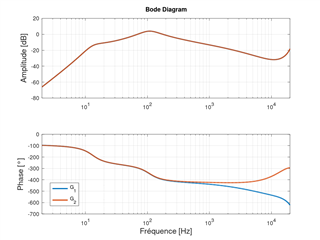
My sampling rate for calculation is 22kHz in Octave. When I am looking to my Analog response vs Discrete repsonse into Octave, the IIR coefficients seem to perfectly match. Actually my two responses are one over the other and I am very happy with my filters coefficients.
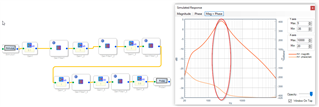
But, Once I import my values into sigma studio, these coefficients seem to change my frequency response... Actually, my cutoff frequency switch from about a factor 2... It is at 220Hz instead of 110Hz...
When I try to change the sample rate of the ADAU1772 going from 22kHz to 48kHz and then 96kHz, nothing change in the response. (Measurements seem to follow the simulated response in SigmaStudio).
Is there a problem with my IIR coefficients or with the SigmaStudio sample rate or anywhere else ?
These are the coefficients.
Fullscreen
Goz_22kHz_5.txt
Download
1.00000000000000000000
0.00000000000000000000
0.00000000000000000000
-0.90209958572942838817
0.00000000000000000000
Fullscreen
Goz_22kHz_4.txt
Download
1.00000000000000000000
-1.93899567792706117864
0.93900259455762513650
-1.60568618982887567626
0.63869664757499888808
Fullscreen
Goz_22kHz_1.txt
Download
1.00000000000000000000
-2.00011389190564026208
1.00011390338456784832
-1.97559598102406197562
0.97653286943711747892
Fullscreen
Goz_22kHz_2.txt
Download
1.00000000000000000000
-0.32964387213485907280
-0.02979901802003098732
-1.99727901603975643852
0.99729302200791913879
Fullscreen
Goz_22kHz_3.txt
Download
1.00000000000000000000
-1.67840137352800011783
0.70422655802059397345
-0.52926893449157674798
0.05881092927835331052
I hope I am clear, but don't hesitate to ask me further information if I am not.
Thanks in advance for your support.
Yvan
adau1772
Integrated/Special Purpose A/D Converters
Audio CODECs
Hello Yvan,
You are not properly setting the sample rate in the DSP. The DSP core cannot operate at 22kHz fs. The slowest it can operate is 96kHz fs. So you must calculate the filters using either 96kHz fs or 192kHz fs.
Please excuse me if I am giving too much detail but I need to explain the sampling rate settings.
The SigmaStudio program has sample rate settings at the top of the window and by right clicking on some of the GUI objects in the schematic diagram. Those settings have nothing to do with the actual sample rate of the DSP. Those settings are only used by SigmaStudio when compiling the program that will run at a certain rate. Several algorithms must know the sample rate like oscillators and filters are two examples. The Stimulus and Probe features use the settings in SigmaStudio to show the filter response.
Now in the DSP the sample rate is determined by the master clock and the PLL settings along with other register settings for the sample rate. So the setting must be correct and the clocks being sent to the DSP must be correct. SigmaStudio has no way to know this information which is why you have the settings in SigmaStudio. You have to tell it what rate the DSP is running at and you must be certain that it is actually running at that rate.
Then on to the ADAU1772. This part is rather different than most DSPs. It has a fast core which only processes filters really fast. The core only runs at 192kHz or 96kHz. no other choices. There are ASRCs to change the sample rate when sending data to and from the serial port. So there are slower settings for the serial port.
The DACs operate at the core rate.
The ADCs you can choose 96kHz or 192kHz. These need to be set to match the core rate.
Now, unfortunately the SigmaStudio DLL for control of the ADAU1772 does not include a GUI object for changing the core rate. It is in the register map and you can use the sequencer to change it but it is best to leave it at the 192kHz fs default setting. This is register 0x0009, Core Control Register. It is in the datasheet.
So you need to calculate your coefficients to be 192kHz fs and set SigmaStudio to 192Khz fs and your filters should look good both on the screen and in the actual hardware.
Feel free to zip up your project and attach it if you still have problems.
Dave T
Hi Dave,
Thanks for your support and for the detailed answer.
Well understood for the sampling rate inside the ADAU 1772. Only 96kHz or 192kHz available.
Sorry for the late answer. I have not seen the notification about your reply.
Please log in to reply.