Ultra-strange filter problem..
Hi!
While evaluating the second revision of my DSP board, I noticed some super strange behaviour that is caused by a 2nd order lowpass filter.
See for yourself.
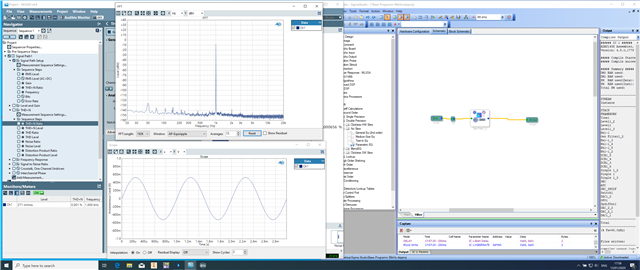
This is basically what you would expect. This uses a single-precision, no slew, 2nd order LP filter set to 2000Hz. The measurement below is not meant to show the filter function, rather the device output. You'll see what I mean when we get to the problem.
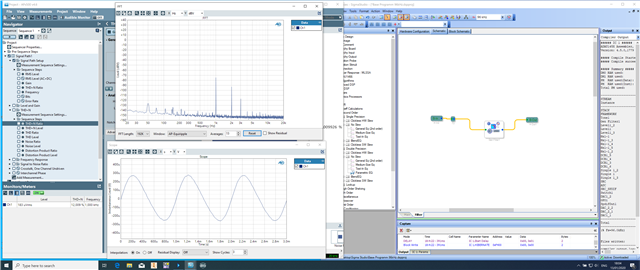
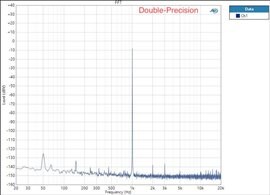
Now, this is the exact same thing, but with a double precision filter (same type of course):
What the hell?
It gets even stranger..
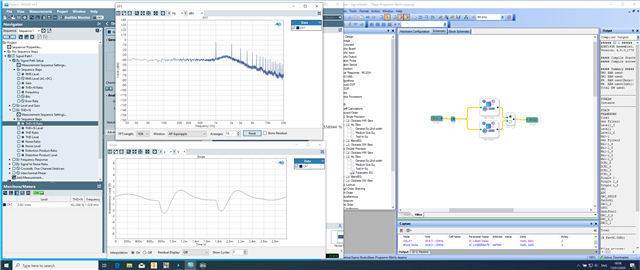
This is the two filters above in one design, with a switch to easily compare them (at least that was my approach to troubleshooting the issue)
This results in this:
What is this ? It makes zero sense.
The switch doesn't change the behaviour either.
Thankful for any help.
Noel
Edit Notes
-
[edited by: nneu at 2:35 AM (GMT 0) on 14 Jan 2020]
Audio Signal Processors
possessedDSP
strange
2nd order
adau
filter
SigmaDSP Audio Processors
adau1466
Show More
Noel,
Which DSP is this?
Do you have an eval board? If so, is it exhibiting the same behavior?
I see a reference to 96 kHz at the bottom of the page. Does it do the same thing at 48 kHz?
Ken
Hi Ken,
sorry for not mentioning; it's the ADAU1466.
I don't have the eval board, so I can't tell.
Yes, the DSP is running at 96kHz sample rate. I haven't tried 48kHz and I didn't expect that would make a difference.
After all, the DSP behaves normally with single precision filters.
BTW I have also tried the `propagate sampling rate` button, didn't help.
Noel
There is a little more to changing the sample rate than changing the menu at the top. Would you please post the project that you used for measurements, and I'll try to reproduce the problem here?
Thanks,
Ken
Sure thing!Base Programm 96kHz.dspproj.zip
Please let me know if you find any errors and where I went wrong.
Thanks!
Noel
Noel,
You are adjusting the sample rate incorrectly. Are you using a 12.288 MHz crystal? If so, on the CLOCK_CONTROL, PLL_CTRL1 should be set to divide by 4 (rather than divide by 2), and the ratio of N/M for CLK_GEN1 should be set to 2/6 or 1/3 (rather than 1/6).
It's confusing, but setting of divide by 2 with a feedback divider 96 would be suitable for a 6.144 MHz crystal to get the correct signal to the PLL. Once the PLL has the correct frequency, it is the N/M ratio that sets the sample rate.
I don't quite understand how this works at all, but we need to fix this to debug further, regardless. Please test this and see if it makes a difference.
Ken
Ken,
thank you very much !
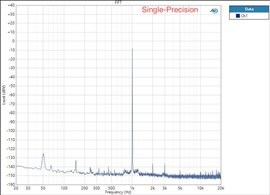
That did the trick. The two filters are now behaving identically apart from the impurities at the bottom of the 1kHz spike with the single precision filter.
I guess the fact that it worked at all, led me to believe that it was set up correctly. I still don't understand why -the way it was previously set up- would work with the single precision filter but not the double precision one.
Again, thanks for your help !
It's nice to see that you and Dave are more active on the forum again.
Noel
P.S. You have also answered to my other thread concerning thermal issues with the ADAU1466. Do you believe that the source of the issue I had (level meter showing pulses of signal on the serial inputs) could also be linked to this ?
Looking backwards, that seems to make more sense than the issue being caused by heat.
Then again, I don't understand why it only happened sporadically.
Please log in to reply.