Use multiple ADAU on a single SigmaStudio project
Hello to everyone.
I'm experimenting to design in a unique SigmaStudio project the use of three ADAU1452 to be sure that exported constant referements in include file are not equivocable.
So I I have connected two auxiliary CS from the usbi programmer to DSP2 and DSP3 and connected the same SPI pins from programmer to all DSP.
When I do the download it seems all ok but not every times: some times the programming fail in one device, other times some SPORT in master mode start working without the SDATA line, and in most case the VuMeter reading not work well!
I'm not understanding if the problem is the triple device project or my custom hardware board.
I Have tried separeted device project and they work fine but all together not.
I need some explanation:
Each ADAU has it's own crystal oscillator; it's correct or it'is required to supply all DSP with the same clock reference?
For connect the same SPI pin to all the DSP is required buffering or any sort of impedence adaptation?
Thinking about the VeMeter reading, it's possible to down speed the reading cycle? Actually SigmaStudio ask the VuMeter on max 3msec but it's possible to read at 30msec rate?
Thanks in advance
Best regards
Audio Signal Processors
adau1452
SigmaDSP Audio Processors
Hello Siro_78,
There may be a hardware issue if the SPI lines are long. You may be getting errors in the transmission and this will cause some of the issues you described. You might want to implement a newer feature where a checksum is calculated by the DSP as the program and data is loaded and then compared to what it should be according to SigmaStudio. With SPI there is no confirmation that the receiving device received anything so this is a way to do it.
The cell is under the BasicDSP->DSP Functions->Checksum. and you can find the info here:
wiki.analog.com/.../CheckSum
Like all checksum features, it is not 100% perfect but it catches most errors.
Generally, you can drive three devices but with the length of the lines on your PCB and the ribbon on the USBi there might be enough capacitance and reflections to make the data transfer on the edge of functioning. It is difficult for me to see what else could be the issue without seeing things like scope plots etc.
To answer some of your other questions.
It is usually a good idea to have all the DSPs on a single board to operate using the same master clock. It makes communication between them a lot easier and it should keep down the noise on the power and ground planes. At least it will all be in sync. With three processors it might be good to include a low jitter clock and clock driver. You can use one of the DSPs to generate a master clock from its CLKOUT pin and then distribute that using a buffer to the other parts in the system. I assume you have codecs in the system and they will need a master clock as well.
Regarding the SPI buffering. It might be needed. At some point you should look at the SPI transactions on a scope to see what the waveforms look like. Use a scope instead of a logic monitor.
Will the parts all be self-booting?
The VU meter problem is understandable. The USBi has limited bandwidth due to the USB interface and so the more meters you enable the worse this will get. You will not be able to enable very many meters at the same time. This is normal even with one DSP. I usually do not enable more than 4 or 5 meters at any one time.
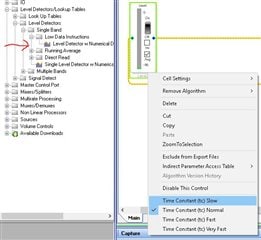
You might be able to improve this by using the low instruction type of meter. It has a setting for the time constant which will also be the read rate of the meter from SigmaStudio. Here is where you find it and how to change the setting. You have to right-click over the control.
Dave T
Thanks Dave for your reply.
After a lot of test where I tried to remove ripple, buffering lines, check different ribbon lenght, I solve the problem using a different programmer: the freedsp USBi.
I have analyzed the difference between the two and my conclusion is that they differ to SPI clock timing
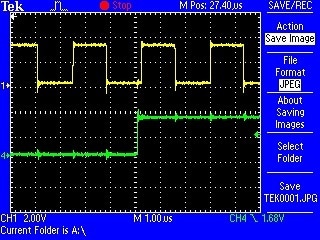
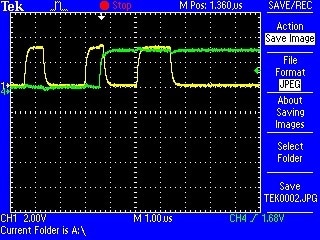
In the following pictures the yellow line is the SPI CLK and the blu line is the MOSI
Using freedsp USBi you can notice that the data change is more near the rising edge of the clock or in other words the data change is more far the falling edge of the clock
Using EVAL-ADUSB2EBZ the timing is very different in the way that the MOSI data line change more far the rising edge of the clock, at the same time of the falling edge of the clock.
Is a problem related to polarity and phase of SPI?
You think that is correct my check?
Have you other suggestions?
Using the freedsp USBi now I'm able to program 3 ADAU on the same project.
I'm using SigmaStudio4.2 on Windows10.
Best regards
Very good work!
I missed that detail. We had added 1K ohm resistors in series with the SPI output to protect the USBi and the slave part when the eval board is not powered. In that condition the SPI outputs might be high and that would forward bias the ESD protection on the pins of a chip that is not powered. It is too much of a load and sometimes damaged the USBi. The resistors are not usually a problem but with your setup the capacitive load is much greater and you would need the drive capabilities without a large damping resistor.
So you could modify the USBi but you have a working solution so no need to modify.
Sorry that I had forgotten about those resistors until your post reminded me. I am reasonably certain that this is the issue.
Dave T
Please log in to reply.