Connecting ADAU1452 to the programmer
Hi. I have problem connecting the EVAL-ADUSB2EBZ programmer to my custom ADAU1452 board.
12.288MHz sine wave is present on XTAL pins
DVDD is 1.2v and other power pins are on 3.3V
SELFBOOTis shorted to GND
When I connect the USB, programmer first has D1 I2C led on, but it changes to D3 SPI when I press Download button in SigmaStudio.
I checked the SPI lineas and SS and MOSI seems to be correct.
Only problem - in the datasheet, it is said that SS pin must be toggled three times to set the IC to SPI mode. On Oscilloscope I don't see such toggling. Any ideas? Below picture of SS and SCLK lines when i press Download button. No toggling there.
Audio Signal Processors
adau1452
SigmaDSP Audio Processors
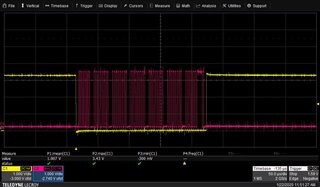
Solved it quickly this time - PLL settings were wrong in CLOCK CONTROL window. Works now.
Hello ErkiL,
Great! Glad you found it quickly and for letting us know.
The toggling of the Slave Select is usually just three dummy messages sent. That should show up in the capture window without using a scope like you did.
Great post by the way. Plenty of info.
Dave T
Please log in to reply.