Trouble with rotary-encoder volume control on ADAU1466 evaluation board
Hi,
I'm trying a Bourns PC11R series rotary encoder. I built the suggested filter circuit shown on page 2 of the datasheet. I connect terminals A and B to GPIO pins 12 and 13, which are labelled on headers J2 and J3 as LRCLK_IN2 and LRCLK_IN3, and in SigmaStudio, I connect those GPIOs to the terminals of the rotary encoder volume control.
According to the schematics of the evaluation board, there is nothing else connected to those lines. Each pin from the ADAU1466 goes directly to the corresponding header pin and nowhere else.
However, I put the oscilloscope probe at those terminals to see the signals, and they both show a 48kHz square wave — well, slightly smoothed due to the capacitors of the rotary encoder's filtering circuit; if I disconnect the rotary encoder circuit, then the square waves are sharper (i.e., the signals' edges are sharper).
Those are I2S inputs, why / how are they outputting a LRCLK 48kHz signal?
For reference: in the same project, I am reading audio at 48kHz through the SPDIF, routing through an ASRC, as suggested/explained in the evaluation board's datasheet. I'm outputting processed audio through an I2S output (I2S0).
What's going on?
Thanks,
Carlos
--
Audio Signal Processors
rotary encoder
SigmaDSP Audio Processors
evaluationboard
adau1462
adau1466
Show More
Carlos,
You are correct in that nothing else is connected to those pins. However, those GPIO are multiplexed with two of the LRCLK_IN pins as you have noticed. These signals are, by default, clock masters even though the data line is an input, which is why you are seeing 48 kHz on them. The setting in the register window that you need to change is on the MULTIPURPOSE page in the lower right corner.
You must enable the MP function of the pin rather than the primary function, which is the LRCLK signal. Just above it is the selection for the signal direction, but input is the default.
Ken

Thanks Ken! Clock master, even though it's an I2S input, of course!! (it makes so much sense after you pointed out the detail !!)
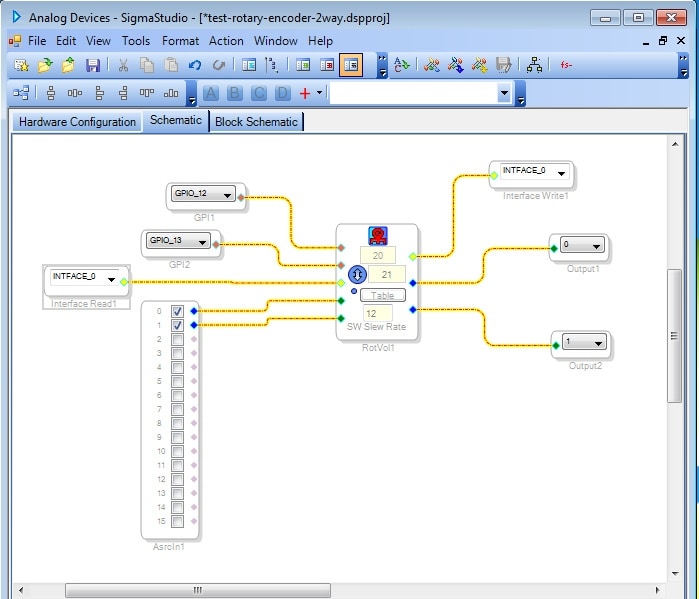
I still have no audio. I see the pulses, and as far as I can tell, they look clean and valid/sane (if I turn clockwise, channel A of the oscilloscope is ahead; I turn counter-clockwise, channel B is ahead). I played with the debouncing (the pulse coming from the rotary encoder can be as short as 2ms). But I still have no audio. This is a screenshot of the project:
Notice: if I remove the RotVol and related controls and connect inputs 0 and 1 from AsrcIn1 to Output1 and Output2, I do get sound on the headphones (connected to the OUT1 headphones jack on the evaluation board).
The table has just an arithmetic sequence from 0 to 1 in steps of 0.05. The InterfaceRead and InterfaceWrite controls, I have no idea what their role is, or whether I need some specific settings. I just placed them because the project won't compile if I let those pins disconnected.
Just to confirm: I tried moving the rotary encoder in both directions, but it seems to have no effect, and at all times I have no sound at the output.
What am I missing?
Thanks,
Carlos
--
Hello Carlos,
About a year ago it came to my attention that all rotary encoders are not built the same. How they implement the stops can be different. I detailed this on a post recently. Read what I said and see what type of encoder you have. As I said on the post, I did work up one project for one of the types that did not work. The person in that post has not answered the question of what type of encoder he has. Have a read:
https://ez.analog.com/dsp/sigmadsp/f/q-a/120659/adau-1701-rotary-encoder
Dave T
Please log in to reply.