ADAU1467 will not write to self-boot EEPROM
I've designed a PCB using the ADAU1467 DSP. I've been able to program it using Sigmastudio and the DSP seems to be running properly, but I can't seem to get it to write anything to the self-boot EEPROM. I've probed the SPI interface to the EEPROM while programming it after a link-compile-download, and there is no visible activity on any of the pins. I'm following the programming instructions in the ADAU1467 evaluation board user's guide. I've included a jumper that can switch the SELFBOOT pin between high and low. My DSP and EEPROM (24AA1024-I/SM) circuitry are copied from the evaluation board.
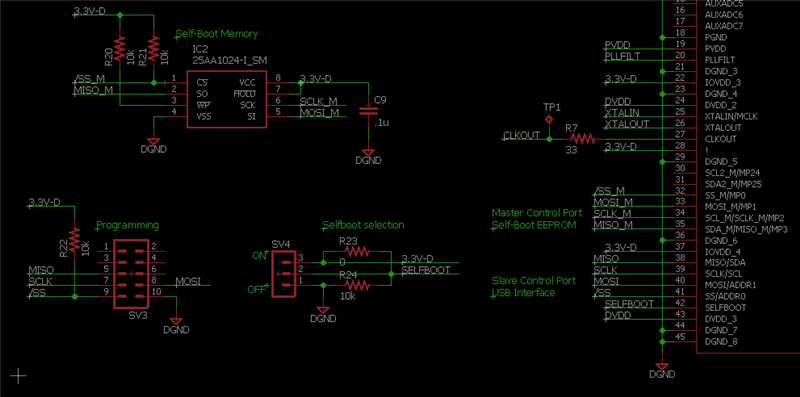
Below is a screenshot of my schematic showing the programming header, self-boot jumper (I've removed R23 and R24), and the EEPROM circuitry. The big component on the right side is the DSP.
If it matters, I'm running SigmaStudio 4.5, attempting to program the EEPROM doesn't give me any errors but checking it against the latest compilation returns an error.
What can I do to debug this?
Audio Signal Processors
adau1467
SigmaDSP Audio Processors
Hello,
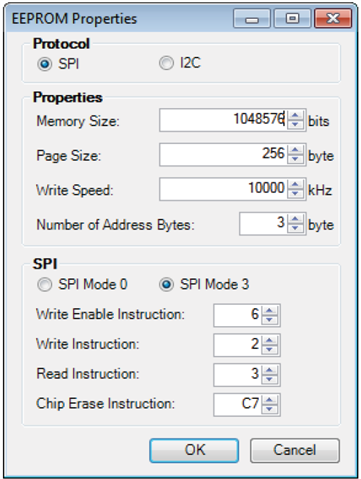
Have you followed the process in the EVAL-ADAU1467Z user guide for programming self boot memory through the DSP? What settings are you using to set up the transfer? For this EEPROM, they should look like this:
Joshua
Hi Joshua,
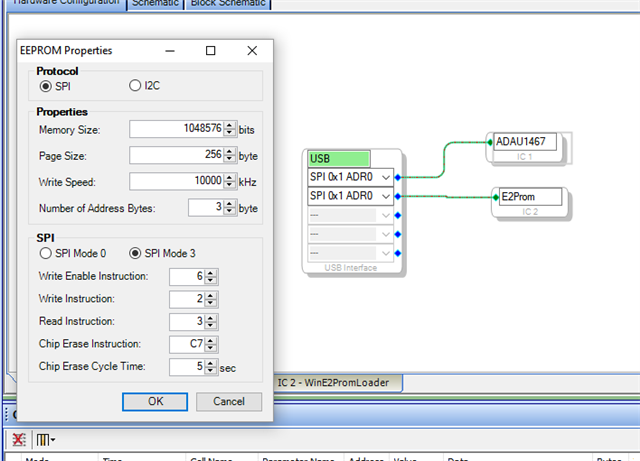
Yes, those are the exact settings I'm using (see below). Here's my procedure for programming the EEPROM:
1. Move the SELFBOOT jumper to OFF.
2. Run a link-compile-download.
3. Program the EEPROM (I proved it here with the logic analyzer and I didn't see any activity on the SPI_M lines)
4. Power off the board, unplug the programmer.
5. Move the SELFBOOT jumper to ON.
6. Power on the device.
Hi aytli,
This is the correct process to program the EEPROM.
Since you're using a custom PCB, it's difficult to say whether this is a firmware/SigmaStudio related issue or a hardware issue.
Do you have an ADAU1467 evaluation board available? If you do, I would recommend performing the self boot programming process there; see if you observe any activity on the SPI lines. Then we will have a better idea where the problem is.
If you do see SPI activity on the evaluation board, we can look more closely into your custom hardware.
Joshua
I do have an eval board, and I just probed the EEPROM while programming it. The SPI lines look good. I went back to my PCB and probed the same chip. The first time I probed it, I saw activity on the MOSI and SCLK lines, but nothing on the SS or MISO lines. I tried it a few more times and saw nothing. I switched over to a second one of my boards, and still saw nothing.
Great, thank you for trying that! I recommend probing the value of R21 (the slave select pullup) with a multimeter. Is it actually 10kΩ? And is the top pin 3.3V like we expect?
Also, is slave select always high or always low?
If the slave select line is not pulled up properly, the EEPROM will not recognize that it is being addressed and therefore will not respond on MISO.
Please note that if the Secondary I2C Master Port is enabled on the Multipurpose 1 page, the EEPROM will not be programmed properly. The Secondary I2C button needs to be green as shown below.

Hi Joshua, enabling that secondary I2C port seemed to fix it. Thanks for your help.
Please log in to reply.