ADAU 1701 Frequency Meter
Hello, is there a way to obtain the frequency of a sine wave input signal with ADAU 1701 - Sigma Studio?
Thanks!
Hello Alessandro,
The example circuit shown below demonstrates how a ADAU1701 can measure an audio frequency. We can also see whether using a ADAU1701 to measure frequency fits your application.
The Mux lets us select either an external audio input from the ADC, or the test source Tone1. Comparator ABCD1 compares the input to an internal signal near zero (+ or - 0.01). When the input sine wave goes positive, the comparator outputs -1. The output stays at -1 until the input sine wave drops to (-0.01), then the comparator output switches to +1. Then as the input sine wave reverses and rises, it must go past (+ 0.01) before the comparator switches again. In both directions, the input always has to go further than just crossing zero to switch the comparator. This hysteresis provides some immunity from noise which would otherwise give erratic readings. This arrangement works well with sine waves as well as square waves, triangle waves -- any waveform which crosses zero exactly twice each cycle. It doesn't do well when the input sound includes strong individual harmonics -- this includes most voices and musical instruments. Such waveforms may cross zero multiple times within a single fundamental cycle.
Each time the input changes direction, the Value Cross block produces a pulse one sample wide (1/48000 second at the default sample rate of 48K). When the input frequency is low, these narrow pulses are surrounded by much wider spaces, thus they average to a low value. Higher frequencies cause a higher average. The two filters average the pulse train to yield a DC level proportional to frequency. The final result is theoretically equal to 1.0 at f = fs/2. It won't work that high in practice, but the relationship is quite linear over a wide swath of audio frequency. In fact, self-contained frequency-to-voltage (F-V) converter ICs often work on this principle.
There's other methods you could try. Instead of averaging the pulses, we could count them over a time base -- as a frequency counter does. If your application involves detecting a narrow frequency band, a phase-locked loop approach would work well. All these have been done with a ADAU1701.
Whether any of this is practical depends upon your ultimate application. As it stands now, we're viewing the measured frequency on a Readback block within SigmaStudio while connected to a ADAU1701 eval board. To make a self-contained system, you could have a microcontroller communicate with the -1701 via I2C, perform the readback, and format the result to show on a numeric display. Yet in this case you might as well instead build a hardware input comparator and have the micro count the frequency. In other words, the -1701 isn't adding any value to the system. However, you may have a completely different application in mind, where the -1701 uses the frequency measurement to perform something it does uniquely well. Hopefully I've helped answer your question.
Best regards,
Bob
Frequency-meas.zip

Hi Bob, thank you very much for your example and clear explanation! Thats exactly what I need for my project. What I am doing an instrument to measure the speed and level of tape recorders by playing a calibration tape with 1KHz signal on it. Your example works great Next step is to add a phase detector, can you point me to a similar example in order to do that? I have two input signal (sine wave, same frequency) and I need to detect the phase shift (if any) between them. Thank you!!!
Hello Alessandro,
You might want to consider using a higher frequency. Old analog guys like me used to work on tape recorders a lot. The frequency on the test tape was always 3.125kHz if I remember correctly. It was for sure just over 3kHz. This was to give it more accuracy and there may be other reasons that I am not aware of.
Then you had to use a proper test tape. If you recorded the tone on the same recorder then it would record the flutter as well so it would cause inaccurate readings when you played it back to measure wow and flutter.
Now today most of the test tapes are shorter versions and many do not have the wow and flutter section on the tape. So then you are correct that you have no choice but to use the 1K section.
Your question about the phase detector. I have not worked out an example for that. Bob may have some good ideas on that. I will wait to see what he comes up with since I do not have time right now to work on this.
One approach would be to time the zero crossings but the resolution cannot be better than one sample period but that might be good enough for what you are doing.
Dave T
Hello Dave, thanks for your reply. Yes you are right 3Khz or more will give better resolution but as you correctly said most (if not all) calibration tapes available are 100Hz - 1Khz - 10 Khz, some may have 16 Khz as well. MRL Labs are the best in my opinion. Nice to hear you used to work on tape recorders :) My work is mainly about repair and maintenance of these machines like Studer, Nagra, Stellavox and so on Will wait to see if Bob has some example for Phase detection, thank you!
All,
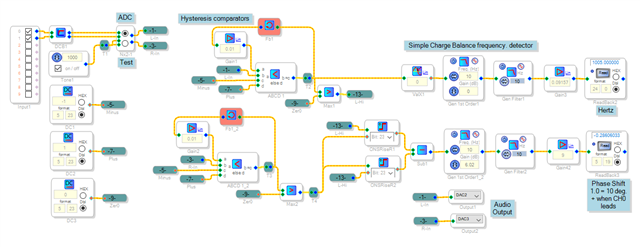
I played around with two circuits. The first one multiplied one input and a 90 degrees shifted second input -- the averaged result equals the sine of the phase shift. But I couldn't get this one below 590 instructions, so it would be stuck at the 48K sample rate. As Dave said, the sample rate limits your phase resolution, so a higher rate would be helpful. The other circuit, shown below, builds upon the previous frequency-measuring project with a far lower instruction count.
The front end is similar to that of the frequency project. A One-Shot Rise for each channel outputs a pulse when its channel comes before the other, of width equal to the time difference. Subtracting one from the other and filtering the result gives a signal proportional to phase. I calibrated the output by inserting a delay in one channel -- at the project's 96K rate, one sample amounts to a 3.75 degree shift in a 1 KHz tone. Finally, I tested the project with (sorry) a Teac dual cassette deck. I found that the frequency drifted upward a few hertz as I played back the recording multiple times, and the phase averaged about three degrees.
Best regards,
Bob
Frequency-phase-meas2.zip
Thank you very much Bob, I just made a quick test and seems to be ok for my purpose, I need to make some little modification but I think this is the way to go! Thank you and keep up the great work!
Thanks, Alessandro,
Here's a frequency-phase meter using phase-locked loop (PLL) techniques which I believe overcomes the resolution limitation by averaging the frequency and phase over many samples. It begins with the same frequency detector but then it refines the result by synchronizing (phase locking) a VCO to the incoming signal. The VCO's input then becomes the frequency measurement. A second PLL works on the other input channel, and by multiplying & filtering the two VCO outputs we can determine phase. The project is too large to picture here, so if desired you can download and examine it.
In use, LED D5 indicates that the PLLs are locked and the readings are valid. I didn't test this one thoroughly, so please try it and see if it gives more precise results than the previous project.
Best regards,
Bob
Frequency-phase-PLL-meas.zip
Thanks a lot again Bob, I am testing your project but I can obtain valid result until phase shift is < 90°, after that the result decrease and get back to zero when phase is 180°. I tried to modify your project but I guess its too complex for me... is there an easy way to get valid results for phase shift from 0 to 180°? I attached your project with a simple dual channel sine wave generator with phase, can you try and tell me if you get my same result? Thank you!
Frequency-phase-PLL-meas-sinegen.dspproj.zip
Hello Alessandro,
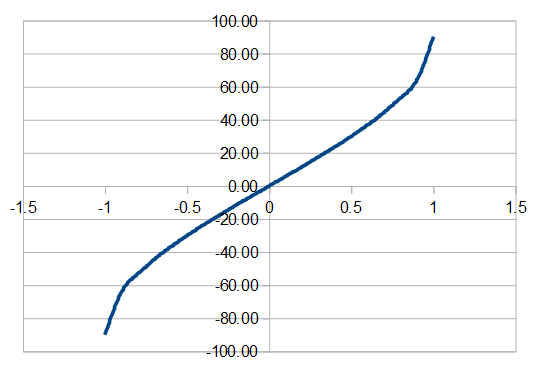
Using the Sine Oscillator with Phase is a great idea! It makes calibration a lot easier. Yes, the Frequency-phase-PLL project in its present form can only handle a + / - 90 degree phase range. This is because presently it relies upon only one multiplication of its two PLL outputs. The result contains a double-frequency component which we filter out, and a DC value equal to 0.5 * cos(p), where p is the phase difference. At zero phase the cosine value is 1.0, decreasing as the phase shifts either way. By taking a 90 degree shifted signal from the top PLL, the DC value becomes 0.5 * sine(p). This is zero when in phase, going from -0.5 at -90 degrees to +0.5 at +90 degrees. Then we convert this sine value to degrees with the Arc-sine LUT. Its graph appears like this:
Since this function repeats outside the -90 to +90 degree range, our phase measurement is fundamentally limited to this range. I added your sine-with-phase oscillator to the original project and it worked from about -170 to +170 degrees. Its limited resolution makes its measurement "jump" a few degrees, yet so far it's the best method for phase shifts beyond 90.
It appears i had misunderstood your application -- that you need both low-end resolution and full phase range. Perhaps I could ask you and/or Dave could help me understand how this works in the practice of maintaining pro tape machines, if only to satisfy my curiosity. Viva analog!
So finally, your question: Can we expand the PLL arrangement to cover a wider phase range? I suspect the answer is yes, however it will take some heavy lifting. By adding a second multiplier using the top PLL's cosine output, we can generate the cosine version of the phase shift. Together these sine and cosine signals cover a full +/- 180 degree range -- we only need something like a two-input interpolating LUT to convert them to a usable phase reading. Or maybe the existing LUT along with some logic. This is the present problem to solve. Perhaps we can come up with something.
Best regards
Bob
Hi Bob, thanks for your kind reply! Yes I also tried your first example and I can confirm it goes from -170 to 170, I did some experiment with PLL project but guess it is beyond my ability... :) Regarding tape recorders, phase check is useful in order to calibrate heads azimuth. This is the procedure: you playback a full track 'mono' calibration tape with a 10 Khz signal and turn the azimuth screw of playback head until you reach Ch1 and Ch2 maximum output levels. At this point you check phase (normally this is done using an oscilloscope) and do very little adjustment until the two waves are in perfect phase. Thats why I would need to check phase up to 180°, in your PLL example I obtain the same value (near 0) if the signals are in phase or they are out of phase of 180°
Since I need it for that purpose, do you think would be possible to modify you first project in order to make it 'just work' with a 10 Khz signal? Will it be easier to obtain phase shift -180 to 180 that way?
Thank you!
Hello Alessandro and Bob,
When adjusting the azmuith of a tape recorder it is always important to start at a low frequency. usually 500 Hz. then step it up to 8kHZ, then 16kHz. This is because at the highest frequency the accuracy is the best but the range of the adjustment is such that you can be aligning two peaks that are 360 degrees or 720 degrees from each other. You could not tell the difference on a scope.
So the procedure would always be to start at 500 Hz and get it in the "middle" of the adjustment but you have a lot of slop in the adjustment range where it does not change much at all. At this wavelength you cannot adjust to the wrong peak.
Then go to 8kHz and it is a little more sensitive and you can fine tune it a little more. Again, center it in the sweet spot. You can adjust it to the wrong peak but it is difficult to do because it would be adjusting it rather far from where you had it at 500Hz.
When I say "center it in the sweet spot" I am meaning that you turn it CCW until you see the level drop off and then turn it CW until you see it drop off then center it between the two.
Then going to 16kHz you are going to be within 360 degrees so you then fine tune it. At this frequency the adjustment was always a bit touchy because it is really sensitive to the slightest tilt in the head. This produces the best adjustment. The alignment tapes that had the azimuth adjustment section had these sets of frequencies.
So if this project is able to capture a range of -180 to +180 then it will do the job. It is up to the procedure to ensure you are not greater than 360 degrees.
Now, one side note. Above I mentioned the level dropping off. I usually was adjusting a multitrack machine, usually a 24 track machine. If you are adjusting a 2-track machine then you can use an oscilloscope set to the X-Y mode and adjust for in phase Lissajous figure. However, for a 24 track machine you cannot just compare two channels because of gap scatter of the heads. You can go crazy trying to test several channels and get the "average". So what I would do is get the average of ALL 24 channels. I did it by using the recording console with all the faders set the same (usually -20dB) and panned center. Then I lowered the master fader to keep it from clipping. Then I adjust the azimuth to get the most gain. This is the best phase relationship to all 24 channels at the same time. I used the console to get the average.
Brings back memories of when I ALWAYS had a tweaker in my pocket. Yes, I was that nerd. LOL
Dave T
Yes Dave, you absolutely right! I assumed the coarse tunings has already done and just talked about the fine adjustment in order to explain why I need the 180 deg measurement :) Nice to hear you worked on these machines, my job is most of all on maintaining and service this great recorders! If you wanna take a look visit my website : www.analogplanet.it We are one of the few, if not the last, company that provide service and repair of analog recorders here in Italy, nowadays there are some recording studios that appreciate this gears but lacks of technicians and small budget for production is a limiting factor. There is however a big request for tape transfer, a lot of major and artists have many reels that has never digitalised and time is running out to do this, tapes are often about 40 years old and they usually need restoration and baking before is possibile to read them. Long life to Analog!
Hello Aleddandro,
Yes, I have been to factory training on the old MCI machines and the Studer machines. I have also been trained on the old Mitsubishi digital machines and the Sony 3324/3348 machines. I LOVE the Studer machines. The A827 in my opinion is the pinnacle of tape recorder design! The servos are wonderful and the mechanics of the build are like a Mercedes Benz! I have not done much work on these for a number of years now. For most of my career before ADI I was the expert on large recording desks. I have been to SSL in the UK for training on three different occasions and have refurbished and installed around 100 desks. I have worked on many other brands as well. You are correct in that there is no more budget for large recording rooms with tech staff on site. Things got slow and so I am here at ADI where I can still keep my hands on audio.
Great looking site. Keep up the good work. Someone has to do it!
Dave T
Hi Dave & Alessandro,
Happy to see you two sharing memories together. Today 25000 songs can fit in one's pocket, yet it just isn't the same.
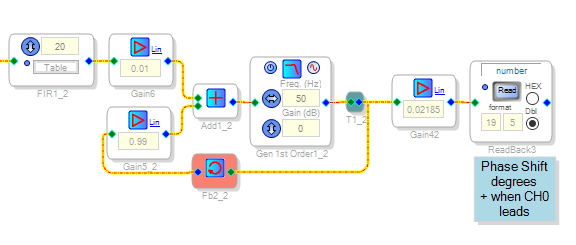
To give the frequency-phase meter better resolution, I tried running it at 192 Khz. At first it didn't work -- the frequency reading was stuck at zero. As it turns out, the filters weren't up to the task of averaging the one-sample width (5.21 uS) pulse trains. Any IIR filter set to a very low cutoff frequency at a high sample rate is an extreme condition that doesn't work well.
The new arrangement shown above uses a moving average FIR filter to stretch the incoming pulses, making them easier to handle. The second filter stage places a first-order lowpass within a feedback loop. The lowpass filter's 50 Hz cutoff frequency is within the audio range, thus quite doable -- while the feedback loop around it allows for an overall response much slower than it could manage on its own. The attached project works fine at 10 KHz.
Best regards,
Bob
Frequency-phase-meas3.zip
Please log in to reply.