DSP amplitude-frequency response calculation question
I have similar problem as https://ez.analog.com/dsp/sigmadsp/f/q-a/66962/plotting-dsp-system-response-curve/219324#219324
and I'm using the code from https://github.com/james34602/JamesDSPManager/blob/master/Audio_Engine/eclipse_libjamesdsp_free_bp/jni/vdc.c
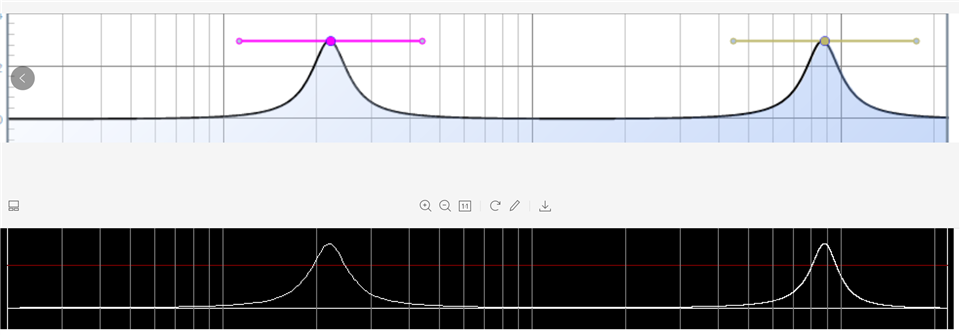
it for sure could plot some similar curve but not exactly as sigma studio. (please check below curve and as the high range of frequency 7000Hz, my value is different with studio output)
A1/A2/B0/B1/B2 calculation is from ADI's document FilterMathCalculations.pdf
above program, using below parameters
gain=3.000000, freq=220.500000, fs=44100, Q=3.000000
a1=-1.990246, a2=0.991229, b0=1.001809, b1=-1.990246, b2=0.989420
gain=3.000000, freq=8820.000000, fs=44100, Q=3.000000
a1=-0.545307, a2=0.764650, b0=1.048545, b1=-0.545307, b2=0.716105
so, my question is, it works, but not perfect and it doesn't work for other filters like low pass filter, so could anybody tell me where I could get the equations for calculate the amplitude frequency response curve ?
Best regards
Power Pan
Hello Power Pan,
You might want to start here:
https://wiki.analog.com/resources/tools-software/sigmastudio/toolbox/filters/general2ndorder
There are a lot of posts about filtering so searching the forum may help.
Are you expecting the curves in SigmaStudio to be absolutely perfect? They are not meant to be a perfect graph of the filter but it will be very close. The two pictures you posted look the same to me. So I do not understand what is wrong?
Dave T
Hi, Dave
thanks for your prompt reply.
just checked the link you sent, that's not what I need. what I need is to calculate the amplitude of the filter output to show to the customer. say I have A1, A2, B0, B1, B2 and I need to plot the amplitude-frequency curve.
Please open the picture and zoom in the second 8820 peak, there is a vertical line shows 8000Hz close to the peak. the horizontal red line is 2db, so, please check 8000Hz/2db cross, I could see sigmastudio draws the line above 2db and my curve is below 2db. (when frequency is 7999.740000 gain is 1.906532)

Hello Power Pan,
Verify that you have SigmaStudio set for 44.1kHz sampling rate and that the project cells are also set to 44.1 kHz fs. You can do this by propagating the sample rate setting. If this happens to be set wrong then the calculations might be slightly off.
However, I think you will find it is set correctly. I think you are expecting too much from the graph. Its purpose is to give you a general representation of the EQ curve not a laboratory graph of the EQ curve. There is probably rounding going on before sending it to the Windows display objects and those objects will be scaling it to the window size etc. This graphing function is not the main job of the program. For other programs like MatLab there is a lot of effort put into the graphing functions because that is one of the main reasons for the program.
I suggest you only use the graphs for a general idea and resort to other programs to precisely graph out the curves or to measure the performance and graph it like an Audio Precision will do.
Dave T
Hi, Dave
Got what you said. wonder if I could find the equation in analog wiki, if no, then forget it.
I think better do it in a software way first than make it and test using AP(use AP is not as good as using FFT to analyse the output). theory should be absolutely working perfect then real hardware might work. that's why I insist matching 2 curves.
thanks for your kind reply.
Regards,
Power Pan
Please log in to reply.